Zum Hauptinhalt wechseln
Gemeinsam reparieren - Jetzt registrieren

ASUS TUF Gaming FX505DY Speakers Replacement

Was du brauchst

  1. ASUS TUF Gaming FX505DY Speakers Replacement, Back Case: Schritt 1, Bild 1 von 1
    • Turn off the laptop.

    • Disconnect the charging cable.

    • Failure to disconnect the charging cable and power down the computer could result in personal or property damage.

    • Flip the laptop so the back is facing up.

    Frag FixBot

    Kommentar hinzufügen

  2. ASUS TUF Gaming FX505DY Speakers Replacement: Schritt 2, Bild 1 von 2 ASUS TUF Gaming FX505DY Speakers Replacement: Schritt 2, Bild 2 von 2
    • Use a Phillips #1 screwdriver to remove the five 6 mm screws that secure the back panel.

    • Use the same screwdriver to remove the six 13 mm screws securing the back panel.

    Frag FixBot

    Kommentar hinzufügen

  3. ASUS TUF Gaming FX505DY Speakers Replacement: Schritt 3, Bild 1 von 2 ASUS TUF Gaming FX505DY Speakers Replacement: Schritt 3, Bild 2 von 2
    • Insert the plastic opening tool at a corner and pry up along the edges, leaving the back side with the hinges for last.

    • Do not insert the opening tool too far into the laptop to avoid damaging internal components.

    Frag FixBot

    Kommentar hinzufügen

  4. ASUS TUF Gaming FX505DY Speakers Replacement: Schritt 4, Bild 1 von 2 ASUS TUF Gaming FX505DY Speakers Replacement: Schritt 4, Bild 2 von 2
    • Gently lift up the back panel to release any remaining clips on the side with the hinges and remove the panel.

    Frag FixBot

    Kommentar hinzufügen

  5. ASUS TUF Gaming FX505DY Speakers Replacement, Battery: Schritt 5, Bild 1 von 3 ASUS TUF Gaming FX505DY Speakers Replacement, Battery: Schritt 5, Bild 2 von 3 ASUS TUF Gaming FX505DY Speakers Replacement, Battery: Schritt 5, Bild 3 von 3
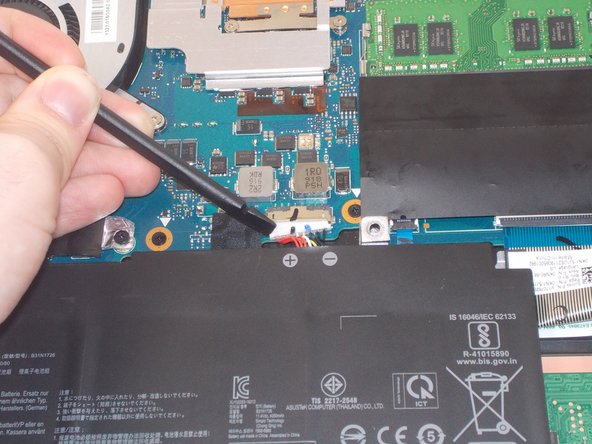
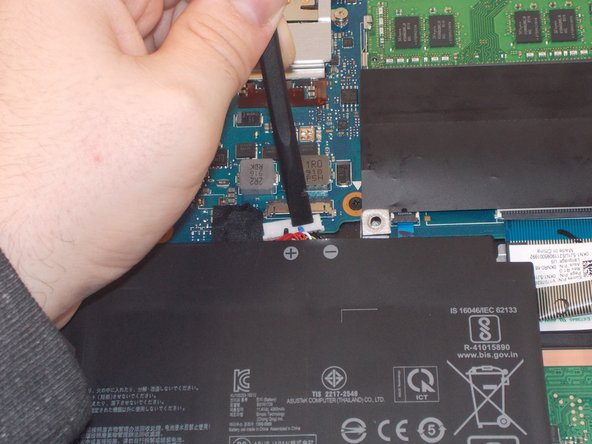
    • Using an ESD-safe spudger, disconnect the battery connector by pulling the plug away from its port.

    Frag FixBot

    Kommentar hinzufügen

  6. ASUS TUF Gaming FX505DY Speakers Replacement: Schritt 6, Bild 1 von 2 ASUS TUF Gaming FX505DY Speakers Replacement: Schritt 6, Bild 2 von 2
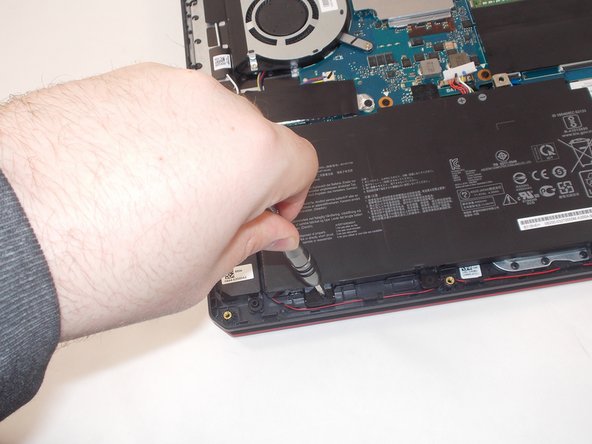
    • Remove the 6 mm screw holding the battery in place using a Phillips #1 screwdriver.

    • Avoid cutting, puncturing, or otherwise damaging the battery. Li-ion batteries can combust or explode if damaged.

    Frag FixBot

    Kommentar hinzufügen

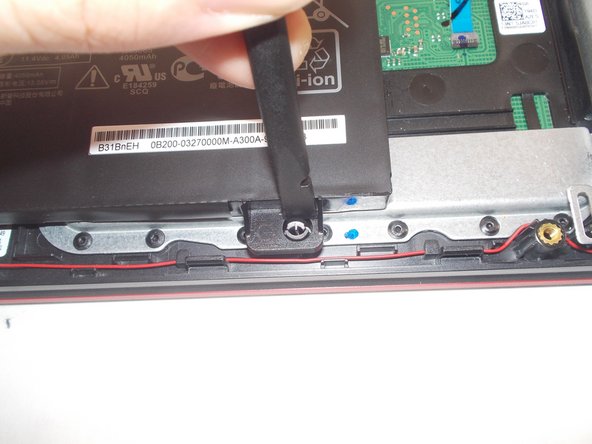
  7. ASUS TUF Gaming FX505DY Speakers Replacement: Schritt 7, Bild 1 von 3 ASUS TUF Gaming FX505DY Speakers Replacement: Schritt 7, Bild 2 von 3 ASUS TUF Gaming FX505DY Speakers Replacement: Schritt 7, Bild 3 von 3
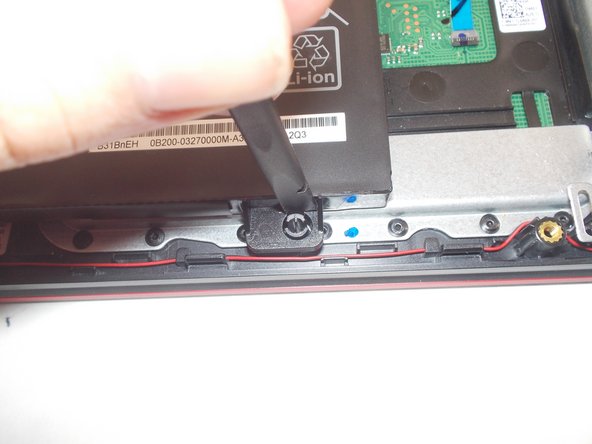
    • Use a spudger to pry the retaining pin into the closed position to allow the battery frame to be removed.

    Frag FixBot

    Kommentar hinzufügen

  8. ASUS TUF Gaming FX505DY Speakers Replacement: Schritt 8, Bild 1 von 1
    • Lift the battery up out of the computer.

    Frag FixBot

    Kommentar hinzufügen

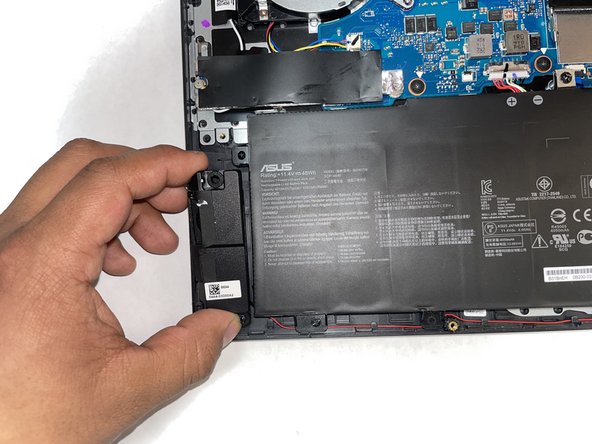
  9. ASUS TUF Gaming FX505DY Speakers Replacement, Speakers: Schritt 9, Bild 1 von 2 ASUS TUF Gaming FX505DY Speakers Replacement, Speakers: Schritt 9, Bild 2 von 2
    • Lift the speakers from the pegs holding them down. Use minimal force as to not break the pegs or the speakers.

    Frag FixBot

    Kommentar hinzufügen

  10. ASUS TUF Gaming FX505DY Speakers Replacement: Schritt 10, Bild 1 von 2 ASUS TUF Gaming FX505DY Speakers Replacement: Schritt 10, Bild 2 von 2
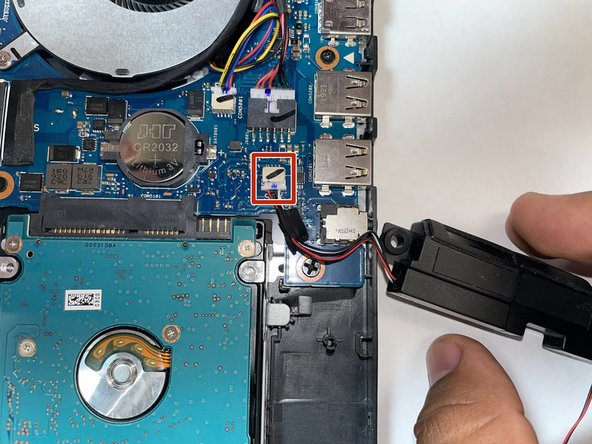
    • Identify the place where the speaker cable connects to the motherboard. The port should be "SPK"

    Frag FixBot

    Kommentar hinzufügen

  11. ASUS TUF Gaming FX505DY Speakers Replacement: Schritt 11, Bild 1 von 2 ASUS TUF Gaming FX505DY Speakers Replacement: Schritt 11, Bild 2 von 2
    • Pull the cable off the motherboard using a plastic pick or other pointed item and remove the speakers.

    Frag FixBot

    Kommentar hinzufügen

Abschluss

To reassemble your device, follow these instructions in reverse order.

Rückgängig: Ich habe diese Anleitung nicht absolviert.

Team

IUPUI, Team 2-3, Harley Spring 2023 Mitglied von IUPUI, Team 2-3, Harley Spring 2023

IUPUI-HARLEY-S23S2G3

3 Mitglieder

3 Anleitungen geschrieben

1 Kommentar zur Anleitung

model for the speaker. I want to buy a replacement , which one should I buy . I cant get original.

albert enstine - Antwort Teilen

Kommentar hinzufügen

Seitenaufrufe:

Letzte 24 Stunden: 0

Letzte 7 Tage: 12

Letzte 30 Tage: 52

Insgesamt: 1,474