Zum Hauptinhalt wechseln
Gemeinsam reparieren - Jetzt registrieren

Acer Aspire One P1VE6 WLAN Card Replacement

Was du brauchst

    1. Acer Aspire One P1VE6 WLAN Card Replacement, Back Panel: Schritt 1, Bild 1 von 1
      • Close the netbook and turn it over so the back panel faces you.

      Frag FixBot

      Kommentar hinzufügen

    2. Acer Aspire One P1VE6 WLAN Card Replacement: Schritt 2, Bild 1 von 1
      • Locate the 4 mm Phillips #1 screw at the bottom of the back panel. Using the Phillips head screwdriver, remove the screw. Place the screw somewhere it will not be lost. Then remove the back panel by gently sliding it towards the front.

      Frag FixBot

      Kommentar hinzufügen

    1. Acer Aspire One P1VE6 WLAN Card Replacement, WLAN Card: Schritt 3, Bild 1 von 1
      • Locate the WLAN Card.

      Frag FixBot

      Kommentar hinzufügen

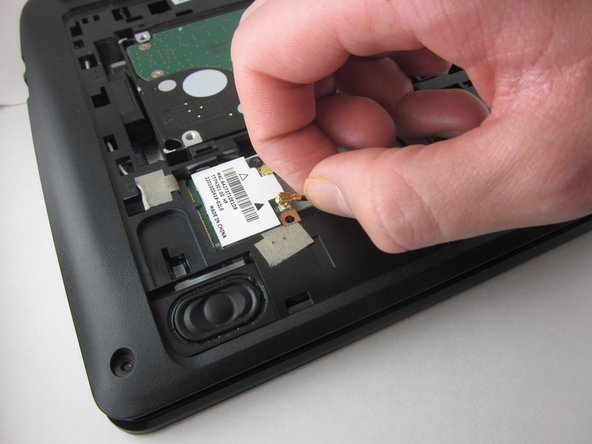
    2. Acer Aspire One P1VE6 WLAN Card Replacement: Schritt 4, Bild 1 von 2 Acer Aspire One P1VE6 WLAN Card Replacement: Schritt 4, Bild 2 von 2
      • Unplug the white and black cables connecting the WLAN card.

      Frag FixBot

      Kommentar hinzufügen

    3. Acer Aspire One P1VE6 WLAN Card Replacement: Schritt 5, Bild 1 von 1
      • Remove the 4mm Phillips #1 screw holding the WLAN card holding it in place.

      Frag FixBot

      Kommentar hinzufügen

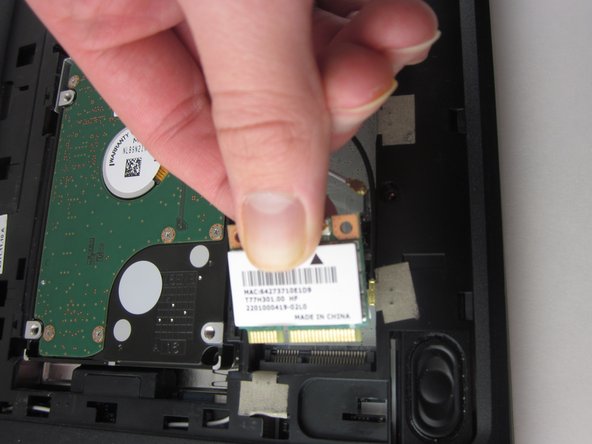
    4. Acer Aspire One P1VE6 WLAN Card Replacement: Schritt 6, Bild 1 von 2 Acer Aspire One P1VE6 WLAN Card Replacement: Schritt 6, Bild 2 von 2
      • Unplug the card.

      Frag FixBot

      Kommentar hinzufügen

Abschluss

To reassemble your device, follow these instructions in reverse order.

Rückgängig: Ich habe diese Anleitung nicht absolviert.

2 weitere Personen haben diese Anleitung absolviert.

0 Kommentare zur Anleitung

Kommentar hinzufügen

Seitenaufrufe:

Letzte 24 Stunden: 2

Letzte 7 Tage: 9

Letzte 30 Tage: 32

Insgesamt: 1,135