Zum Hauptinhalt wechseln
Gemeinsam reparieren - Jetzt registrieren

Acer Aspire R7 Display Assembly Replacement

Was du brauchst

  1. Acer Aspire R7 Display Assembly Replacement, Lower Case: Schritt 1, Bild 1 von 3 Acer Aspire R7 Display Assembly Replacement, Lower Case: Schritt 1, Bild 2 von 3 Acer Aspire R7 Display Assembly Replacement, Lower Case: Schritt 1, Bild 3 von 3
    • Remove all 10 of the lower case screws with a T9 torx screwdriver.

    • The front row screws are shorter then the middle and back row screws.

    Frag FixBot

    Kommentar hinzufügen

  2. Acer Aspire R7 Display Assembly Replacement: Schritt 2, Bild 1 von 3 Acer Aspire R7 Display Assembly Replacement: Schritt 2, Bild 2 von 3 Acer Aspire R7 Display Assembly Replacement: Schritt 2, Bild 3 von 3
    • Remove the long middle rubber piece with a plastic spludger or small flat head screwdriver.

    • Remove the 2 torx screws.

    • The screws are the same size as the top and middle row screws.

    Frag FixBot

    Kommentar hinzufügen

  3. Acer Aspire R7 Display Assembly Replacement: Schritt 3, Bild 1 von 3 Acer Aspire R7 Display Assembly Replacement: Schritt 3, Bild 2 von 3 Acer Aspire R7 Display Assembly Replacement: Schritt 3, Bild 3 von 3
    • Remove the small middle rubber piece with a plastic spludger or small flat head screwdriver.

    • Unscrew the torx screw. It is the same size as the bottom front row screws.

    Frag FixBot

    Kommentar hinzufügen

  4. Acer Aspire R7 Display Assembly Replacement: Schritt 4, Bild 1 von 3 Acer Aspire R7 Display Assembly Replacement: Schritt 4, Bild 2 von 3 Acer Aspire R7 Display Assembly Replacement: Schritt 4, Bild 3 von 3
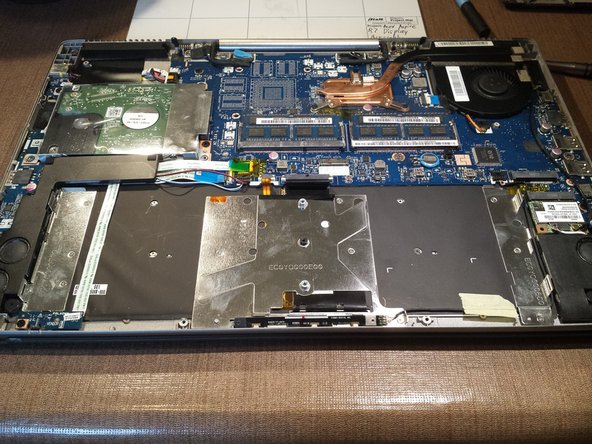
    • Lift up the lower case from the computer.

    Frag FixBot

    Kommentar hinzufügen

  5. Acer Aspire R7 Display Assembly Replacement, Disconnect and Remove the Battery: Schritt 5, Bild 1 von 2 Acer Aspire R7 Display Assembly Replacement, Disconnect and Remove the Battery: Schritt 5, Bild 2 von 2
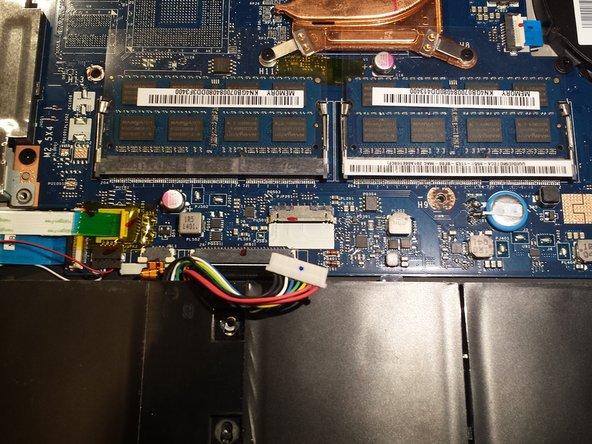
    • Disconnect the battery connector from the motherboard.

    Frag FixBot

    Kommentar hinzufügen

  6. Acer Aspire R7 Display Assembly Replacement: Schritt 6, Bild 1 von 2 Acer Aspire R7 Display Assembly Replacement: Schritt 6, Bild 2 von 2
    • Remove the two battery screws.

    Frag FixBot

    Kommentar hinzufügen

  7. Acer Aspire R7 Display Assembly Replacement: Schritt 7, Bild 1 von 2 Acer Aspire R7 Display Assembly Replacement: Schritt 7, Bild 2 von 2
    • Remove the battery by lifting it up carfully.

    Frag FixBot

    Kommentar hinzufügen

  8. Acer Aspire R7 Display Assembly Replacement, Hard Drive Removal: Schritt 8, Bild 1 von 2 Acer Aspire R7 Display Assembly Replacement, Hard Drive Removal: Schritt 8, Bild 2 von 2
    • Remove the 2 top screws on the hard drive.

    Frag FixBot

    Kommentar hinzufügen

  9. Acer Aspire R7 Display Assembly Replacement: Schritt 9, Bild 1 von 2 Acer Aspire R7 Display Assembly Replacement: Schritt 9, Bild 2 von 2
    • Remove the hard drive by slightly lifting it up on the left side and slightly pulling it to the left carefully untill it pops out.

    Frag FixBot

    Kommentar hinzufügen

  10. Acer Aspire R7 Display Assembly Replacement, WiFi Card Removal: Schritt 10, Bild 1 von 2 Acer Aspire R7 Display Assembly Replacement, WiFi Card Removal: Schritt 10, Bild 2 von 2
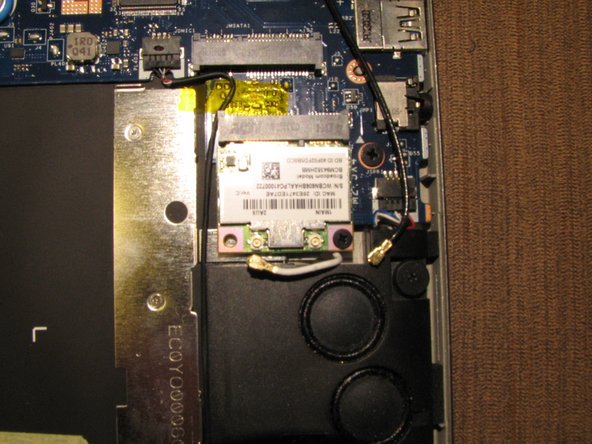
    • Disconnect the black and white WiFi antenna wires.

    Frag FixBot

    Kommentar hinzufügen

  11. Acer Aspire R7 Display Assembly Replacement: Schritt 11, Bild 1 von 3 Acer Aspire R7 Display Assembly Replacement: Schritt 11, Bild 2 von 3 Acer Aspire R7 Display Assembly Replacement: Schritt 11, Bild 3 von 3
    • Unscrew the screw holding down the WiFi card.

    • Remove the WiFi card.

    Frag FixBot

    Kommentar hinzufügen

  12. Acer Aspire R7 Display Assembly Replacement, Disconnecting Motherboard Connections: Schritt 12, Bild 1 von 3 Acer Aspire R7 Display Assembly Replacement, Disconnecting Motherboard Connections: Schritt 12, Bild 2 von 3 Acer Aspire R7 Display Assembly Replacement, Disconnecting Motherboard Connections: Schritt 12, Bild 3 von 3
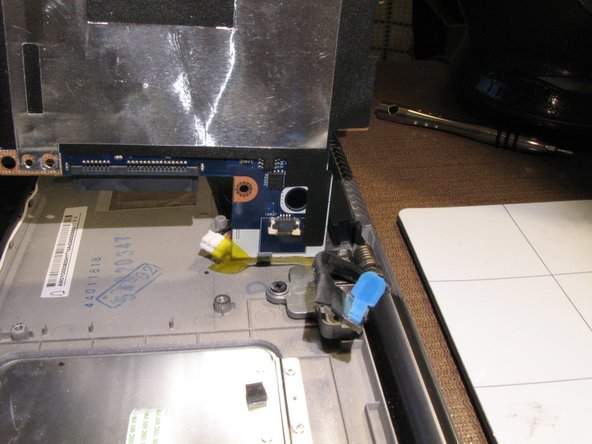
    • Disconnect the two keyboard ribbon cables

    • Disconnect the left speaker wire.

    • Disconnect the front lights ribbon cable.

    • Disconnect the I/O board ribbon cable.

    Frag FixBot

    Kommentar hinzufügen

  13. Acer Aspire R7 Display Assembly Replacement: Schritt 13, Bild 1 von 2 Acer Aspire R7 Display Assembly Replacement: Schritt 13, Bild 2 von 2
    • Disconnect the DC jack cable.

    Frag FixBot

    Kommentar hinzufügen

  14. Acer Aspire R7 Display Assembly Replacement: Schritt 14, Bild 1 von 2 Acer Aspire R7 Display Assembly Replacement: Schritt 14, Bild 2 von 2
    • Disconnect the two display cables.

    Frag FixBot

    Kommentar hinzufügen

  15. Acer Aspire R7 Display Assembly Replacement: Schritt 15, Bild 1 von 2 Acer Aspire R7 Display Assembly Replacement: Schritt 15, Bild 2 von 2
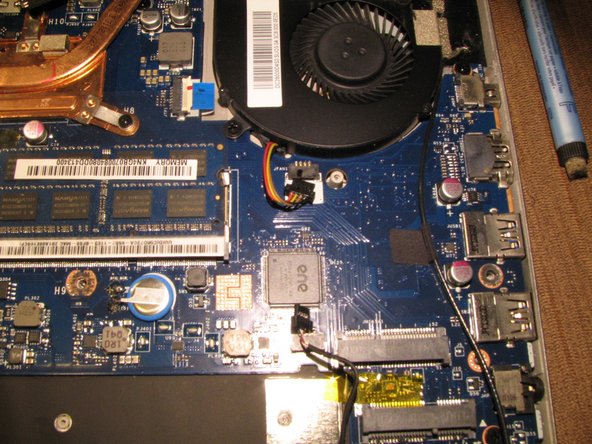
    • Disconnect the heat sink fan wire.

    • Disconnect the microphone wire.

    Frag FixBot

    Kommentar hinzufügen

  16. Acer Aspire R7 Display Assembly Replacement: Schritt 16, Bild 1 von 2 Acer Aspire R7 Display Assembly Replacement: Schritt 16, Bild 2 von 2
    • Disconnect the right speaker wire.

    Frag FixBot

    Kommentar hinzufügen

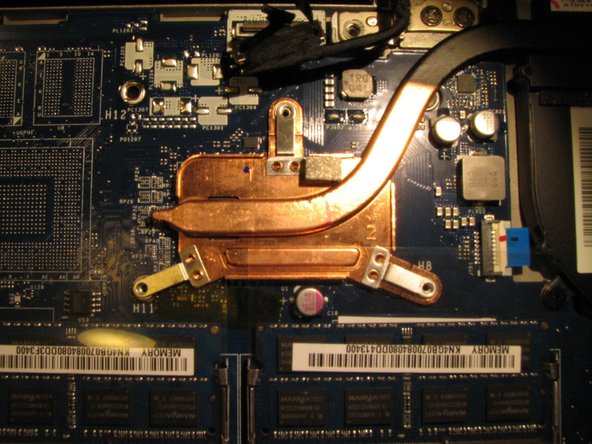
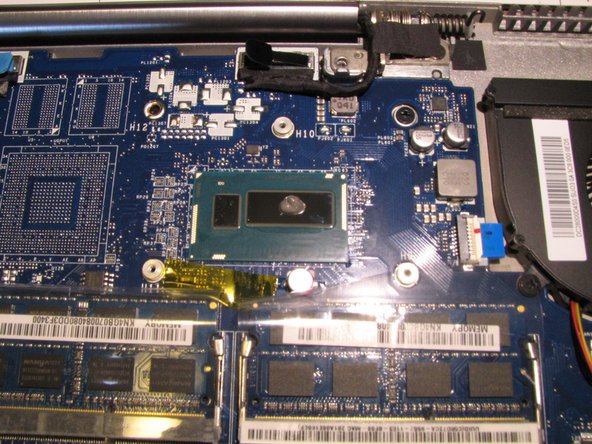
  17. Acer Aspire R7 Display Assembly Replacement, CPU Heat Sink and Fan Removal: Schritt 17, Bild 1 von 3 Acer Aspire R7 Display Assembly Replacement, CPU Heat Sink and Fan Removal: Schritt 17, Bild 2 von 3 Acer Aspire R7 Display Assembly Replacement, CPU Heat Sink and Fan Removal: Schritt 17, Bild 3 von 3
    • Remove the 3 heat sink screws.

    • Lift up the heat sink from the motherboard and remove it.

    • When reinstalling the heat sink during reassembly, make sure to clean off the old thermal paste from the CPU and heat sink with Artic Silver ArtiClean. Then put a grain of rice sized amount of new Artic Silver thermal paste on the CPU so it won't overheat. See 3rd picture.

    Frag FixBot

    Kommentar hinzufügen

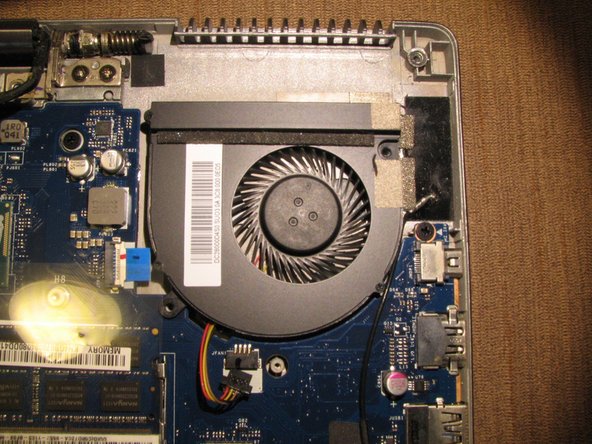
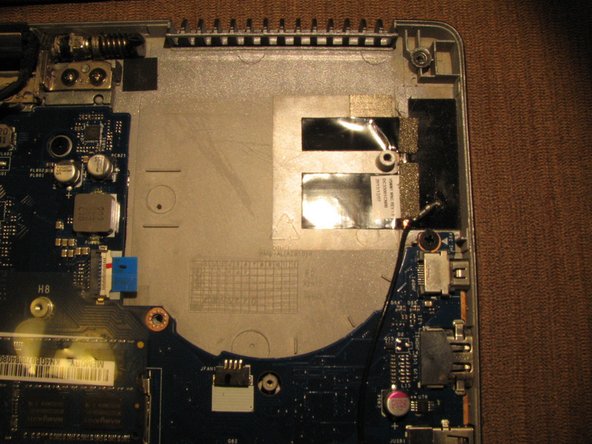
  18. Acer Aspire R7 Display Assembly Replacement: Schritt 18, Bild 1 von 3 Acer Aspire R7 Display Assembly Replacement: Schritt 18, Bild 2 von 3 Acer Aspire R7 Display Assembly Replacement: Schritt 18, Bild 3 von 3
    • Remove the 2 heat sink fan screws.

    • Remove the heat sink fan.

    Frag FixBot

    Kommentar hinzufügen

  19. Acer Aspire R7 Display Assembly Replacement: Schritt 19, Bild 1 von 2 Acer Aspire R7 Display Assembly Replacement: Schritt 19, Bild 2 von 2
    • Disconnect the trackpad ribbon cable.

    Frag FixBot

    Kommentar hinzufügen

  20. Acer Aspire R7 Display Assembly Replacement, Motherboard Removal: Schritt 20, Bild 1 von 2 Acer Aspire R7 Display Assembly Replacement, Motherboard Removal: Schritt 20, Bild 2 von 2
    • Remove the 3 motherboard screws.

    • Remove the motherboard by lifting it up very carefully as the power button ribbon cable is still connected to the left under side of the motherboard. See step 21.

    Frag FixBot

    Kommentar hinzufügen

  21. Acer Aspire R7 Display Assembly Replacement: Schritt 21, Bild 1 von 2 Acer Aspire R7 Display Assembly Replacement: Schritt 21, Bild 2 von 2
    • Remove the power button ribbon cable from the motherboard.

    Frag FixBot

    Kommentar hinzufügen

  22. Acer Aspire R7 Display Assembly Replacement, Display Assembly Removal: Schritt 22, Bild 1 von 2 Acer Aspire R7 Display Assembly Replacement, Display Assembly Removal: Schritt 22, Bild 2 von 2
    • Remove the 4 silver hinge screws.

    • Remove the 2 black hinge screws.

    • The black screws are shorter then the silver screws.

    Frag FixBot

    Kommentar hinzufügen

  23. Acer Aspire R7 Display Assembly Replacement: Schritt 23, Bild 1 von 3 Acer Aspire R7 Display Assembly Replacement: Schritt 23, Bild 2 von 3 Acer Aspire R7 Display Assembly Replacement: Schritt 23, Bild 3 von 3
    • Carefully open the laptop and the hinges will pop off the frame.

    Frag FixBot

    Kommentar hinzufügen

  24. Acer Aspire R7 Display Assembly Replacement: Schritt 24, Bild 1 von 3 Acer Aspire R7 Display Assembly Replacement: Schritt 24, Bild 2 von 3 Acer Aspire R7 Display Assembly Replacement: Schritt 24, Bild 3 von 3
    • Optional Step

    • Remove the 4 T9 torx screws from the display assembly where the model number and serial numbers stickers are located and swap that panel to the replacement display assembly. Completing this step allows for your computer to retain its original identification information.

    Frag FixBot

    Kommentar hinzufügen

  25. Acer Aspire R7 Display Assembly Replacement: Schritt 25, Bild 1 von 1
    • Congradulations! You've completed this guide! :)

    Frag FixBot

    Kommentar hinzufügen

Abschluss

To reassemble your device, follow these instructions in reverse order.

Rückgängig: Ich habe diese Anleitung nicht absolviert.

9 weitere Personen haben diese Anleitung absolviert.

Team

Everything iPod Mitglied von Everything iPod

Community

63 Mitglieder

3 Anleitungen geschrieben

5 Kommentare zur Anleitung

Where do you get a new display?

GoofyBall - Antwort Teilen

I ordered the display on eBay.

computeripodrepair - Antwort Teilen

Horrible guide. None of this is necessary to replace the screen. The actual steps necessary to replace the screen are not listed...

Blue Raja - Antwort Teilen

This is just a teardown. Nobody sells the entire display assembly with shell, and the steps to go over replacing the actual display panel are completely absent.

Black Forest Ham - Antwort Teilen

Although correct this doesn't help and should probably be taken down. As mentioned by others you can't buy the entire screen section, you can only buy the LCD part. Replacing the LCD requires removing the glass and having to glue it back on which is probably beyond most people's capability. This article is therefore misleading.

Mike Short - Antwort Teilen

Kommentar hinzufügen

Seitenaufrufe:

Letzte 24 Stunden: 0

Letzte 7 Tage: 9

Letzte 30 Tage: 52

Insgesamt: 11,192