Zum Hauptinhalt wechseln
Gemeinsam reparieren - Jetzt registrieren

Acer Aspire R7 Speakers Replacement

Was du brauchst

    1. Acer Aspire R7 Speakers Replacement, Cover: Schritt 1, Bild 1 von 1
      • Shut down the laptop and disconnect the power cord.

      • Failing to disconnect or shut down the laptop could result in damage to the laptop or a shock hazard.

      • Turn the laptop over.

      Frag FixBot

      Kommentar hinzufügen

    2. Acer Aspire R7 Speakers Replacement: Schritt 2, Bild 1 von 3 Acer Aspire R7 Speakers Replacement: Schritt 2, Bild 2 von 3 Acer Aspire R7 Speakers Replacement: Schritt 2, Bild 3 von 3
      • Remove six 6mm T7 screws.

      • Remove four 4mm T7 screws.

      • Remove two 10mm T7 screws

      • Use the blue plastic opening tool to carefully remove both rubber pads which cover the four remaining screws.

      • Remove the remaining two10mm T7 screws.

      Frag FixBot

      Kommentar hinzufügen

    3. Acer Aspire R7 Speakers Replacement: Schritt 3, Bild 1 von 1
      • Carefully lift the cover upwards.

      • If the cover seems stuck, use a spudger tool to pry the sides.

      Frag FixBot

      Kommentar hinzufügen

    1. Acer Aspire R7 Speakers Replacement, Speakers: Schritt 4, Bild 1 von 2 Acer Aspire R7 Speakers Replacement, Speakers: Schritt 4, Bild 2 von 2
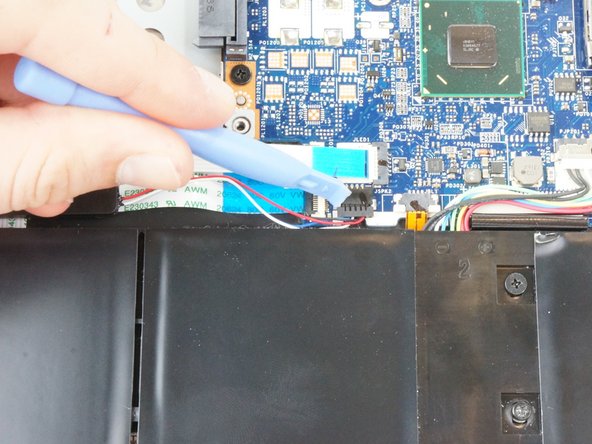
      • Locate the clip attaching the right-side speakers to the motherboard.

      • Carefully pull on the clip until it detaches from the motherboard.

      • Use a plastic opening tool if needed.

      Frag FixBot

      Kommentar hinzufügen

    2. Acer Aspire R7 Speakers Replacement: Schritt 5, Bild 1 von 2 Acer Aspire R7 Speakers Replacement: Schritt 5, Bild 2 von 2
      • Remove two 3.5mm Phillips #00 screws which hold the speaker in place.

      • Carefully lift the right-side speaker assembly away from the motherboard.

      Frag FixBot

      Kommentar hinzufügen

    3. Acer Aspire R7 Speakers Replacement: Schritt 6, Bild 1 von 2 Acer Aspire R7 Speakers Replacement: Schritt 6, Bild 2 von 2
      • Locate the clip attaching the left-side speakers to the motherboard.

      • Carefully pull on the clip until it detaches from the motherboard.

      • Use a plastic opening tool if needed.

      Frag FixBot

      Kommentar hinzufügen

    4. Acer Aspire R7 Speakers Replacement: Schritt 7, Bild 1 von 2 Acer Aspire R7 Speakers Replacement: Schritt 7, Bild 2 von 2
      • Remove the two 3.5mm Phillips #00 screws which hold the speaker in place.

      • Carefully lift the left-side speaker assembly away from the motherboard.

      Frag FixBot

      Kommentar hinzufügen

Abschluss

To reassemble your device, follow these instructions in reverse order.

Rückgängig: Ich habe diese Anleitung nicht absolviert.

Team

USF Tampa, Team 3-4, Hickman Winter 2015 Mitglied von USF Tampa, Team 3-4, Hickman Winter 2015

USFT-HICKMAN-W15S3G4

4 Mitglieder

72 Anleitungen geschrieben

0 Kommentare zur Anleitung

Kommentar hinzufügen

Seitenaufrufe:

Letzte 24 Stunden: 0

Letzte 7 Tage: 14

Letzte 30 Tage: 37

Insgesamt: 1,174