Einleitung
The keyboard may be easily replaced if a key or keys no longer works. It is accessible without removing the back cover of the computer.
Was du brauchst
-
-
Use the pointed end of the spudger to slide the battery lock until the battery pops loose.
-
-
-
-
Use the spudger, push the two tabs, located in the battery slot, through their slots to release the keyboard.
-
Do this with the computer slightly open for ease.
-
-
-
Open the laptop.
-
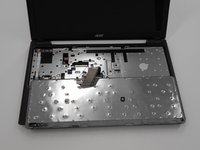
Start top of the keyboard and use the opening tool to pop the remaining tabs around the keyboard loose.
-
The keyboard can be flipped onto its face once removed.
-
-
-
Use the spudger and slide the grey tabs on either side of the keyboard wires away from the white plastic.
-





To reassemble your device, follow these instructions in reverse order.
To reassemble your device, follow these instructions in reverse order.
Rückgängig: Ich habe diese Anleitung nicht absolviert.
Eine weitere Person hat diese Anleitung absolviert.



Team

University of Alabama, Team S2-G7, Bedsole Spring 2018 Mitglied von University of Alabama, Team S2-G7, Bedsole Spring 2018
UA-BEDSOLE-S18S2G7
3 Mitglieder
12 Anleitungen geschrieben
