Zum Hauptinhalt wechseln
Gemeinsam reparieren - Jetzt registrieren

Acer C720-2420 Chromebook cooling fan + CPU heat sink Replacement

Was du brauchst

    1. Acer C720-2420 Chromebook cooling fan + CPU heat sink Replacement, Back Cover Replacement: Schritt 1, Bild 1 von 2 Acer C720-2420 Chromebook cooling fan + CPU heat sink Replacement, Back Cover Replacement: Schritt 1, Bild 2 von 2
      • Place your Chromebook upside down.

      • Utilizing the precision magnetized Phillips #0 screwdriver, remove all thirteen 6.5 mm Phillips screws that secure the back cover.

      • Before doing anything, make sure your Acer Chromebook is completely turned off.

      Frag FixBot

      Kommentar hinzufügen

    2. Acer C720-2420 Chromebook cooling fan + CPU heat sink Replacement: Schritt 2, Bild 1 von 1
      • Use the plastic opening tool to carefully remove the bottom.

      Frag FixBot

      Kommentar hinzufügen

    1. Acer C720-2420 Chromebook cooling fan + CPU heat sink Replacement, Battery: Schritt 3, Bild 1 von 2 Acer C720-2420 Chromebook cooling fan + CPU heat sink Replacement, Battery: Schritt 3, Bild 2 von 2
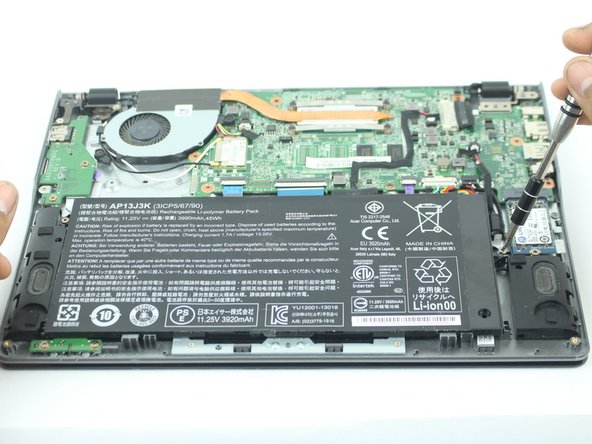
      • Remove the two 3.6 mm Phillips screws holding the battery in place.

      Frag FixBot

      Kommentar hinzufügen

    2. Acer C720-2420 Chromebook cooling fan + CPU heat sink Replacement: Schritt 4, Bild 1 von 2 Acer C720-2420 Chromebook cooling fan + CPU heat sink Replacement: Schritt 4, Bild 2 von 2
      In diesem Schritt verwendetes Werkzeug:
      Tweezers
      $4.99
      • Disconnect the connector that attaches the battery to the Chromebook with a pair of pliers or tweezers.

      • Alternatively, you could use your hands, as it may be difficult to unhook the connector.

      Frag FixBot

      Kommentar hinzufügen

    3. Acer C720-2420 Chromebook cooling fan + CPU heat sink Replacement: Schritt 5, Bild 1 von 1
      • Remove the battery.

      Frag FixBot

      Kommentar hinzufügen

    1. Acer C720-2420 Chromebook cooling fan + CPU heat sink Replacement, cooling fan / CPU heat sink assembly: Schritt 6, Bild 1 von 2 Acer C720-2420 Chromebook cooling fan + CPU heat sink Replacement, cooling fan / CPU heat sink assembly: Schritt 6, Bild 2 von 2
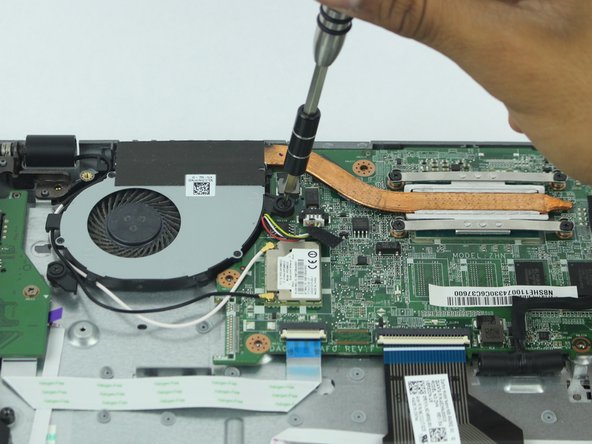
      • Remove the six 4.7 mm Phillips screws that secure the fan.

      Frag FixBot

      Kommentar hinzufügen

    2. Acer C720-2420 Chromebook cooling fan + CPU heat sink Replacement: Schritt 7, Bild 1 von 3 Acer C720-2420 Chromebook cooling fan + CPU heat sink Replacement: Schritt 7, Bild 2 von 3 Acer C720-2420 Chromebook cooling fan + CPU heat sink Replacement: Schritt 7, Bild 3 von 3
      In diesem Schritt verwendetes Werkzeug:
      Tweezers
      $4.99
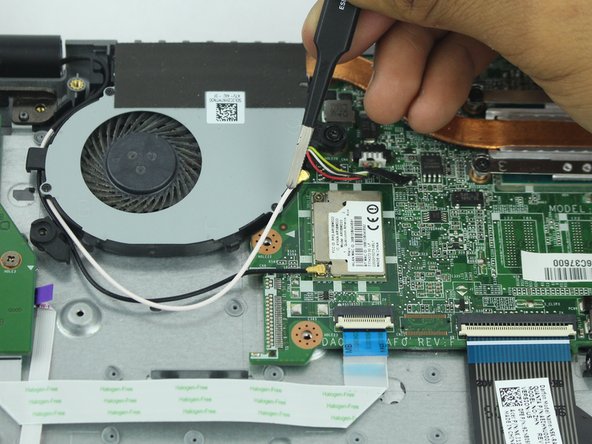
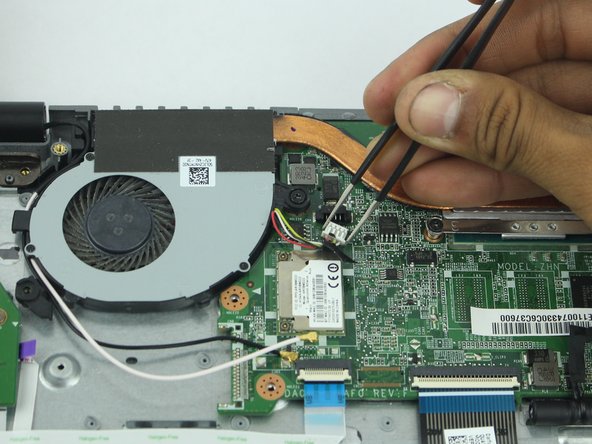
      • Disconnect these cables from the motherboard using the tweezers.

      • Alternatively, you may use your hands.

      • Pull out the fan.

      Frag FixBot

      Kommentar hinzufügen

Abschluss

To reassemble your device, follow these instructions in reverse order.

Rückgängig: Ich habe diese Anleitung nicht absolviert.

Team

USF Tampa, Team S15-G4, Boczar Spring 2018 Mitglied von USF Tampa, Team S15-G4, Boczar Spring 2018

USFT-BOCZAR-S18S15G4

4 Mitglieder

72 Anleitungen geschrieben

0 Kommentare zur Anleitung

Kommentar hinzufügen

Seitenaufrufe:

Letzte 24 Stunden: 0

Letzte 7 Tage: 8

Letzte 30 Tage: 25

Insgesamt: 517