Zum Hauptinhalt wechseln

Amazon Echo Show 10 3rd Gen Camera Replacement

Was du brauchst

Einführungsvideo

  1. Amazon Echo Show 10 3rd Gen Camera Replacement, Microphone: Schritt 1, Bild 1 von 1
    • Insert a Jimmy along the seam of the screen and the shell and slide it along the length to separate the two sides.

    • For this particular step, a careful amount of force may be needed to separate the two parts. The connection is especially tight at the four corners. Use the iOpener to loosen the small amount of adhesive.

  2. Amazon Echo Show 10 3rd Gen Camera Replacement: Schritt 2, Bild 1 von 1
    • Gently separate the display from the base.

    • There is a small amount of glue holding the two components together in the top corner, which may require the user to apply more force when separating.

    • Don't yank the display off as it is connected by a cable.

  3. Amazon Echo Show 10 3rd Gen Camera Replacement: Schritt 3, Bild 1 von 2 Amazon Echo Show 10 3rd Gen Camera Replacement: Schritt 3, Bild 2 von 2
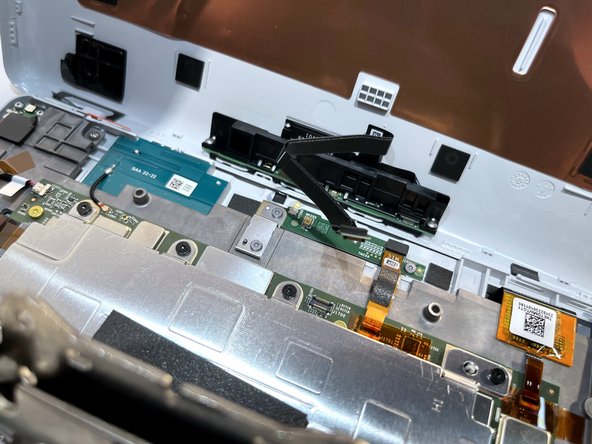
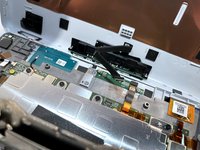
    • Hold the display away from the board at an angle to ensure a clear view while keeping the ribbon cable slack.

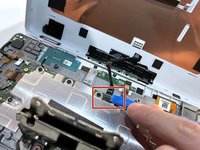
    • Place the tip of your opening tool under the edge of the display connector, and pry the connector straight up from its socket.

    • Be very careful to pry only under the edge of the connector, and not under the socket itself. If you pry under the socket, you will separate it from the circuit board, which requires specialized microsoldering skills and equipment to repair.

    • Set aside the display.

  4. Amazon Echo Show 10 3rd Gen Camera Replacement: Schritt 4, Bild 1 von 1
    • Place the tip of your opening tool under the edge of the orange connector, and pry it straight up from its socket.

    • To reconnect, align the connector carefully over its socket and press down with your fingertip—first at one side, then the other—until it clicks into place.

  5. Amazon Echo Show 10 3rd Gen Camera Replacement: Schritt 5, Bild 1 von 1
    • Use the T5 Torx screwdriver to remove the two 4 mm screws from the bracket covering the microphone board and the one 4 mm screw holding down the board itself.

  6. Amazon Echo Show 10 3rd Gen Camera Replacement: Schritt 6, Bild 1 von 3 Amazon Echo Show 10 3rd Gen Camera Replacement: Schritt 6, Bild 2 von 3 Amazon Echo Show 10 3rd Gen Camera Replacement: Schritt 6, Bild 3 von 3
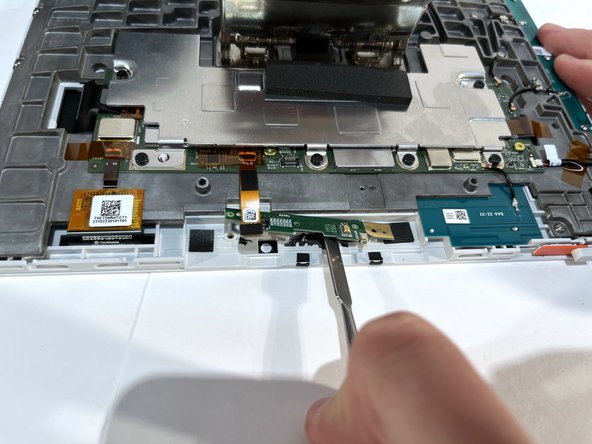
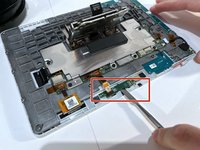
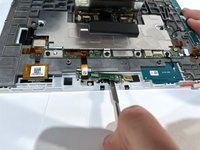
    • Use a spudger to pry under the microphone board. and gently wear away at the connecting glue.

    • The board is glued on so use the spudger to release the glue. It may take some time but be patient to avoid damaging the device.

    • The microphone component is delicate and relatively flimsy, so a gentle approach to breaking the adhesive is recommended.

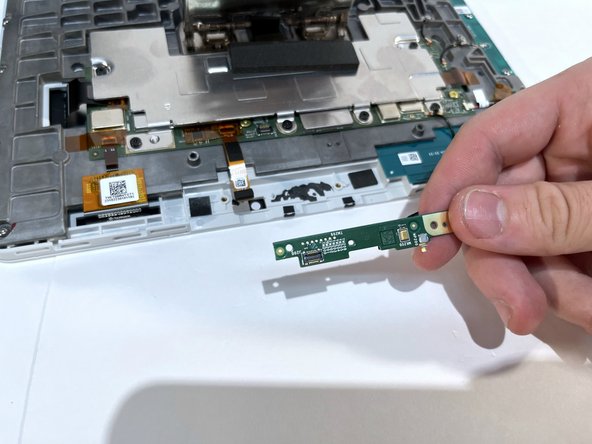
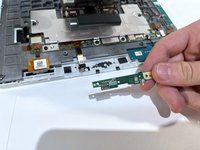
    • After the adhesive seal has been broken, gently lift and remove the microphone board.

  7. Amazon Echo Show 10 3rd Gen Camera Replacement, Camera: Schritt 7, Bild 1 von 1
    • Remove the silver pannel's eight T5 Torx screws:

    • Eight 7.8mm black screws

    • Do not press too hard with the Torx driver, the threads in the plastic can strip easily.

  8. Amazon Echo Show 10 3rd Gen Camera Replacement: Schritt 8, Bild 1 von 1
    • Remove the mounting screws using a T10 Torx screwdriver:

    • Four 7.7 mm screws

    • These screws secure the internal frame, so the panel may shift slightly once loose.

  9. Amazon Echo Show 10 3rd Gen Camera Replacement: Schritt 9, Bild 1 von 1
    • Remove the board's three T5 Torx screws:

    • Three 3.9 mm screws

    • The board will still be connected by ribbon cables underneath. Do not pull up forcefully.

  10. Amazon Echo Show 10 3rd Gen Camera Replacement: Schritt 10, Bild 1 von 1
    • Remove the panels seventeen T5 Torx screws

    • Seventeen 5.6 mm silver screws

    • The screws may look similar, but this set is slightly longer. Keep them separate to avoid confusion later.

  11. Amazon Echo Show 10 3rd Gen Camera Replacement: Schritt 11, Bild 1 von 1
    • Carefully disconnect the ribbon cables using Heavy-Duty Spudger.

    • Ribbon cables tear easily, lift the connector latch before pulling the cable out.

    • When reassembling, make sure each latch clicks down to fully secure the ribbon cables.

  12. Amazon Echo Show 10 3rd Gen Camera Replacement: Schritt 12, Bild 1 von 1
    • Remove the panel's three T5 Torx screwdriver:

    • Three 6.9 mm gold screws

    • These screws hold the internal camera bracket in place.

  13. Amazon Echo Show 10 3rd Gen Camera Replacement: Schritt 13, Bild 1 von 1
    • Remove the backing layer

    • Remove loose PCB's (printed circuit boards)

    • When reassembling, route each PCB ribbon and cable the same way as before to avoid pinching the wiring.

    • You now have access to the camera.

Abschluss

To reassemble your device, reverse the steps outlined in this guide.

Justin Abney

Mitglied seit: 04/01/24

154 Reputation

1 Anleitung geschrieben

Team

IUPUI, Team 1-3, Harley Spring 2024 Mitglied von IUPUI, Team 1-3, Harley Spring 2024

IUPUI-HARLEY-S24S1G3

4 Mitglieder

4 Anleitungen geschrieben

0 Kommentare zur Anleitung

Kommentar hinzufügen

Seitenaufrufe:

Letzte 24 Stunden: 1

Letzte 7 Tage: 4

Letzte 30 Tage: 20

Insgesamt: 303