Einleitung
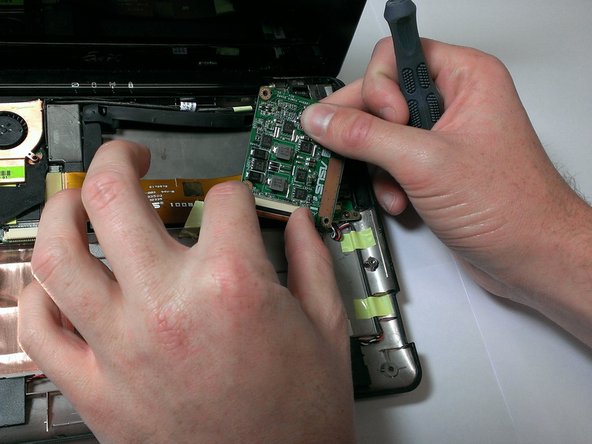
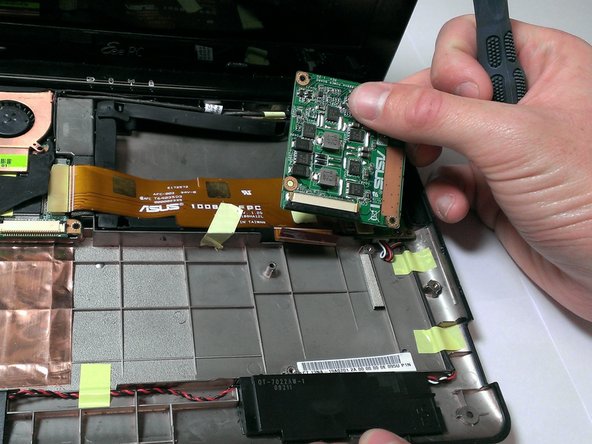
You will be the remove of the battery and continue to cautiously take the graphics card off of the laptop. This installation would be necessary if a user has a fried, defected, or inoperative in general.
Was du brauchst
-
-
Using the plastic opening tool, carefully pry the top panel from the base.
-
-
-
Lift the side of the keyboard.
-
Disconnect the attached ribbon located underneath the keyboard.
-
Place your index finger in the hole on the right side of the keyboard tray and lift the tray.
-
-
-
-
Use your fingers to lift the battery and gently disconnect the wires from the base.
-
-
-
Flip over the graphics card.
-
Pull the black plastic locking mechanism towards the golden ribbon to unlock.
-
Pull out the ribbon.
-


To reassemble your device, follow these instructions in reverse order.
To reassemble your device, follow these instructions in reverse order.
Rückgängig: Ich habe diese Anleitung nicht absolviert.
Ein:e weitere:r Nutzer:in hat diese Anleitung absolviert.



Team

Cal Poly, Team 21-52, Johann Spring 2013 Mitglied von Cal Poly, Team 21-52, Johann Spring 2013
CPSU-JOHANN-S13S21G52
4 Mitglieder
11 Anleitungen geschrieben
Ein Kommentar
Is this the graphics card?
Is this pc has no integrated graphics card?
