Zum Hauptinhalt wechseln
Gemeinsam reparieren - Jetzt registrieren

Asus X751MA-DH01TQ Keyboard Replacement

Was du brauchst

  1. Asus X751MA-DH01TQ  Keyboard Replacement, Keyboard: Schritt 1, Bild 1 von 2 Asus X751MA-DH01TQ  Keyboard Replacement, Keyboard: Schritt 1, Bild 2 von 2
    • Turn the laptop upside down and locate the ten screws holding in the plate cover.

    • Remove all ten screws using a PH00 screwdriver.

    Frag FixBot

    Kommentar hinzufügen

  2. Asus X751MA-DH01TQ  Keyboard Replacement: Schritt 2, Bild 1 von 1
    • Once the screws are out, open up the laptop and use the plastic opening tool on the keyboard and the back to pry it open.

    Frag FixBot

    Kommentar hinzufügen

  3. Asus X751MA-DH01TQ  Keyboard Replacement: Schritt 3, Bild 1 von 1
    • Separate the keyboard from the computer to expose the inside of the computer.

    Frag FixBot

    Kommentar hinzufügen

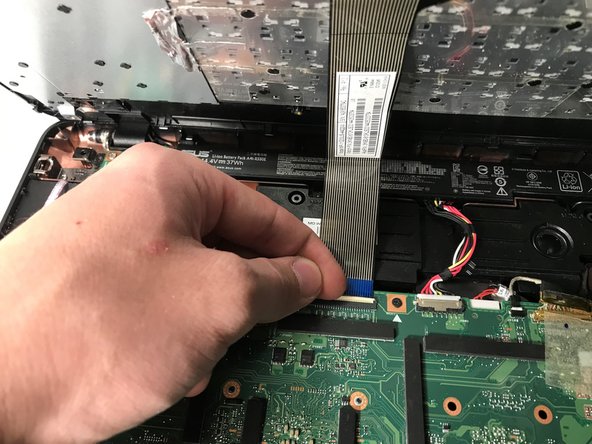
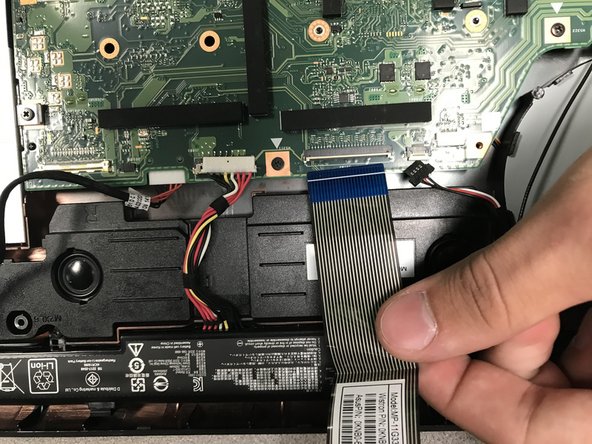
  4. Asus X751MA-DH01TQ  Keyboard Replacement: Schritt 4, Bild 1 von 3 Asus X751MA-DH01TQ  Keyboard Replacement: Schritt 4, Bild 2 von 3 Asus X751MA-DH01TQ  Keyboard Replacement: Schritt 4, Bild 3 von 3
    • Flip up the white connector.

    • Take the blue cable out of the motherboard.

    Frag FixBot

    Kommentar hinzufügen

Abschluss

To reassemble your device, follow these instructions in reverse order.

Rückgängig: Ich habe diese Anleitung nicht absolviert.

0 Kommentare zur Anleitung

Kommentar hinzufügen

Seitenaufrufe:

Letzte 24 Stunden: 2

Letzte 7 Tage: 5

Letzte 30 Tage: 23

Insgesamt: 605