Zum Hauptinhalt wechseln
Gemeinsam reparieren - Jetzt registrieren

CubiCubi 47 Inch Computer Desk Keyboard Tray Replacement

Was du brauchst

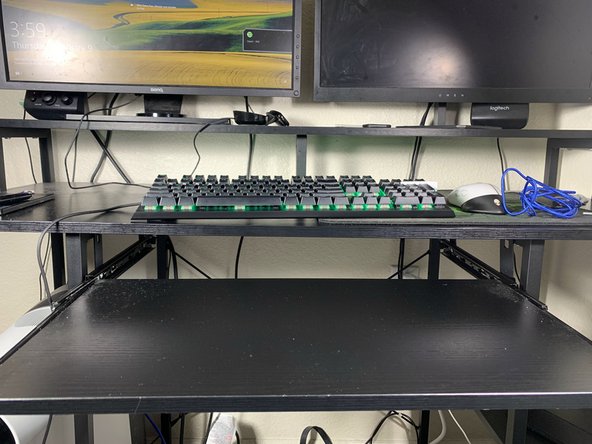
    1. CubiCubi 47 Inch Computer Desk Keyboard Tray Replacement, Keyboard Tray: Schritt 1, Bild 1 von 1
      • Pull out the desk tray so it's fully extended.

      Frag FixBot

      Kommentar hinzufügen

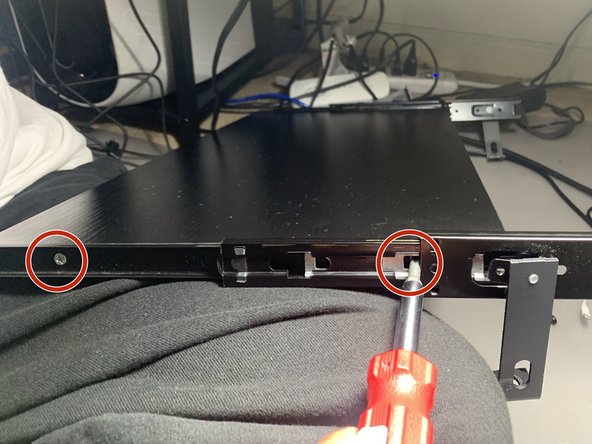
    2. CubiCubi 47 Inch Computer Desk Keyboard Tray Replacement: Schritt 2, Bild 1 von 3 CubiCubi 47 Inch Computer Desk Keyboard Tray Replacement: Schritt 2, Bild 2 von 3 CubiCubi 47 Inch Computer Desk Keyboard Tray Replacement: Schritt 2, Bild 3 von 3
      • Remove each of the 1.5 mm hex socket tray pillar screws with your screwdriver. Repeat for each corner.

      • Save these screws to reattach the tray later.

      Frag FixBot

      Kommentar hinzufügen

    3. CubiCubi 47 Inch Computer Desk Keyboard Tray Replacement: Schritt 3, Bild 1 von 1
      • Detach the tray from the desk.

      Frag FixBot

      Kommentar hinzufügen

    4. CubiCubi 47 Inch Computer Desk Keyboard Tray Replacement: Schritt 4, Bild 1 von 2 CubiCubi 47 Inch Computer Desk Keyboard Tray Replacement: Schritt 4, Bild 2 von 2
      • Tighten the four side screws on the tray.

      Frag FixBot

      Kommentar hinzufügen

    5. CubiCubi 47 Inch Computer Desk Keyboard Tray Replacement: Schritt 5, Bild 1 von 2 CubiCubi 47 Inch Computer Desk Keyboard Tray Replacement: Schritt 5, Bild 2 von 2
      • Tighten the four screws connecting the tray pillar and the tray track.

      Frag FixBot

      Kommentar hinzufügen

    6. CubiCubi 47 Inch Computer Desk Keyboard Tray Replacement: Schritt 6, Bild 1 von 2 CubiCubi 47 Inch Computer Desk Keyboard Tray Replacement: Schritt 6, Bild 2 von 2
      • Screw the tray pillars back on the desk with the 1.5 mm Hex socket screws. Repeat for each four corners.

      • Reattaching the screws alone may be difficult. Try using a small table to hold the tray up or you may need another person to help.

      Frag FixBot

      Kommentar hinzufügen

Abschluss

To reassemble your device, follow these instructions in reverse order.

Rückgängig: Ich habe diese Anleitung nicht absolviert.

Alex

Mitglied seit: 01/26/23

133 Reputation

1 Anleitung geschrieben

Team

UC Davis, Team 2-1, Morris Winter 2023 Mitglied von UC Davis, Team 2-1, Morris Winter 2023

UCD-MORRIS-W23S2G1

2 Mitglieder

2 Anleitungen geschrieben

0 Kommentare zur Anleitung

Kommentar hinzufügen

Seitenaufrufe:

Letzte 24 Stunden: 1

Letzte 7 Tage: 11

Letzte 30 Tage: 21

Insgesamt: 660