Zum Hauptinhalt wechseln
Gemeinsam reparieren - Jetzt registrieren

Dell Inspiron 6000 Keyboard Replacement

Was du brauchst

  1. Dell Inspiron 6000 Keyboard Replacement, Battery: Schritt 1, Bild 1 von 1
    • To prevent injury, make sure the laptop is unplugged before removing the battery.

    • Flip the laptop over, bottom-side up.

    Frag FixBot

    Kommentar hinzufügen

  2. Dell Inspiron 6000 Keyboard Replacement: Schritt 2, Bild 1 von 1
    • Push the switch next to the battery.

    • At the same time, lift the battery away from the laptop.

    Frag FixBot

    Kommentar hinzufügen

  3. Dell Inspiron 6000 Keyboard Replacement, Keyboard: Schritt 3, Bild 1 von 3 Dell Inspiron 6000 Keyboard Replacement, Keyboard: Schritt 3, Bild 2 von 3 Dell Inspiron 6000 Keyboard Replacement, Keyboard: Schritt 3, Bild 3 von 3
    • Place the laptop on flat surface.

    • Carefully open the laptop at far as it will go so that the back of screen is touching the flat surface.

    • Carefully take a spudger and separate part of the cover at the red circle.

    Frag FixBot

    Kommentar hinzufügen

  4. Dell Inspiron 6000 Keyboard Replacement: Schritt 4, Bild 1 von 2 Dell Inspiron 6000 Keyboard Replacement: Schritt 4, Bild 2 von 2
    • Remove two 4 mm Philips #00 screws.

    Frag FixBot

    Kommentar hinzufügen

  5. Dell Inspiron 6000 Keyboard Replacement: Schritt 5, Bild 1 von 1
    • Gently lift the keyboard away from the laptop without harming the cord that is located at the bottom of the keyboard.

    Frag FixBot

    Kommentar hinzufügen

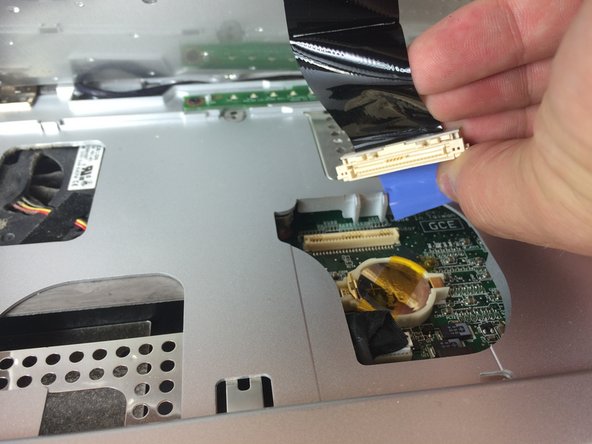
  6. Dell Inspiron 6000 Keyboard Replacement: Schritt 6, Bild 1 von 3 Dell Inspiron 6000 Keyboard Replacement: Schritt 6, Bild 2 von 3 Dell Inspiron 6000 Keyboard Replacement: Schritt 6, Bild 3 von 3
    • Gently pull the blue tab up until it comes away from computer.

    Frag FixBot

    Kommentar hinzufügen

Abschluss

To reassemble your device, follow these instructions in reverse order.

Rückgängig: Ich habe diese Anleitung nicht absolviert.

5 weitere Personen haben diese Anleitung absolviert.

Team

USF Tampa, Team 11-1, Blackwell Fall 2014 Mitglied von USF Tampa, Team 11-1, Blackwell Fall 2014

USFT-BLACKWELL-F14S11G1

5 Mitglieder

7 Anleitungen geschrieben

1 Kommentar zur Anleitung

Hi there, my dell inspiron 6000 does not power up when I switch on. This happened after I remove my keypad to clean.. Any idea why?

John KAPA - Antwort Teilen

Kommentar hinzufügen

Seitenaufrufe:

Letzte 24 Stunden: 0

Letzte 7 Tage: 8

Letzte 30 Tage: 40

Insgesamt: 2,603