Zum Hauptinhalt wechseln
Gemeinsam reparieren - Jetzt registrieren

Dell Venue 7 Speaker Replacement

Was du brauchst

  1. Dell Venue 7 Speaker Replacement, Rear Case: Schritt 1, Bild 1 von 2 Dell Venue 7 Speaker Replacement, Rear Case: Schritt 1, Bild 2 von 2
    • Use a spudger or your fingers to pry off the back case.

    • If your case is badly damaged, use caution because the fragments may be sharp.

    Frag FixBot
  2. Dell Venue 7 Speaker Replacement, Battery: Schritt 2, Bild 1 von 1
    In diesem Schritt verwendetes Werkzeug:
    Tweezers
    $4.99
    • Gently disconnect the battery from the motherboard using your fingers or a pair of tweezers.

    Frag FixBot
  3. Dell Venue 7 Speaker Replacement: Schritt 3, Bild 1 von 1
    • Remove the battery by pulling it from the edges and carefully peeling it off of the base.

    • There is adhesive keeping the battery in place, so don't be afraid to use a little extra force.

    • Do not bend or warp the battery in any way as it can be a fire hazard.

    Frag FixBot
  4. Dell Venue 7 Speaker Replacement, Speaker: Schritt 4, Bild 1 von 2 Dell Venue 7 Speaker Replacement, Speaker: Schritt 4, Bild 2 von 2
    • Use a spudger to remove the ribbon cable that is around the speaker wire.

    Frag FixBot
  5. Dell Venue 7 Speaker Replacement: Schritt 5, Bild 1 von 2 Dell Venue 7 Speaker Replacement: Schritt 5, Bild 2 von 2
    • Disconnect the speaker wire from the motherboard by prying the connector upwards with the spudger.

    Frag FixBot
  6. Dell Venue 7 Speaker Replacement: Schritt 6, Bild 1 von 1
    • Remove the plastic covering on the speaker.

    Frag FixBot
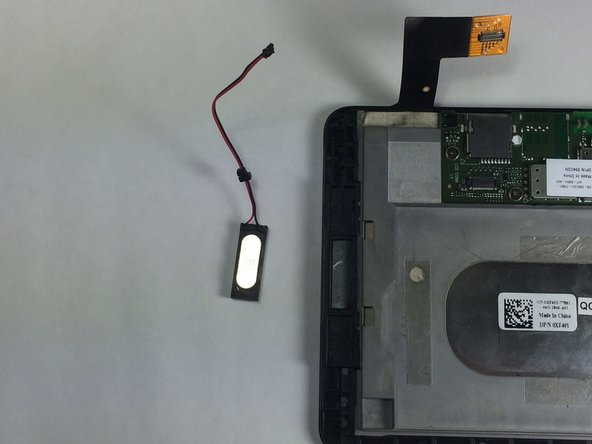
  7. Dell Venue 7 Speaker Replacement: Schritt 7, Bild 1 von 2 Dell Venue 7 Speaker Replacement: Schritt 7, Bild 2 von 2
    • Gently pull on the wire and remove the speaker.

    Frag FixBot
Abschluss

To reassemble your device, follow these instructions in reverse order.

2 weitere Personen haben diese Anleitung absolviert.

Team

USF Tampa, Team 11-4, Blackwell Winter 2015 Mitglied von USF Tampa, Team 11-4, Blackwell Winter 2015

USFT-BLACKWELL-W15S11G4

4 Mitglieder

10 Anleitungen geschrieben

0 Kommentare zur Anleitung

Kommentar hinzufügen

Seitenaufrufe:

Letzte 24 Stunden: 1

Letzte 7 Tage: 7

Letzte 30 Tage: 44

Insgesamt: 1,006