Zum Hauptinhalt wechseln
Gemeinsam reparieren - Jetzt registrieren

GameSir T4 Pro Joystick Replacement

Was du brauchst

  1. GameSir T4 Pro Joystick Replacement, Battery: Schritt 1, Bild 1 von 1
    • Using the Phillips 1 screwdriver, gently turn the screw to the left (repeat this step until all four screws are taken out).

    Frag FixBot

    Kommentar hinzufügen

  2. GameSir T4 Pro Joystick Replacement: Schritt 2, Bild 1 von 1
    • Use your iFixit opening tool to break the seam of the back of your controller.

    • Be careful when pulling apart, as the charging port wires are connected to both sides of the controller.

    Frag FixBot

    Kommentar hinzufügen

  3. GameSir T4 Pro Joystick Replacement: Schritt 3, Bild 1 von 1
    • Using the plastic spudger, wiggle the connection out of place.

    Frag FixBot

    Kommentar hinzufügen

  4. GameSir T4 Pro Joystick Replacement: Schritt 4, Bild 1 von 1
    • Apply a slow, but consistent pull to the old 600 maH battery.

    • Attach new battery onto the pad.

    Frag FixBot

    Kommentar hinzufügen

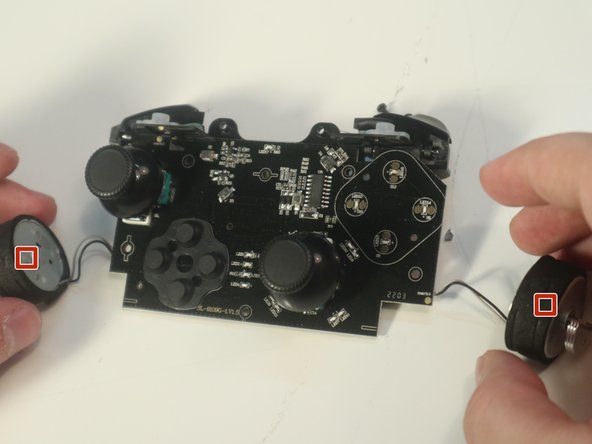
  5. GameSir T4 Pro Joystick Replacement, Joystick: Schritt 5, Bild 1 von 2 GameSir T4 Pro Joystick Replacement, Joystick: Schritt 5, Bild 2 von 2
    • Disconnect the rumblers from the motherboard

    • Be careful not to pull the wires while disconnecting rumbler

    Frag FixBot

    Kommentar hinzufügen

  6. GameSir T4 Pro Joystick Replacement: Schritt 6, Bild 1 von 1
    • Using the screwdriver, remove the 5 mm screws from the motherboard

    Frag FixBot

    Kommentar hinzufügen

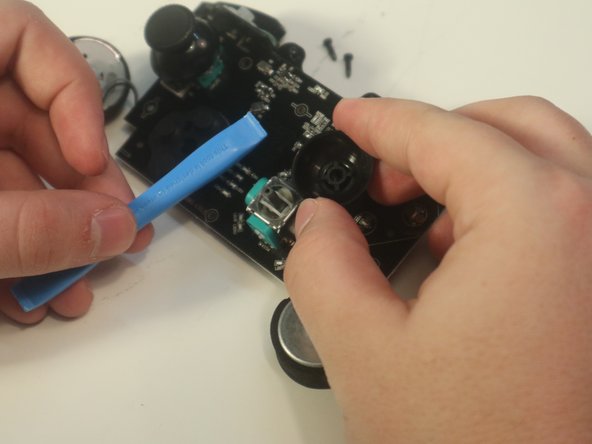
  7. GameSir T4 Pro Joystick Replacement: Schritt 7, Bild 1 von 2 GameSir T4 Pro Joystick Replacement: Schritt 7, Bild 2 von 2
    • Using the wedge tool, pop the joystick out

    Frag FixBot

    Kommentar hinzufügen

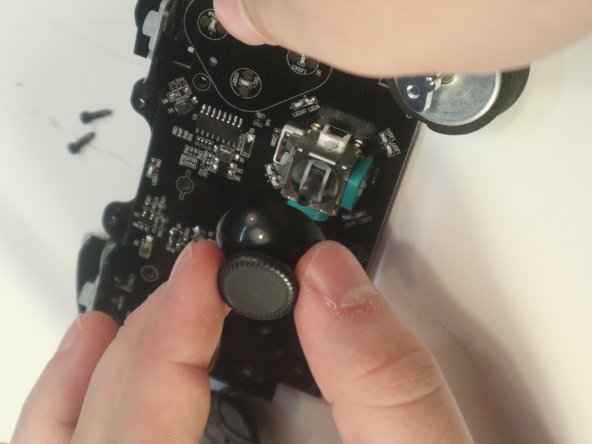
  8. GameSir T4 Pro Joystick Replacement: Schritt 8, Bild 1 von 2 GameSir T4 Pro Joystick Replacement: Schritt 8, Bild 2 von 2
    • Make sure the square of the joystick matches the square of the pad and pop it in place.

    Frag FixBot

    Kommentar hinzufügen

Abschluss

To reassemble your device, follow these instructions in reverse order.

Rückgängig: Ich habe diese Anleitung nicht absolviert.

3 weitere Personen haben diese Anleitung absolviert.

6 Kommentare zur Anleitung

I bought ps4 joysticks for the repair, but ps4 joysticks seems larger so it's stuck

Mohamed NACERI - Antwort Teilen

PlayStation4 stick is not compatible with GameSir T4 Pro. The stick for the Nintendo Switch PRO controller does not interfere, but this also requires processing for installation.

NAKIRI - Antwort Teilen

It appears that you will need to remove the light diffuser(white tubular plastic sleeve) from the case to make the parts fit.

NAKIRI - Antwort Teilen

Los stick del control de ps4 no son compatibles no entiendo por qué está esta quia de reparación si es falsa compre los stick de ps4 y no fueron compatibles tuve que modificar el control con un dremel muy delicadamente, ya que los stick de ps4 son ligeramente mas anchos y se atascan al girar se tiene que comer la carcasa del mando unos 2mm en cada agujero donde van los stick asi que no sigan las recomendaciones de esta guia al menos que tengan pensado modificar su control

Familia Play - Antwort Teilen

On a real note. Has anyone found any thumb covers that fit out of the box without mods? The default T4 pro ones seem smaller than both PS4 and Xbox 360 so far that I've checked.

Jordan Rodriguez - Antwort Teilen

Kommentar hinzufügen

Seitenaufrufe:

Letzte 24 Stunden: 12

Letzte 7 Tage: 43

Letzte 30 Tage: 185

Insgesamt: 8,712