Zum Hauptinhalt wechseln
Gemeinsam reparieren - Jetzt registrieren

GameStop GS3 GameCube Controller Motherboard Replacement

Was du brauchst

  1. GameStop GS3 GameCube Controller Motherboard Replacement, Motherboard: Schritt 1, Bild 1 von 2 GameStop GS3 GameCube Controller Motherboard Replacement, Motherboard: Schritt 1, Bild 2 von 2
    • Open the controller by unscrewing the screws located on the back panel

    • Separate the two halves of the controller.

    Frag FixBot

    Kommentar hinzufügen

  2. GameStop GS3 GameCube Controller Motherboard Replacement: Schritt 2, Bild 1 von 3 GameStop GS3 GameCube Controller Motherboard Replacement: Schritt 2, Bild 2 von 3 GameStop GS3 GameCube Controller Motherboard Replacement: Schritt 2, Bild 3 von 3
    • Remove the rumble-pack by unscrewing the screws located on on either side.

    • Remove the rumble pack to fully separate the two halves of the controller

    Frag FixBot

    Kommentar hinzufügen

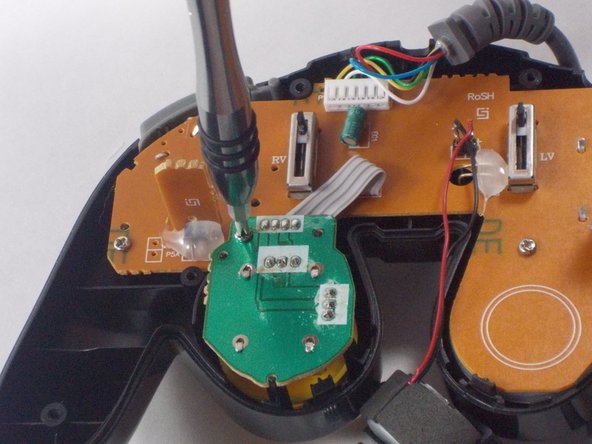
  3. GameStop GS3 GameCube Controller Motherboard Replacement: Schritt 3, Bild 1 von 3 GameStop GS3 GameCube Controller Motherboard Replacement: Schritt 3, Bild 2 von 3 GameStop GS3 GameCube Controller Motherboard Replacement: Schritt 3, Bild 3 von 3
    • Disconnect the motherboard from the front half of the controller by unscrewing the small screws around its perimeter.

    • The motherboard should separate and lift right out from the front half.

    Frag FixBot

    Kommentar hinzufügen

Abschluss

To reassemble your device, follow these instructions in reverse order.

Rückgängig: Ich habe diese Anleitung nicht absolviert.

Team

UMass Dartmouth, Team 3-5, Isaacson Fall 2016 Mitglied von UMass Dartmouth, Team 3-5, Isaacson Fall 2016

UMASSD-ISAACSON-F16S3G5

3 Mitglieder

10 Anleitungen geschrieben

0 Kommentare zur Anleitung

Kommentar hinzufügen

Seitenaufrufe:

Letzte 24 Stunden: 2

Letzte 7 Tage: 11

Letzte 30 Tage: 50

Insgesamt: 1,024