Zum Hauptinhalt wechseln
Gemeinsam reparieren - Jetzt registrieren

HP Pavilion g4-1117dx Speaker Replacement

Was du brauchst

  1. HP Pavilion g4-1117dx Speaker Replacement, Battery: Schritt 1, Bild 1 von 1
    • Slide pill shaped tab to the other side of the channel.

    Frag FixBot
    • Remove battery while keeping the tab to the side.

    Frag FixBot
  2. HP Pavilion g4-1117dx Speaker Replacement, L-Shaped Back Panel: Schritt 3, Bild 1 von 1
    • Unscrew the two screws JIS #0 located on opposites sides of the panel.

    • Screws are attached to the panel and will not fully come out.

    Frag FixBot
  3. HP Pavilion g4-1117dx Speaker Replacement: Schritt 4, Bild 1 von 1
    • Carefully pry off the L-shaped panel.

    Frag FixBot
  4. HP Pavilion g4-1117dx Speaker Replacement, Hard Drive: Schritt 5, Bild 1 von 1
    • Pull out and unplug the tab on the right hand side.

    Frag FixBot
  5. HP Pavilion g4-1117dx Speaker Replacement, Larger Back Panel: Schritt 6, Bild 1 von 1
    • Unscrew all nine 6.0mm JIS #0 screws located on the border of the back panel.

    Frag FixBot
  6. HP Pavilion g4-1117dx Speaker Replacement: Schritt 7, Bild 1 von 1
    • Remove 3 screws located where the battery previously was.

    Frag FixBot
  7. HP Pavilion g4-1117dx Speaker Replacement: Schritt 8, Bild 1 von 2 HP Pavilion g4-1117dx Speaker Replacement: Schritt 8, Bild 2 von 2
    • Remove 6 screws located under the spot where the smaller L-shaped panel was located.

    Frag FixBot
  8. HP Pavilion g4-1117dx Speaker Replacement: Schritt 9, Bild 1 von 1
    • Slowly pry off the keyboard from the back panel.

    • Between the back panel and the keyboard there are two ribbon wires.

    • Remove slowly to not break the back panel. If it does not come off easily, check to see if all screws are removed.

    Frag FixBot
  9. HP Pavilion g4-1117dx Speaker Replacement: Schritt 10, Bild 1 von 1
    • Unplug wires connecting back panel to keyboard.

    Frag FixBot
  10. HP Pavilion g4-1117dx Speaker Replacement, Speaker: Schritt 11, Bild 1 von 2 HP Pavilion g4-1117dx Speaker Replacement, Speaker: Schritt 11, Bild 2 von 2
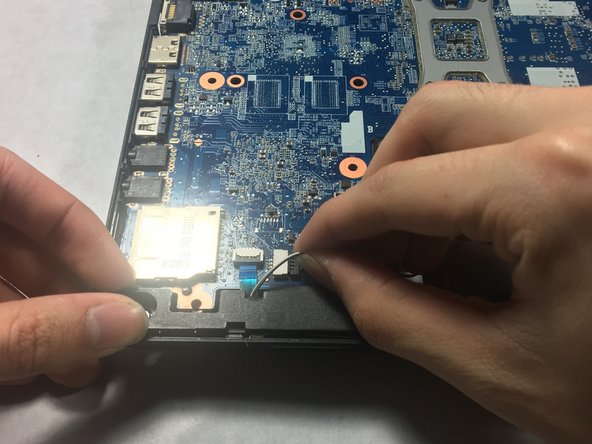
    • Unplug the red and white wires.

    Frag FixBot
  11. HP Pavilion g4-1117dx Speaker Replacement: Schritt 12, Bild 1 von 1
    • Remove the speakers.

    Frag FixBot
Abschluss

To reassemble your device, follow these instructions in reverse order.

Team

UMass Dartmouth, Team S2-G7, Simcock Spring 2018 Mitglied von UMass Dartmouth, Team S2-G7, Simcock Spring 2018

UMASSD-SIMCOCK-S18S2G7

4 Mitglieder

10 Anleitungen geschrieben

0 Kommentare zur Anleitung

Kommentar hinzufügen

Seitenaufrufe:

Letzte 24 Stunden: 1

Letzte 7 Tage: 8

Letzte 30 Tage: 41

Insgesamt: 908