Zum Hauptinhalt wechseln
Gemeinsam reparieren - Jetzt registrieren

HP iPAQ HW6515 SIM Card Replacement

    1. HP iPAQ HW6515 SIM Card Replacement, Battery: Schritt 1, Bild 1 von 3 HP iPAQ HW6515 SIM Card Replacement, Battery: Schritt 1, Bild 2 von 3 HP iPAQ HW6515 SIM Card Replacement, Battery: Schritt 1, Bild 3 von 3
      • Flip the HP iPAQ HW6515 over with the screen facing down.

      • Take the back cover off by pressing on the small silver button while pulling back then up on the case.

      • Place the back of the case aside for now.

      Frag FixBot

      Kommentar hinzufügen

    2. HP iPAQ HW6515 SIM Card Replacement: Schritt 2, Bild 1 von 1
      • Remove the battery by pulling up on the black tab.

      Frag FixBot

      Kommentar hinzufügen

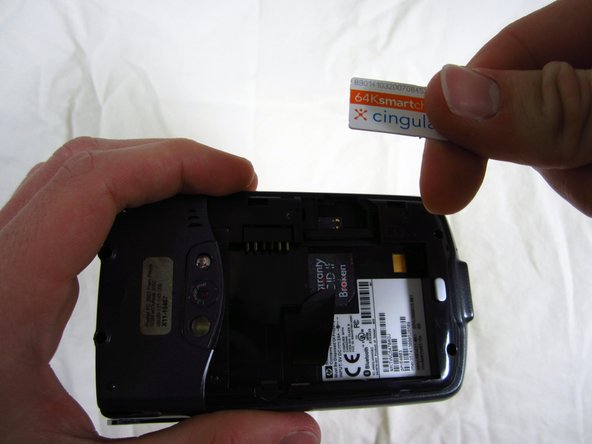
    1. HP iPAQ HW6515 SIM Card Replacement, SIM Card: Schritt 3, Bild 1 von 2 HP iPAQ HW6515 SIM Card Replacement, SIM Card: Schritt 3, Bild 2 von 2
      • Place finger on top of SIM card and slide it to the left.

      Frag FixBot

      Kommentar hinzufügen

Abschluss

To reassemble your device, follow these instructions in reverse order.

Rückgängig: Ich habe diese Anleitung nicht absolviert.

Eine weitere Person hat diese Anleitung absolviert.

Team

Cal Poly, Team 15-17, Forte Spring 2012 Mitglied von Cal Poly, Team 15-17, Forte Spring 2012

CPSU-FORTE-S12S15G17

4 Mitglieder

60 Anleitungen geschrieben

0 Kommentare zur Anleitung

Kommentar hinzufügen

Seitenaufrufe:

Letzte 24 Stunden: 19

Letzte 7 Tage: 37

Letzte 30 Tage: 61

Insgesamt: 1,800