Zum Hauptinhalt wechseln
Gemeinsam reparieren - Jetzt registrieren

LG VX5200 Keypad Replacement

Was du brauchst

  1. LG VX5200 Keypad Replacement, Battery: Schritt 1, Bild 1 von 2 LG VX5200 Keypad Replacement, Battery: Schritt 1, Bild 2 von 2
    • Turn the phone on its back.

    Frag FixBot
  2. LG VX5200 Keypad Replacement: Schritt 2, Bild 1 von 2 LG VX5200 Keypad Replacement: Schritt 2, Bild 2 von 2
    • Orient the phone as shown.

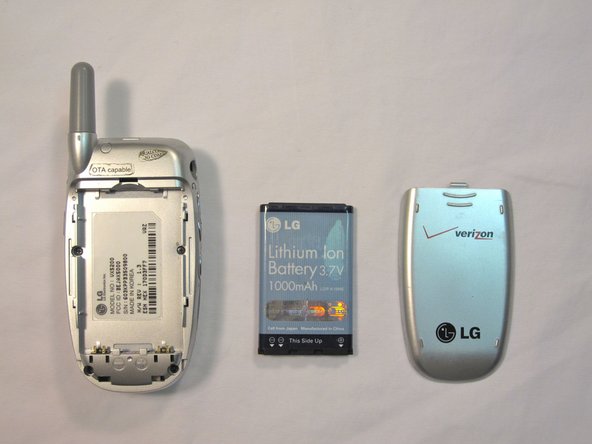
    • Remove the battery cover by pushing upward with your thumb.

    Frag FixBot
  3. LG VX5200 Keypad Replacement: Schritt 3, Bild 1 von 2 LG VX5200 Keypad Replacement: Schritt 3, Bild 2 von 2
    • Place your fingernail at the top of the battery and pry the battery out towards you.

    Frag FixBot
  4. LG VX5200 Keypad Replacement, LG VX5200 Rear Body Panel Disassembly: Schritt 4, Bild 1 von 1
    • Orient the phone as shown with the battery already removed.

    Frag FixBot
  5. LG VX5200 Keypad Replacement: Schritt 5, Bild 1 von 3 LG VX5200 Keypad Replacement: Schritt 5, Bild 2 von 3 LG VX5200 Keypad Replacement: Schritt 5, Bild 3 von 3
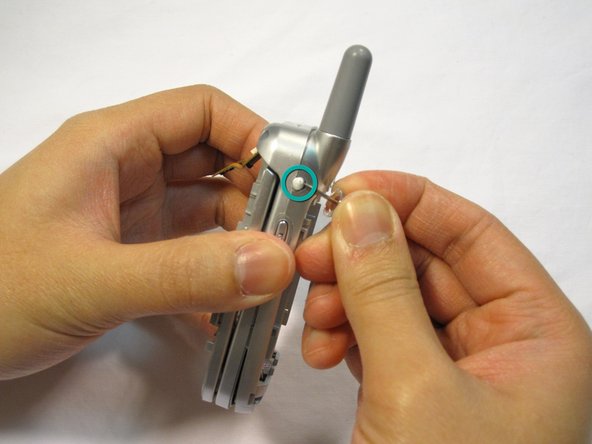
    • Remove the 2 plastic plugs located on the side and upper quadrant of the rear body panel by using the push-pin and lifting outwards.

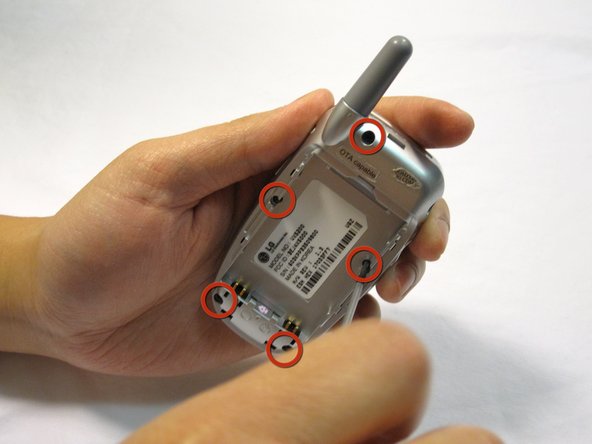
    • Use a Phillips #00 screwdriver to remove the 5 screws as shown here.

    Frag FixBot
  6. LG VX5200 Keypad Replacement: Schritt 6, Bild 1 von 3 LG VX5200 Keypad Replacement: Schritt 6, Bild 2 von 3 LG VX5200 Keypad Replacement: Schritt 6, Bild 3 von 3
    • Place an iPod opener tool in the seam above the antenna.

    • Run the tool around the perimeter of the entire phone.

    Frag FixBot
  7. LG VX5200 Keypad Replacement: Schritt 7, Bild 1 von 1
    • Check to see that your device looks like the attached photo.

    Frag FixBot
  8. LG VX5200 Keypad Replacement, main board: Schritt 8, Bild 1 von 3 LG VX5200 Keypad Replacement, main board: Schritt 8, Bild 2 von 3 LG VX5200 Keypad Replacement, main board: Schritt 8, Bild 3 von 3
    • Locate the tabs that hold the logic board in place.

    • Pull the outer frame of the phone outwards to release the board from the tabs.

    Frag FixBot
  9. LG VX5200 Keypad Replacement: Schritt 9, Bild 1 von 3 LG VX5200 Keypad Replacement: Schritt 9, Bild 2 von 3 LG VX5200 Keypad Replacement: Schritt 9, Bild 3 von 3
    • Locate the copper connection (orange-colored) on the back of the board.

    • Pry the connector free from the board with your fingernail.

    Frag FixBot
  10. LG VX5200 Keypad Replacement: Schritt 10, Bild 1 von 1
    • Check to see that your device looks like the image shown.

    • Note: The image is shown with the LCD screen removed. This is not necessary for logic board removal.

    Frag FixBot
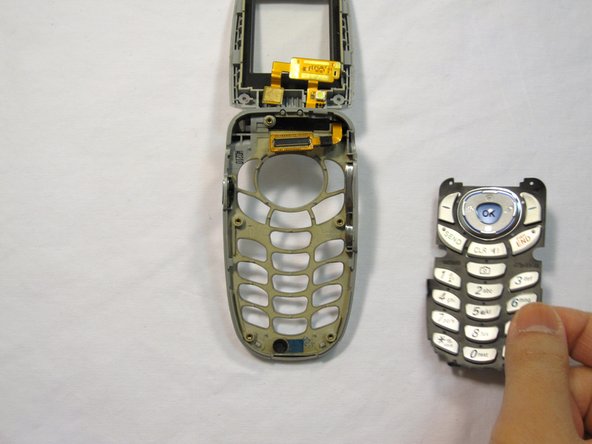
  11. LG VX5200 Keypad Replacement, Keypad: Schritt 11, Bild 1 von 3 LG VX5200 Keypad Replacement, Keypad: Schritt 11, Bild 2 von 3 LG VX5200 Keypad Replacement, Keypad: Schritt 11, Bild 3 von 3
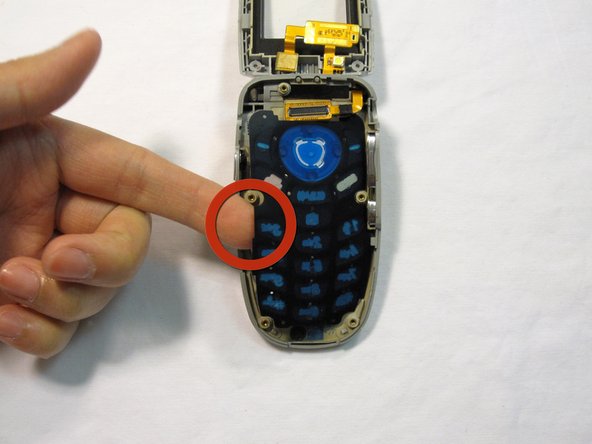
    • Use your finger to lift up the keypad.

    Frag FixBot
  12. LG VX5200 Keypad Replacement: Schritt 12, Bild 1 von 1
    • Check to see that your device looks like the image shown.

    • Do not let the buttons fall out of the side casing of the phone!

    • Note: The image is shown with the LCD screen removed. This is not necessary for keypad repair.

    Frag FixBot
Abschluss

To reassemble your device, follow these instructions in reverse order.

Eine weitere Person hat diese Anleitung absolviert.

Team

Cal Poly, Team 4-13, Forte Winter 2010 Mitglied von Cal Poly, Team 4-13, Forte Winter 2010

CPSU-FORTE-W10S4G13

5 Mitglieder

17 Anleitungen geschrieben

0 Kommentare zur Anleitung

Kommentar hinzufügen

Seitenaufrufe:

Letzte 24 Stunden: 0

Letzte 7 Tage: 2

Letzte 30 Tage: 51

Insgesamt: 2,175