Einleitung
In this guide you will be removing the back panel from the rest of the phone.
Was du brauchst
-
-
Place the phone face down on the table.
-
Pull down the tab below the battery with your fingernail or an opening tool.
-
Lift the battery out.
-
-
-
Locate the five rubber covers on the back panel of the phone.
-
Use a metal probe to remove each rubber cover and expose the screws underneath.
-
-
-
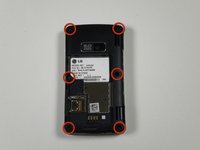
Locate the six 2.5-millimeter Phillips #00 screws on the back panel.
-
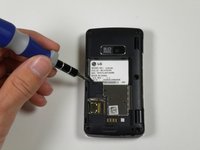
Remove all six screws with a Phillips #00 screwdriver.
-
-
-
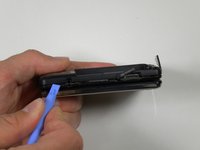
Locate the seam around the edge of the phone.
-
Insert a plastic opening tool into the seam and gently pry to release the tabs.
-
Work around the phone until all tabs are released.
-
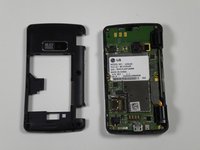
Remove the back panel.
-




To reassemble your device, follow these instructions in reverse order.
Rückgängig: Ich habe diese Anleitung nicht absolviert.
2 weitere Personen haben diese Anleitung absolviert.



Team

Cal Poly, Team 16-55, Forte Fall 2012 Mitglied von Cal Poly, Team 16-55, Forte Fall 2012
CPSU-FORTE-F12S16G55
5 Mitglieder
14 Anleitungen geschrieben
