Zum Hauptinhalt wechseln
Gemeinsam reparieren - Jetzt registrieren

Mad Catz Street Fighter IV FightPad Front Case Replacement

Was du brauchst

  1. Mad Catz Street Fighter IV FightPad Front Case Replacement, Rear and Side Case: Schritt 1, Bild 1 von 1
    In diesem Schritt verwendetes Werkzeug:
    Tweezers
    $4.99
    • Use tweezers to completely remove the sticker from the rear of controller.

    Frag FixBot
  2. Mad Catz Street Fighter IV FightPad Front Case Replacement: Schritt 2, Bild 1 von 1
    • Find the seven 8.3 mm Phillips screws on the rear of the controller and remove them.

    Frag FixBot
  3. Mad Catz Street Fighter IV FightPad Front Case Replacement: Schritt 3, Bild 1 von 2 Mad Catz Street Fighter IV FightPad Front Case Replacement: Schritt 3, Bild 2 von 2
    • Use a plastic opening tool to separate the rear and front casing by inserting it in-between the two cases.

    • Use the plastic opening tool to pry the two cases apart.

    Frag FixBot
  4. Mad Catz Street Fighter IV FightPad Front Case Replacement: Schritt 4, Bild 1 von 2 Mad Catz Street Fighter IV FightPad Front Case Replacement: Schritt 4, Bild 2 von 2
    • Remove the two rubber side grips.

    Frag FixBot
  5. Mad Catz Street Fighter IV FightPad Front Case Replacement, RS-DP-LS Switch: Schritt 5, Bild 1 von 2 Mad Catz Street Fighter IV FightPad Front Case Replacement, RS-DP-LS Switch: Schritt 5, Bild 2 von 2
    • Locate RS-DP-LS switch.

    • Pull upwards on the switch to remove it.

    Frag FixBot
  6. Mad Catz Street Fighter IV FightPad Front Case Replacement, Circuit Board: Schritt 6, Bild 1 von 1
    • Locate the four 8.3 mm Phillips screws on the circuit board and remove them.

    Frag FixBot
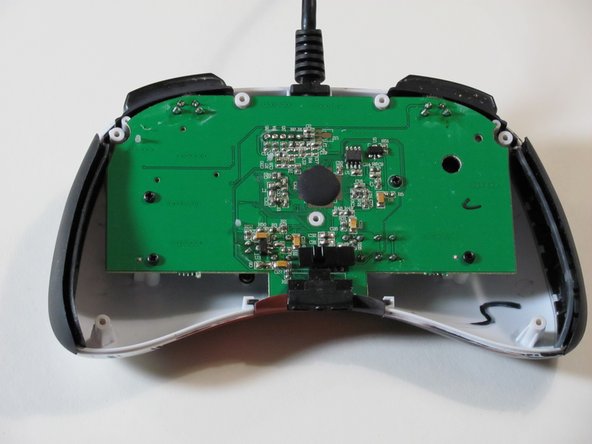
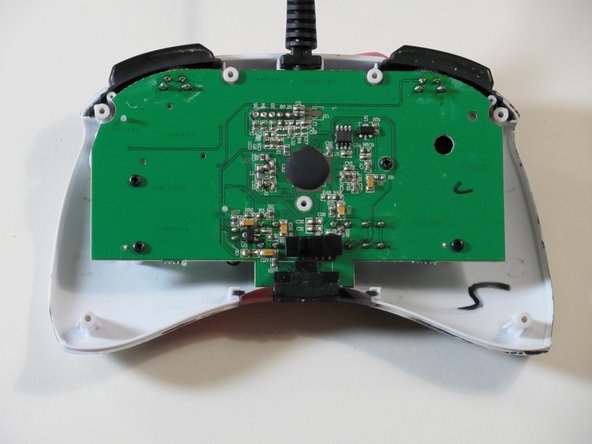
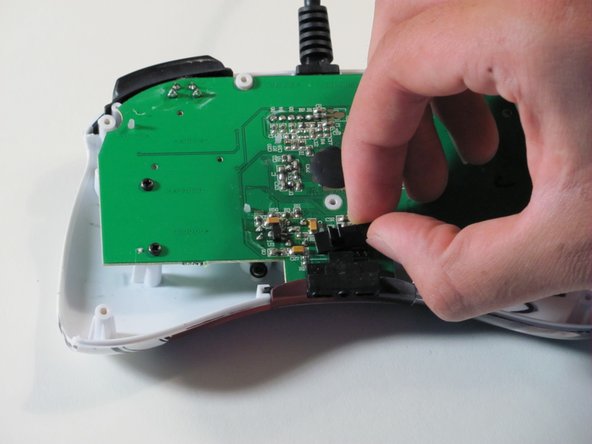
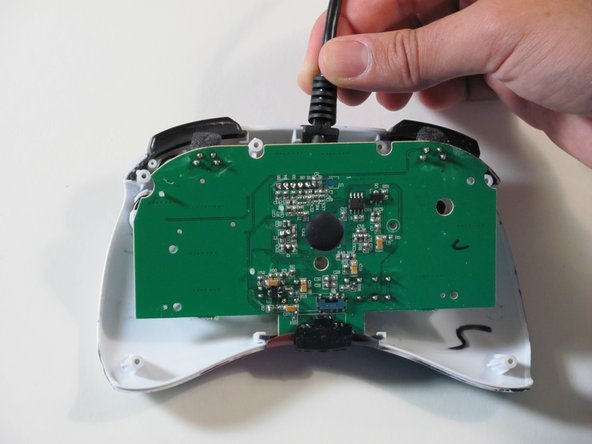
  7. Mad Catz Street Fighter IV FightPad Front Case Replacement: Schritt 7, Bild 1 von 3 Mad Catz Street Fighter IV FightPad Front Case Replacement: Schritt 7, Bild 2 von 3 Mad Catz Street Fighter IV FightPad Front Case Replacement: Schritt 7, Bild 3 von 3
    • Hold the controller cable at the area just before it meets the controller and slowly lift upwards to slide it out of its plastic slot and remove the circuit board.

    • Be careful with the wires connected to the circuit board itself as they are thin and delicate.

    • When reassembling the controller, make sure that the bottom plastic piece is fully inserted into its slot before replacing the circuit board.

    Frag FixBot
  8. Mad Catz Street Fighter IV FightPad Front Case Replacement, Buttons: Schritt 8, Bild 1 von 2 Mad Catz Street Fighter IV FightPad Front Case Replacement, Buttons: Schritt 8, Bild 2 von 2
    In diesem Schritt verwendetes Werkzeug:
    Tweezers
    $4.99
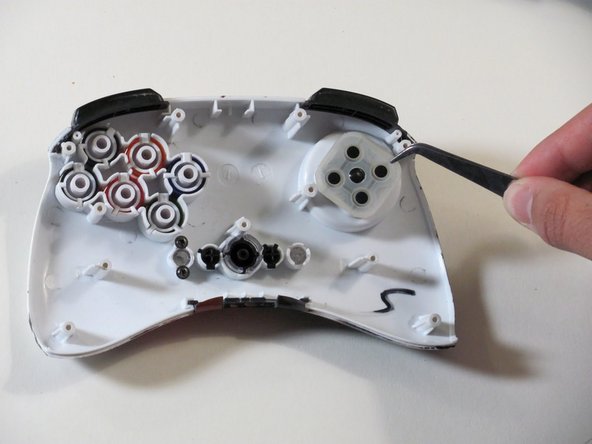
    • Remove the six buttons one by one by gripping the back of each one and pushing on them from the front.

    • Use tweezers to remove the rubber part of the directional pad before you try to remove the shoulder buttons.

    • When reinserting the buttons make sure they are in the correct place and oriented correctly.

    Frag FixBot
  9. Mad Catz Street Fighter IV FightPad Front Case Replacement: Schritt 9, Bild 1 von 1
    • Remove the left and right shoulder buttons by sliding them out of their respective slots.

    Frag FixBot
  10. Mad Catz Street Fighter IV FightPad Front Case Replacement, Front Case: Schritt 10, Bild 1 von 2 Mad Catz Street Fighter IV FightPad Front Case Replacement, Front Case: Schritt 10, Bild 2 von 2
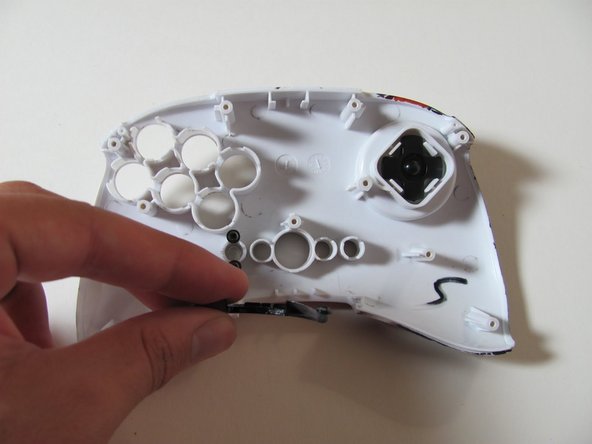
    • Pull the plastic piece out from the bottom of the controller.

    Frag FixBot
Abschluss

To reassemble your device, follow these instructions in reverse order.

Eine weitere Person hat diese Anleitung absolviert.

Eric

Mitglied seit: 09/26/12

121 Reputation

3 Anleitungen geschrieben

Team

Cal Poly, Team 1-7, Propen Fall 2012 Mitglied von Cal Poly, Team 1-7, Propen Fall 2012

CPSU-PROPEN-F12S1G7

4 Mitglieder

14 Anleitungen geschrieben

0 Kommentare zur Anleitung

Kommentar hinzufügen

Seitenaufrufe:

Letzte 24 Stunden: 1

Letzte 7 Tage: 8

Letzte 30 Tage: 59

Insgesamt: 1,861