Einleitung
This guide will demonstrate how to remove and replace your Nabi 2's battery. The battery powers your device, and over time your battery may lose its ability to function correctly. There are many reasons to perform this repair, but the most common causes are the device not turning on, and the device not holding a charge. This repair involves the use of a soldering iron; be very careful not to touch the hot end of the iron while it is plugged in. It is recommended to document the order of the battery wires before you detach them so that you can attach the new battery's wires in the correct order.
Was du brauchst
-
-
With a PH00 screwdriver, remove the four outermost screws from the back of the tablet.
-
-
-
-
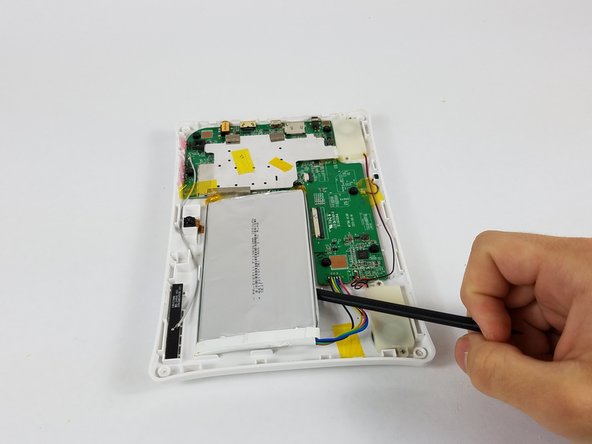
Carefully, insert a plastic opening tool into the seam of the device and begin gently prying the two plastic pieces apart.
-
Work the tool all the way around the device. Small plastic clips should release. If they do not, gently apply outwards pressure until the clips give.
-
-
-
Desolder the battery connection and remove the battery completely
-
Note the color order for future replacemement
-




To reassemble your device, follow these instructions in reverse order.
To reassemble your device, follow these instructions in reverse order.
Rückgängig: Ich habe diese Anleitung nicht absolviert.
4 weitere Personen haben diese Anleitung absolviert.


Team

USF Tampa, Team 4-3, Lacy Spring 2016 Mitglied von USF Tampa, Team 4-3, Lacy Spring 2016
USFT-LACY-S16S4G3
4 Mitglieder
14 Anleitungen geschrieben
3 Kommentare
Was hoping you could provide the replacement part number for this battery.
It shows on the picture: 1ICP6/68/112
Zoltan -
Hi,
where i can buy this replacement battery?
Thanks
