Zum Hauptinhalt wechseln
Gemeinsam reparieren - Jetzt registrieren

Nabi Big Tab HD24 Speakers Replacement

Was du brauchst

  1. Nabi Big Tab HD24 Speakers Replacement, Back Assembly: Schritt 1, Bild 1 von 1
    • Ensure that the tablet is facing you with the screen on the table.

    • Locate the four red rubber stops at the corners.

    Frag FixBot

    Kommentar hinzufügen

  2. Nabi Big Tab HD24 Speakers Replacement: Schritt 2, Bild 1 von 1
    • Use your fingers to carefully peel them off the device to reveal the screws underneath.

    Frag FixBot

    Kommentar hinzufügen

  3. Nabi Big Tab HD24 Speakers Replacement: Schritt 3, Bild 1 von 1
    • Use a Phillips #1 screwdriver to remove the 9.5 mm screw in each of the four corners.

    Frag FixBot

    Kommentar hinzufügen

  4. Nabi Big Tab HD24 Speakers Replacement: Schritt 4, Bild 1 von 1
    • Flip the tablet over such that the screen is facing upwards.

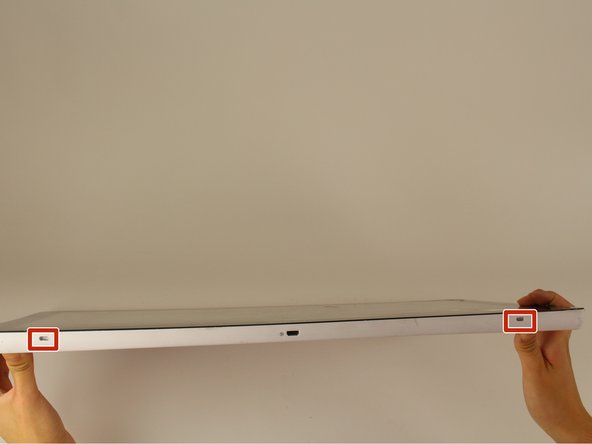
    • Locate the the 4 small openings on the sides of the tablet.

    • There should be 2 on the bottom of the tablet, 1 on each side of the tablet viewing it from the front as if you were using it.

    • Do not confuse the openings with the charging port or the USB ports. The openings will be labelled with an icon of a small fan, the Nabi logo.

    Frag FixBot

    Kommentar hinzufügen

  5. Nabi Big Tab HD24 Speakers Replacement: Schritt 5, Bild 1 von 1
    • Insert a metal spudger into one of the openings and carefully pop the device open by applying a steady downward force.

    • Repeat for the other three openings.

    Frag FixBot

    Kommentar hinzufügen

  6. Nabi Big Tab HD24 Speakers Replacement: Schritt 6, Bild 1 von 2 Nabi Big Tab HD24 Speakers Replacement: Schritt 6, Bild 2 von 2
    • Flip the device over so that the back assembly is facing you.

    • Use a plastic opening tool to carefully pry open the device from its hinges.

    • Take care when opening the device as there are cables running internally that are connected to both the front and the back assemblies.

    Frag FixBot

    Kommentar hinzufügen

  7. Nabi Big Tab HD24 Speakers Replacement: Schritt 7, Bild 1 von 2 Nabi Big Tab HD24 Speakers Replacement: Schritt 7, Bild 2 von 2
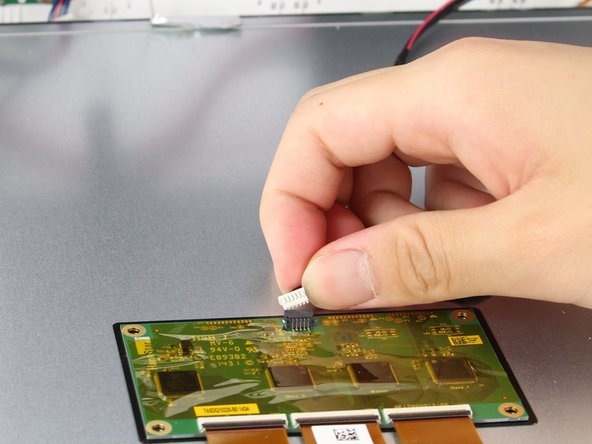
    • Locate the white port that connects the back panel to the circuit board on the back of the display.

    • Carefully pull the plastic connector straight out.

    Frag FixBot

    Kommentar hinzufügen

  8. Nabi Big Tab HD24 Speakers Replacement: Schritt 8, Bild 1 von 1
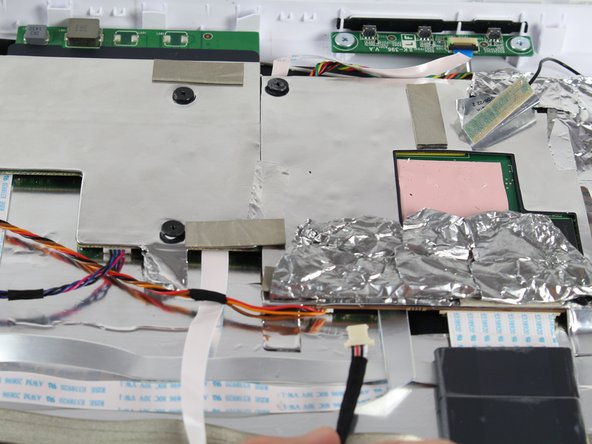
    • Be careful of the aluminum foil tape, as it can easily rip.

    • Carefully lift up the aluminum foil tape with your fingers so that the ribbon connector reveals itself.

    • Do not try to pull the ribbon cables off the screen as there is a plastic piece surrounding the ribbon cables glued onto the metal display.

    Frag FixBot

    Kommentar hinzufügen

  9. Nabi Big Tab HD24 Speakers Replacement: Schritt 9, Bild 1 von 1
    • Firmly press the two switches located on the sides of the connector and disconnect the connector from its connections.

    • Leave the connector disconnected but still intact with the metal display.

    Frag FixBot

    Kommentar hinzufügen

  10. Nabi Big Tab HD24 Speakers Replacement: Schritt 10, Bild 1 von 1
    • Use a plastic opening tool and carefully push it underneath the grey plastic case surrounding the ribbon cable.

    • Apply a downward force to carefully peel the grey plastic off of the metal display.

    Frag FixBot

    Kommentar hinzufügen

  11. Nabi Big Tab HD24 Speakers Replacement: Schritt 11, Bild 1 von 1
    • Locate the two cables running on both sides of the device found at the bottom side of the screen.

    Frag FixBot

    Kommentar hinzufügen

  12. Nabi Big Tab HD24 Speakers Replacement: Schritt 12, Bild 1 von 2 Nabi Big Tab HD24 Speakers Replacement: Schritt 12, Bild 2 von 2
    • Carefully grab both sides of the white plastic piece with your fingers and gently pull directly upward.

    • Do not pull from the red and black cable as it is not very sturdy and may come undone from the connector.

    Frag FixBot

    Kommentar hinzufügen

  13. Nabi Big Tab HD24 Speakers Replacement, Speakers: Schritt 13, Bild 1 von 1
    • Locate the faulty speaker. The two speakers are located in the upper corners of the back panel.

    Frag FixBot

    Kommentar hinzufügen

  14. Nabi Big Tab HD24 Speakers Replacement: Schritt 14, Bild 1 von 1
    • Lift the speakers upwards, out of its holding place, with your fingers.

    • Lift from the cross shaped white plastic surrounded by the speakers at its edges.

    Frag FixBot

    Kommentar hinzufügen

  15. Nabi Big Tab HD24 Speakers Replacement: Schritt 15, Bild 1 von 1
    • Remove the black tape taping the two wire bundles together.

    • Follow the wires attached to the speakers to the motherboard.

    • Gently lift up the aluminum tape so you can see the white connector connecting the wires to the motherboard.

    Frag FixBot

    Kommentar hinzufügen

  16. Nabi Big Tab HD24 Speakers Replacement: Schritt 16, Bild 1 von 2 Nabi Big Tab HD24 Speakers Replacement: Schritt 16, Bild 2 von 2
    • Pull the wire bundle out of the motherboard with a light tug to disconnect the speakers.

    • Replace your broken speaker with the new ones.

    Frag FixBot

    Kommentar hinzufügen

Abschluss

To reassemble your device, follow these instructions in reverse order.

Rückgängig: Ich habe diese Anleitung nicht absolviert.

Team

Cal Poly, Team 4-1, Livingston Fall 2016 Mitglied von Cal Poly, Team 4-1, Livingston Fall 2016

CPSU-LIVINGSTON-F16S4G1

4 Mitglieder

14 Anleitungen geschrieben

0 Kommentare zur Anleitung

Kommentar hinzufügen

Seitenaufrufe:

Letzte 24 Stunden: 1

Letzte 7 Tage: 5

Letzte 30 Tage: 29

Insgesamt: 569