Was du brauchst
-
-
Drücke beim Herausdrehen der Schrauben während der ersten zwei Umdrehungen (mit dem höchsten Drehmoment) den Schraubendreher sehr fest nach unten, bis die Schrauben gelöst sind. Wenn du das nicht tust, können die Schraubenköpfe beschädigt werden und du hast du Riesenprobleme, sie zu entfernen.
-
Entferne die fünf Schrauben an der Unterseite der Kamera mit einem JIS #000 Schraubendreher.
-
-
-
Entferne die drei Schrauben unter der Batterieklappe und nimm die untere Abdeckung ab.
-
-
-
-
Ziehe die selbstklebende Lederabdeckung der Schrauben ab und entferne die beiden Schrauben darunter.
-
-
-
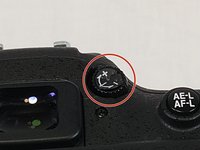
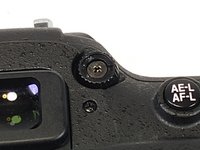
Entferne den Aufkleber für die Dioptrieneinstellung und die darunter befindliche Schraube.
-
-
-
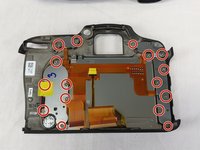
Löse dann die restlichen Schrauben, mit denen die Rückwand am LCD befestigt ist.
-
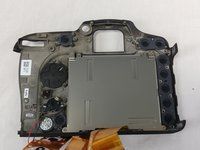
Nun kannst du einfach die Platte mit dem LCD entfernen.
-





Um dein Gerät wieder zusammenzubauen, befolge diese Anweisungen in umgekehrter Reihenfolge.
Rückgängig: Ich habe diese Anleitung nicht absolviert.
12 weitere Personen haben diese Anleitung absolviert.
Besonderer Dank geht an diese Übersetzer:innen:
100%


Diese Übersetzer:innen helfen uns, die Welt zu reparieren! Wie kann ich mithelfen?
Hier starten ›



Team

USF Tampa, Team S11-G6, Cheng Spring 2018 Mitglied von USF Tampa, Team S11-G6, Cheng Spring 2018
USFT-CHENG-S18S11G6
4 Mitglieder
6 Anleitungen geschrieben
9 Kommentare zur Anleitung
I DID IT! A couple notes: 1) You don’t need to disconnect the ribbon cables from the body. I’m new to fine electronics repair like this and I didn’t want to mess around with more cables than necessary. 2) My body doesn’t have a plastic cover over the LCD (probably why it broke…) and as such I had to reallllly pry it off. 3) Learn how to reconnect ribbon cables - I had no idea.
A couple of points. This is listed as a LCD display replacement. Says only said to buy tools… Need the LCD screen as well. No idea of cost or a link to buy same. Also, you do not show removing the screen and remounting. I appreciate all the instructions on screws, but do not feel this was complete. Thanks for your instructions to this point.
That’s very easy guide to understand. I hope to see a full guide for the Nikon D7200. thank you http://www.nikonbundle.com/nikon-d7200-b...
My replacement screen cost about £44 gbp pounds from China on Ebay. The main ribbon cable is released by flipping up the thin dark grey strip opposite the ribbon using a finger nail or plastic tool on the socket then you just gently pull the cable out, the thin cable is wee bit different, using a small screw driver or dentist tool just unclip and pull/push it down towards the thin ribbon cable then slide ribbon out. When all done clean the screen on the camera and fit a thin glass protector from JJC on ebay to give more protection.
