Zum Hauptinhalt wechseln
Gemeinsam reparieren - Jetzt registrieren

Nokero N400 Back Cover Replacement

Was du brauchst

  1. Nokero N400 Back Cover Replacement, Remove Battery Cover: Schritt 1, Bild 1 von 3 Nokero N400 Back Cover Replacement, Remove Battery Cover: Schritt 1, Bild 2 von 3 Nokero N400 Back Cover Replacement, Remove Battery Cover: Schritt 1, Bild 3 von 3
    • Press down firmly to remove the battery cover and display battery.

    • Then remove the battery.

    Frag FixBot

    Kommentar hinzufügen

  2. Nokero N400 Back Cover Replacement, Unscrew Back Cover: Schritt 2, Bild 1 von 2 Nokero N400 Back Cover Replacement, Unscrew Back Cover: Schritt 2, Bild 2 von 2
    • Remove the 7mm Phillips #1 screw.

    Frag FixBot

    Kommentar hinzufügen

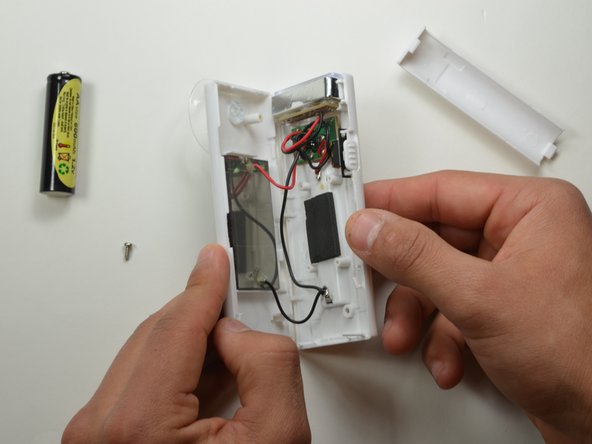
  3. Nokero N400 Back Cover Replacement, Pry Open Back Cover: Schritt 3, Bild 1 von 2 Nokero N400 Back Cover Replacement, Pry Open Back Cover: Schritt 3, Bild 2 von 2
    • Place the plastic opening tool in between the two plastic panels and slowly work your way around the device.

    • Unlatch the clips on the inside and pull device apart.

    • Some clips will break when forced open.

    Frag FixBot

    Kommentar hinzufügen

Abschluss

To reassemble your device, follow these instructions in reverse order.

Rückgängig: Ich habe diese Anleitung nicht absolviert.

Team

USF Tampa, Team 19-2, Blackwell Winter 2015 Mitglied von USF Tampa, Team 19-2, Blackwell Winter 2015

USFT-BLACKWELL-W15S19G2

4 Mitglieder

10 Anleitungen geschrieben

0 Kommentare zur Anleitung

Kommentar hinzufügen

Seitenaufrufe:

Letzte 24 Stunden: 1

Letzte 7 Tage: 16

Letzte 30 Tage: 60

Insgesamt: 443