Zum Hauptinhalt wechseln
Gemeinsam reparieren - Jetzt registrieren

PDP Afterglow Wired Xbox 360 Controller Cable Replacement

Was du brauchst

  1. PDP Afterglow Wired Xbox 360 Controller Cable Replacement, Case: Schritt 1, Bild 1 von 2 PDP Afterglow Wired Xbox 360 Controller Cable Replacement, Case: Schritt 1, Bild 2 von 2
    • Loosen the seven 11 mm Phillips #0 screws located on the back of the controller.

    Frag FixBot

    Kommentar hinzufügen

  2. PDP Afterglow Wired Xbox 360 Controller Cable Replacement: Schritt 2, Bild 1 von 1
    • Using a plastic opening tool, pry the back cover from the front.

    • The covers should separate without needing a plastic opening tool, but in some cases you may need to use it.

    Frag FixBot

    Kommentar hinzufügen

  3. PDP Afterglow Wired Xbox 360 Controller Cable Replacement: Schritt 3, Bild 1 von 1
    • Remove the top cover from the bottom and place next to each other.

    Frag FixBot

    Kommentar hinzufügen

  4. PDP Afterglow Wired Xbox 360 Controller Cable Replacement, Cable: Schritt 4, Bild 1 von 2 PDP Afterglow Wired Xbox 360 Controller Cable Replacement, Cable: Schritt 4, Bild 2 von 2
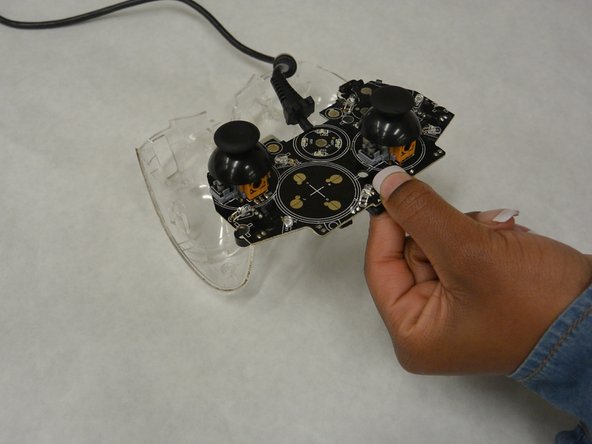
    • Remove the logic board by lifting up on the logic board and pulling out.

    Frag FixBot

    Kommentar hinzufügen

  5. PDP Afterglow Wired Xbox 360 Controller Cable Replacement: Schritt 5, Bild 1 von 1
    • The cable connects to the logic board with a white connector. Above the right joystick, there are four solder pins labeled GND, VCC, DM, and DP.

    Frag FixBot

    Kommentar hinzufügen

  6. PDP Afterglow Wired Xbox 360 Controller Cable Replacement: Schritt 6, Bild 1 von 1
    • The soldering iron is very hot and can harm you or the device if used incorrectly.

    • Desolder the four pins.

    Frag FixBot

    Kommentar hinzufügen

  7. PDP Afterglow Wired Xbox 360 Controller Cable Replacement: Schritt 7, Bild 1 von 1
    • Using your new cable, solder the white connector to the logic board. Be sure to have the cables facing towards the inside of the logic board.

    Frag FixBot

    Kommentar hinzufügen

Abschluss

To reassemble your device, follow these instructions in reverse order.

Rückgängig: Ich habe diese Anleitung nicht absolviert.

6 weitere Personen haben diese Anleitung absolviert.

Team

IUPUI, Team 3-1, Harley Fall 2015 Mitglied von IUPUI, Team 3-1, Harley Fall 2015

IUPUI-HARLEY-F15S3G1

4 Mitglieder

5 Anleitungen geschrieben

4 Kommentare zur Anleitung

where can I find a replacement cable to perform this precedure with?

Aaron English - Antwort Teilen

yes!! i would like to know too.. i have been searching for long time for that cable

sokratis162 - Antwort Teilen

Android cable

Wayne - Antwort Teilen

U can use a old Android cable

Wayne - Antwort Teilen

Kommentar hinzufügen

Seitenaufrufe:

Letzte 24 Stunden: 0

Letzte 7 Tage: 14

Letzte 30 Tage: 69

Insgesamt: 8,518