Zum Hauptinhalt wechseln
Gemeinsam reparieren - Jetzt registrieren

Power Mac G4 M5183 Logic Board Replacement

Was du brauchst

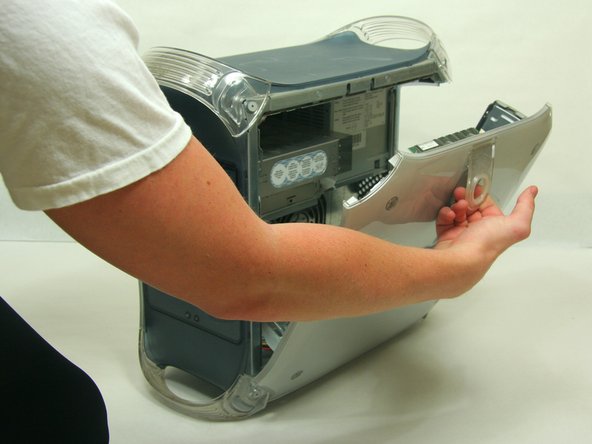
  1. Power Mac G4 M5183 Logic Board Replacement, Opening PowerMac G4 M5183 Case: Schritt 1, Bild 1 von 2 Power Mac G4 M5183 Logic Board Replacement, Opening PowerMac G4 M5183 Case: Schritt 1, Bild 2 von 2
    • Pull on outer latch.

    • Lower door until it is level with your work surface.

    • Before working on the computer make sure it is not plugged into a power supply, then touch a metal object. This discharges static electricity, which could damage the computer.

    Frag FixBot

    Kommentar hinzufügen

  2. Power Mac G4 M5183 Logic Board Replacement, Heat Sink: Schritt 2, Bild 1 von 2 Power Mac G4 M5183 Logic Board Replacement, Heat Sink: Schritt 2, Bild 2 von 2
    • Use the spudger to pry the clips horizontally off of the heat sink.

    • Fully remove the clips by lifting upwards.

    Frag FixBot

    Kommentar hinzufügen

  3. Power Mac G4 M5183 Logic Board Replacement: Schritt 3, Bild 1 von 1
    • Remove the heat sink by pulling upwards, off of the logic board.

    Frag FixBot

    Kommentar hinzufügen

  4. Power Mac G4 M5183 Logic Board Replacement, RAM: Schritt 4, Bild 1 von 2 Power Mac G4 M5183 Logic Board Replacement, RAM: Schritt 4, Bild 2 von 2
    • Locate the RAM modules.

    • Pull side tabs outward. The RAM will pop out of the housing.

    Frag FixBot

    Kommentar hinzufügen

  5. Power Mac G4 M5183 Logic Board Replacement, Graphics Card: Schritt 5, Bild 1 von 2 Power Mac G4 M5183 Logic Board Replacement, Graphics Card: Schritt 5, Bild 2 von 2
    • Remove the single screw with the Phillips #1 screwdriver.

    • Pull the graphics card up and out.

    Frag FixBot

    Kommentar hinzufügen

  6. Power Mac G4 M5183 Logic Board Replacement, Logic Board: Schritt 6, Bild 1 von 2 Power Mac G4 M5183 Logic Board Replacement, Logic Board: Schritt 6, Bild 2 von 2
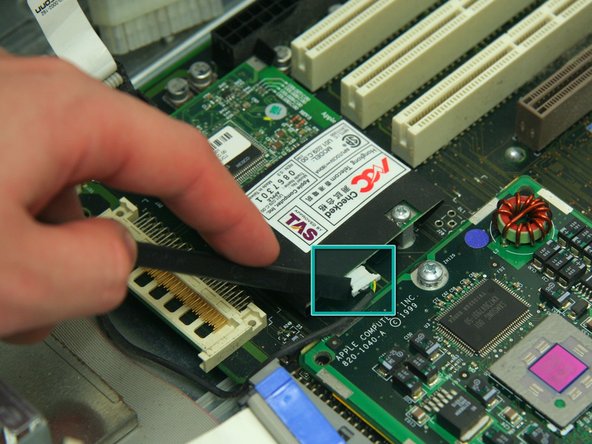
    • Remove the six indicated cables attached to the logic board.

    • Use the spudger to remove the modem cable as indicated.

    Frag FixBot

    Kommentar hinzufügen

  7. Power Mac G4 M5183 Logic Board Replacement: Schritt 7, Bild 1 von 2 Power Mac G4 M5183 Logic Board Replacement: Schritt 7, Bild 2 von 2
    • Unfasten 3 Phillips screws revealed beneath the heat sink on the CPU board.

    • Carefully remove the CPU board from the Mother Board.

    • Remove the barrell nut screws from the Mother Board which held the CPU board.

    • Unfasten 3 Phillips #1 screws on Mother Board as shown in illustration 1.

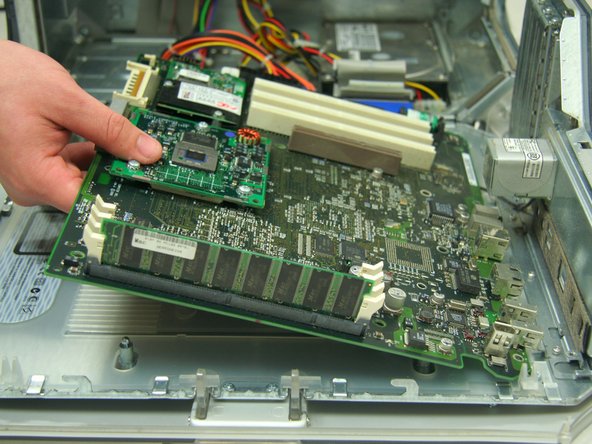
    • Slide the logic board about a quarter of an inch to free it from the three retaining pins.

    • Pull upwards and outwards to fully remove the logic board.

    Frag FixBot

    Kommentar hinzufügen

  8. Power Mac G4 M5183 Logic Board Replacement: Schritt 8, Bild 1 von 1
    • After removing the (3) #2 philips screws, remove the (4) 1/4" hex nuts, then slide as directed and remove board.

    Frag FixBot

    Kommentar hinzufügen

Ziellinie

Rückgängig: Ich habe diese Anleitung nicht absolviert.

15 weitere Personen haben diese Anleitung absolviert.

Team

Cal Poly, Team 13-24, Maness Winter 2010 Mitglied von Cal Poly, Team 13-24, Maness Winter 2010

CPSU-MANESS-W10S13G24

4 Mitglieder

37 Anleitungen geschrieben

3 Kommentare zur Anleitung

Chad O - Antwort Teilen

Are the "hex nuts" under the processor board? Could you provide a close up picture of the "nuts?"

D george - Antwort Teilen

So what is being replaced here? Wouldn’t one have to purchase a new logic board? Any info would be greatly appreciated!

Sandra Cai - Antwort Teilen

Kommentar hinzufügen

Seitenaufrufe:

Letzte 24 Stunden: 0

Letzte 7 Tage: 18

Letzte 30 Tage: 116

Insgesamt: 19,200