Einleitung
This guide will explain step-by-step how to replace the speaker in a Ring Video Doorbell Pro.
Was du brauchst
-
-
Start by using the star-shaped end of the included Ring screwdriver to take out the 5 mm screw on the bottom of the device.
-
-
-
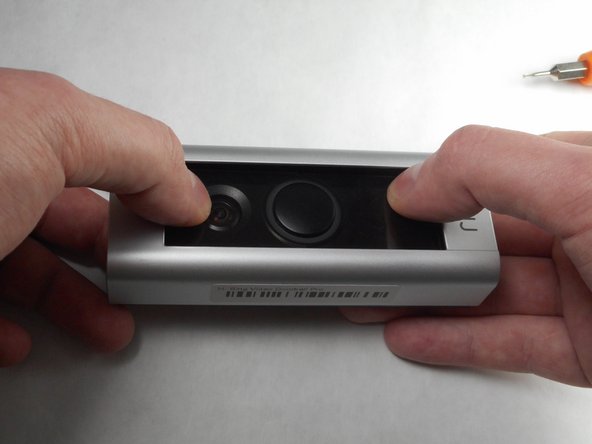
Use your thumbs to apply downward pressure on the glass part of the device while pulling the faceplate up and off of the device.
-
-
-
Using a PH-000 screwdriver, unscrew and set aside all four of these 5.25 mm screws.
-
-
-
-
Using a plastic pry tool, go along the edge of the device prying the device apart. While doing this, focus on the four clips, two of which are on either side of the device.
-



To reassemble your device, insert the new speaker and follow these instructions in reverse order.
To reassemble your device, insert the new speaker and follow these instructions in reverse order.
Rückgängig: Ich habe diese Anleitung nicht absolviert.
6 weitere Personen haben diese Anleitung absolviert.



Team

IUPUI, Team S7-G4, Baechle Fall 2017 Mitglied von IUPUI, Team S7-G4, Baechle Fall 2017
IUPUI-BAECHLE-F17S7G4
3 Mitglieder
5 Anleitungen geschrieben
8 Kommentare
Hi Jake. This looks brilliant - I would love to contact you directly as I have a further question about this. My member name is robinfeild, and my email is email is robinfeild@gmail.com.
Hope to hear from you!
Thanks
Robin
Anyone happen to know where you can purchase the replacement speaker from?
Where did you get a replacement speaker from?
I dismantled the speaker in mine having verified it was faulty by testing it with one from a standard Ring Doorbell, (It has the same connector but the housing is a different shape. Having cracked open the plastic housing of the speaker it has one of these inside (1w 8 Ohm Rectangular speaker 15*11*3.5mm) such as https://www.ebay.co.uk/itm/224485373996 a couple of drops of superglue and two dabs of solder, works like new.
