Zum Hauptinhalt wechseln
Gemeinsam reparieren - Jetzt registrieren

Sega Dreamcast Power Supply Replacement

Was du brauchst

  1. Sega Dreamcast Power Supply Replacement, Expansion Bay: Schritt 1, Bild 1 von 2 Sega Dreamcast Power Supply Replacement, Expansion Bay: Schritt 1, Bild 2 von 2
    • Verify that the console is disconnected from the AC outlet before you begin.

    • Flip the console over on its back.

    • Take note of your model number, in case replacement parts are needed.

    Frag FixBot

    Kommentar hinzufügen

  2. Sega Dreamcast Power Supply Replacement: Schritt 2, Bild 1 von 3 Sega Dreamcast Power Supply Replacement: Schritt 2, Bild 2 von 3 Sega Dreamcast Power Supply Replacement: Schritt 2, Bild 3 von 3
    • Remove the expansion bay by applying pressure to the small clip on the expansion bay while prying it away from the console.

    Frag FixBot

    Kommentar hinzufügen

  3. Sega Dreamcast Power Supply Replacement, Top Cover: Schritt 3, Bild 1 von 1
    • Locate and remove all four black 12mm Phillips #02 screws from the underside of the console.

    • Note: Remove the expansion bay to locate the fourth screw

    Frag FixBot

    Kommentar hinzufügen

  4. Sega Dreamcast Power Supply Replacement: Schritt 4, Bild 1 von 1
    • Internal components can be loose. Be careful that they do not fall out when removing the cover.

    • Turn the console right side up.

    • Remove the top cover by gently lifting the upper portion of the console.

    Frag FixBot

    Kommentar hinzufügen

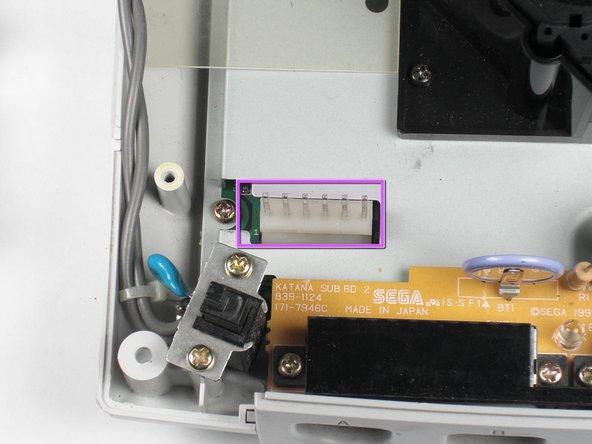
  5. Sega Dreamcast Power Supply Replacement, Power Supply: Schritt 5, Bild 1 von 2 Sega Dreamcast Power Supply Replacement, Power Supply: Schritt 5, Bild 2 von 2
    • Unplug the device from the outlet. If you have just powered off the system, allow a few minutes for the capacitors to discharge before you begin working.

    • Remove the white female pin head by pinching and lifting directly up on the harness.

    • Remove the two Philips #02 screws from the board.

    • Remove the power board. Using both hands, gently lift the power board away from the console without damaging the male pin head

    Frag FixBot

    Kommentar hinzufügen

  6. Sega Dreamcast Power Supply Replacement: Schritt 6, Bild 1 von 2 Sega Dreamcast Power Supply Replacement: Schritt 6, Bild 2 von 2
    • Remove the unit. Carefully remove the power board from the console by lightly grasping the board by the edge and lifting directly upward.

    • Remove the two 10mm #02 Philips screws to detach the switch module from the console.

    • Purchase a replacement power board.

    Frag FixBot

    Kommentar hinzufügen

Abschluss

To reassemble your device, follow these instructions in reverse order.

Rückgängig: Ich habe diese Anleitung nicht absolviert.

6 weitere Personen haben diese Anleitung absolviert.

Team

Cal Poly, Team 5-1, Regan Fall 2009 Mitglied von Cal Poly, Team 5-1, Regan Fall 2009

CPSU-REGAN-F09S5G1

5 Mitglieder

29 Anleitungen geschrieben

0 Kommentare zur Anleitung

Kommentar hinzufügen

Seitenaufrufe:

Letzte 24 Stunden: 2

Letzte 7 Tage: 20

Letzte 30 Tage: 145

Insgesamt: 19,399