Zum Hauptinhalt wechseln
Gemeinsam reparieren - Jetzt registrieren

Sony Cyber-shot DSC-W510 LCD Screen Replacement

Was du brauchst

  1. Sony Cyber-shot DSC-W510 LCD Screen Replacement, LCD Screen: Schritt 1, Bild 1 von 1
    • Place the Sony Cyber-shot DSC-W510 on the magnetic project mat. This will help keep the small screws organized.

    Frag FixBot

    Kommentar hinzufügen

  2. Sony Cyber-shot DSC-W510 LCD Screen Replacement, Unscrew: Schritt 2, Bild 1 von 2 Sony Cyber-shot DSC-W510 LCD Screen Replacement, Unscrew: Schritt 2, Bild 2 von 2
    • Using the Phillips #00 screwdriver, unscrew the outside screws from the frame of the camera.

    • There are five screws on the bottom of the camera and two on the side.

    • If the screws are stripped, visit the Removing a Stripped Screw Guide.

    Frag FixBot

    Kommentar hinzufügen

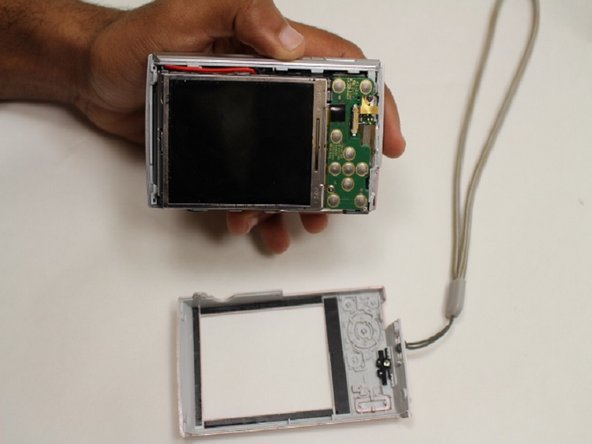
  3. Sony Cyber-shot DSC-W510 LCD Screen Replacement: Schritt 3, Bild 1 von 2 Sony Cyber-shot DSC-W510 LCD Screen Replacement: Schritt 3, Bild 2 von 2
    • Pry open the screen frame using a plastic opening tool.

    • It may be necessary to start by prying at one end of the screen and moving around the edge of the screen frame, until it pops out.

    Frag FixBot

    Kommentar hinzufügen

  4. Sony Cyber-shot DSC-W510 LCD Screen Replacement: Schritt 4, Bild 1 von 2 Sony Cyber-shot DSC-W510 LCD Screen Replacement: Schritt 4, Bild 2 von 2
    • Using the screw driver, unscrew the one screw on the control panel board.

    Frag FixBot

    Kommentar hinzufügen

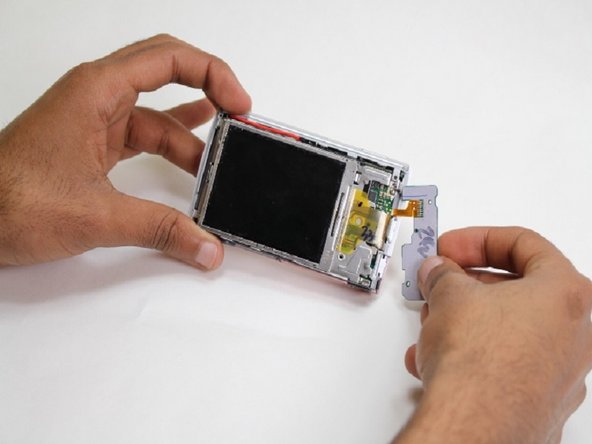
  5. Sony Cyber-shot DSC-W510 LCD Screen Replacement: Schritt 5, Bild 1 von 1
    • Gently unplug the control panel from the motherboard outlet.

    Frag FixBot

    Kommentar hinzufügen

  6. Sony Cyber-shot DSC-W510 LCD Screen Replacement: Schritt 6, Bild 1 von 2 Sony Cyber-shot DSC-W510 LCD Screen Replacement: Schritt 6, Bild 2 von 2
    • Using your hands, pry open the LCD screen from the metal board.

    • Gently unplug the LCD screen from the motherboard.

    Frag FixBot

    Kommentar hinzufügen

Abschluss

To reassemble your device, follow these instructions in reverse order.

Rückgängig: Ich habe diese Anleitung nicht absolviert.

3 weitere Personen haben diese Anleitung absolviert.

kyle

Mitglied seit: 02/05/15

445 Reputation

3 Anleitungen geschrieben

0 Kommentare zur Anleitung

Kommentar hinzufügen

Seitenaufrufe:

Letzte 24 Stunden: 1

Letzte 7 Tage: 14

Letzte 30 Tage: 53

Insgesamt: 2,352