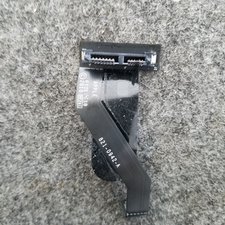
Is it possible to put the 2011 2.5 i5 components in a 2010 slotted case and include a superdrive?
Update (07/22/2011)
Regardless of the cost, we still need an answer. As one person commented, some of us may have an existing case or 2010 mini. I noted a similar question posted recently as well.
Schau durch den Thread, bis du den richtigen Platz für diesen Kommentar gefunden hast. Klicke dann auf "Den Kommentar diesem Post zuordnen", um ihn zu verschieben.
2 Kommentare
Did you successfully attempt this? I'm thinking about doing the same thing.
The mac mini 2011 does not fit in the 2010 case. After carefully moving the components to the old case I realized that optical drive bracket did not allow the logic board to slide in smoothly and required some angling to get in in. Then when I was closing up shop I made a second realization that the 2011 logic board simply does not have a place to connect the optical drive to the logic board. I considering doing some soldering but I did not want to risk it. I'm going to just buy an external optical drive and mount it behind my screen. Maybe oneday Apple will include an optical drive again, I mean what kind of desktop does not have an optical drive.
Schau durch den Thread, bis du den richtigen Platz für diesen Kommentar gefunden hast. Klicke dann auf "Den Kommentar diesem Post zuordnen", um ihn zu verschieben.

7 Kommentare:
Even if you can the cost of the old case is about $140 + the bottom plate at about $32
For me it's not about cost. I already own a mid 2010 model. I will do the replacement if it is possible. So the real question is does it fit or not? Dimensions, screws etc. I can even use glues instead of screws :) we just need to know if it is fits or not ;)
@danj Fortunately it is possible, with some modification of the ODD holder plastic as I have already done this swap, and there is more detail on a thread I have already linked to below.
I've swapped shells between the workstation and the server versions as well as logic boards, I don't see any benefit swapping out the case shell or body of a 2010 model.
- a stock Macmini4,1 (Mid 2010 Mac Mini with P8800 2.66GHz Core2Duo, 320GB HD, SuperDrive) running 10.6 (for Rosetta) and 10.8 on separate partitions
- a stock Macmini5,2 (Mid 2011 Mac Mini with i7-2620M 2.7GHz i7, 750GB) running 10.9
Following the iFixit disassembly guide, in the process of swapping motherboards, I removed the optical drive tray and made the cuts as described in the thread. Two of the cuts aren't as necessary, as they can be shaved off a little and still fit with the 2011 motherboard. I also switched the HDs and swapped the SuperDrive for a Blu-Ray rewritable drive. However, I had later found out that the drive would not accept discs in the Mac Mini due to the Manufacturing Diagnostic pin in the optical drive power connector, and needed to be removed. While disassembling it again, instead of removing it, I just bent it in so that there would be no contact with the optical drive.
After this process, I ended with:
- a Mac Mini 2011 with i7-2620M 2.7GHz (and its Radeon HD 6630M), 750GB, UJ-267 Blu-Ray rewriter running 10.9
- a Mac Mini 2010 with P8800 2.66GHz (and its Geforce 320M), 320GB, no optical drive running 10.6 and upgraded 10.8 to 10.9 and sold it
Schau durch den Thread, bis du den richtigen Platz für diesen Kommentar gefunden hast. Klicke dann auf "Den Kommentar diesem Post zuordnen", um ihn zu verschieben.
9 Kommentare:
I should note that, thanks to LowEndMac, I am able to still run 10.6 on my Mac Mini 2011 for Rosetta, allowing me to continue to play older PowerPC-only Mac games like Diablo 2 and Warcraft 3.
Is it possible to do the same thing, except with late 2012 innards, and the 2.6Ghz Quad core i7? It's hard to tell from online pictures, but it looks like the heat sinks on the quad 2.6 are much larger, and would interfere with the space needed to fit an optical drive in as well.
That makes at least 5 of us who succeeded in adding a Superdrive or Blu-ray to a Mac Mini 2011-2012.
It is interesting that you used the same Mac Mini 2011 that I did, but that you also had to remove the #4 connector pin from the ODD SATA flat cable to make it work with your UJ-267 Blu-Ray writer.
Up to now, I thought this problem related only to the Mac Mini 2012, since I did not encountered it with my own AD-5960S Superdrive.
Thanks! After testing with several different drives, it seems to be that non-Apple drives are the ones with issues regarding the Diagnostic Pin. It seems that in your guide you used an Apple drive from a MacBook Pro, judging by the metaltabs that were cut off in the installation process. Most optical drives will not have these metal tabs that are used for mounting specifically in the MacBook Pro chassis. It also seems that many optical drives will need the strange About This Mac>More Info...>Storage shortcut to accept a disc if one wasn't present in the system a short time ago.
If the only thing holding you back is "will it fit," i'd say go for it! The internal components of the new Mini seem to have the same dimensions, though some of the mounting locations are different. With some minor tampering, it should all fit. I can't guarantee that the old optical drive will work with the new components, but if you really want to give it a shot, how could we say no? That's what the site's all about.
I kept a save of this post and could possibly publish it again in iFixit, but reading your post and reading again (I forgot much ! :-) ) my original post, I am not sure it would help you any since I had no issue powering the drive once I fitted everything within the case. All my issues were mechanical. As mentioned above in my 27 nov. 2013 post, I used a Mac Mini mid-2011 motherboard board, not a Mac Mini end-2012 one.
BTW, I am still using this modified Mac Mini for Home Theater :-)
Schau durch den Thread, bis du den richtigen Platz für diesen Kommentar gefunden hast. Klicke dann auf "Den Kommentar diesem Post zuordnen", um ihn zu verschieben.
1 Kommentar:
@Miles Raymond
Sorry I realize this is an old thread. But there is almost nothing else on this anywhere.
I have nearly completed this process with 2012 i5 board.
I had to relocate 1 Capacitor onto a pigtail so it would not be in the way and I ordered
an inexpensive GS41N 9.5mm but when i try to insert a disc it acts as tho the drive is not receiving power.
I'm assuming the diagnostic pin is the culprit. Thats why I am reaching out to you.
All the links in this article are dead I cant see what pin #4 is or what to do regarding it. Please respond.
p.s.
Based on geeji's post that mentioned...
"Up to now, I thought this problem related only to the Mac Mini 2012, since I did not encountered it with my own AD-5960S Superdrive."
I thought about trying to order that drive if that one is not disabled by the diagnostic pin...
But would really like to have the Pin Removal info "Option" too!
Im long into this project and really cant bring myself to give up now!
ty,
Scott
Weirdly this forum puts some newer posts above vs below... See my post above^
Schau durch den Thread, bis du den richtigen Platz für diesen Kommentar gefunden hast. Klicke dann auf "Den Kommentar diesem Post zuordnen", um ihn zu verschieben.
When I posted my original mod back in 2012 on the defunct (and deeply regretted) 123macmini.com, I never thought some people would still be using it 14 years later in 2026 :-)
BTW I finally retired my beloved Cube, and replaced it 5 years ago with a Mac mini M1. The performance gap was too enthralling...
Unfortunately, when I have to replace my 3 (!!) Mac mini M1, I will be in a quandary, since I dislike the current Mac mini design, with too few connectors making an additional bulky hub mandatory and a ridiculous power ON/OFF button at the bottom.
Schau durch den Thread, bis du den richtigen Platz für diesen Kommentar gefunden hast. Klicke dann auf "Den Kommentar diesem Post zuordnen", um ihn zu verschieben.
2 Kommentare
Did you successfully attempt this? I'm thinking about doing the same thing.
von esny23
Keep in mind there is two case shells! One with the optical drive slot and the server one which does not!
That is why this is not possible as Nantroup has a server model. He will need a 2011 workstation case shell with the optical slot
von DanJ