Schau durch den Thread, bis du den richtigen Platz für diesen Kommentar gefunden hast. Klicke dann auf "Den Kommentar diesem Post zuordnen", um ihn zu verschieben.
I've got the same issue, factory reset etc not working. While I can't help with the repair side, I can share how I've got to the Wi-Fi card, which, if you're lucky, may be a loose connection on your unit.
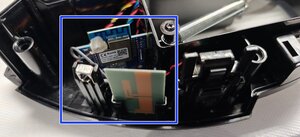
Once there, the Wi-Fi board is behind the right-hand wheel, with the bin facing towards you:
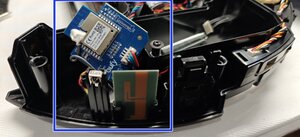
This is in situ. The inner blue board is the Wi-Fi board and the outer green one is the antenna:
A better look at the Wi-Fi board
Mine shows it's a model T2250D and is marked with T211x_WIFI_TY_V1.1_2018.6.8.
The antenna connector is secured with some sort of putty or gel and should be extracted from the bottom if switching (rather than pulling on the wire).
For me, reseating everything and doing another factory reset didn't work. I suspect it's either the Wi-Fi card or the motherboard.
Schau durch den Thread, bis du den richtigen Platz für diesen Kommentar gefunden hast. Klicke dann auf "Den Kommentar diesem Post zuordnen", um ihn zu verschieben.