Zum Hauptinhalt wechseln
Gemeinsam reparieren - Jetzt registrieren

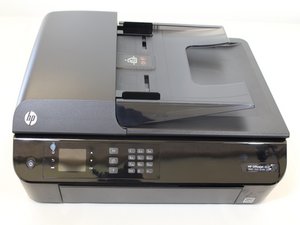
Der HP OfficeJet 4630 ist ein drahtloser Tintenstrahl-Multifunktionsdrucker.

How to hard reset to factory setting this model using only buttons?

I'm looking at a simple procedure to hard reset to factory settings this model with only the usage of external buttons (in situation where the user interface and menu is not available and the printer is stuck).

Diese Frage beantworten Ich habe das gleiche Problem

Ist dies eine gute Frage?

Bewertung 0
Einen Kommentar hinzufügen

2 Antworten

Turn it off and unplug it for 30 seconds. Reconnect the power, then immediately press and hold the Back (left arrow) and Cancel (X) buttons simultaneously for about 10-15 seconds until the printer restarts or a "Factory Reset" message appears.

War diese Antwort hilfreich?

Bewertung 0

2 Kommentare:

The HP Officejet 4630 doesn't have a "Cancel (X)" button...

(src: check the buttons layout on https://duckduckgo.com/?t=ffab&q=HP+Offi... )

von Teilen

This is for the LaserJets with the color touchscreen that was known to wipe out the PC on pre-2016 models if it triggers the NVRAM reset. The newer 2016+ models survive better.

von Teilen

Einen Kommentar hinzufügen

Not on this one - it's in software. You go under Setup>Tools>Restore Factory Defaults -- it wipes everything, though. If the printer turns on long enough, you can try Back>Home>Back>Home or Back>Home>Back>Back and you want to do the semi full reset -- it might impact the PC reading as the NVRAM reset was infamous for doing on all of the pre-2016 HP LJ models, so weigh how much you care about losing it on a printer that will cost $70-130 to replace, and the one you have being worth ~$30 or less. It's been the long time code for 10+ years, at least until HP went to the 1-2 line LCD, or just flat out removed it.

If the printer is locked up hard, some of the old ones like the C4780 were infamous for locking up due to broken WiFi modules -- easily confirmed by turning your router off. These are a little newer then that using the HP 61 carts, but the lower end HP inkjets do not cope well with failing WiFi modules. You can often take it out and run the printer on Ethernet permanently, if it has one - I see conflicting info but more saying no. It might flash red all the on the WiFi light and force you to clear an error on screen, but it will at least turn on again.

War diese Antwort hilfreich?

Bewertung 0

2 Kommentare:

Mine just get stuck as soon as I open it to:

1. Boot screen: the HP logo and a sort of stripped loading bar

2. The ink trail and scanner moves inside.

3. Then a screen saying it looks for paper in the paper tray.

4. Then it get stuck on a screen that is loading the "Cartridge Alignment" but no hardware movements.

During this procedure, I can't access the menu. I can't 'cancel' the screens for the boot, the paper tray, the alignment. Only opening the printer to change cartridges offers me an alternative screen.

On the software side, I'm on Linux, I can't communicate with the printer, and I don't have this option from the Linux interface. That's why I was hoping for a combination of physical button press to hard factory reset this model, in case mine just started to loop in an endless bug.

von Teilen

@kipitku Yep, something is wrong with the main board or the WiFi chip is hanging it up.

von Teilen

Einen Kommentar hinzufügen

Antwort hinzufügen

Kipitku wird auf ewig dankbar sein.
Seitenaufrufe:

Letzte 24 Stunden: 4

Letzte 7 Tage: 10

Letzte 30 Tage: 40

Insgesamt: 450