Einleitung
Wenn deine PlayStation keine Controller oder Memory Cards mehr registriert, könnte es an der Zeit sein die Controlleranschlüsse der Konsole zu ersetzen. Diese Anleitung wird dich durch den Prozess begleiten, wie du dieses Bauteil ersetzen kannst. Das beinhaltet die Controlleranschlüsse und die Memory Card Slots in einer Anleitung.
Hinweis: Diese Reparatur wird an einem SCPH-1001 Modell dargestellt. Der Prozess könnte sich etwas anders gestalten, wenn du ein neueres Modell hast.
Was du brauchst
-
-
Drehe die Konsole mit der Unterseite nach oben und entferne die fünf 15,8 mm Kreuzschlitzschrauben #1.
-
-
-
Drehe die Konsole wieder um, während du die obere und untere Gehäusehälfte zusammenhältst. Hebe das obere Gehäuseteil gerade nach oben, um es zu entfernen.
-
-
-
-
Entferne die fünf Kreuzschlitzschrauben #1, welche die Metallabschirmung der Controlleranschlüsse sichern.
-
Zwei 14 mm Schrauben
-
Drei 8 mm Schrauben
-
-
-
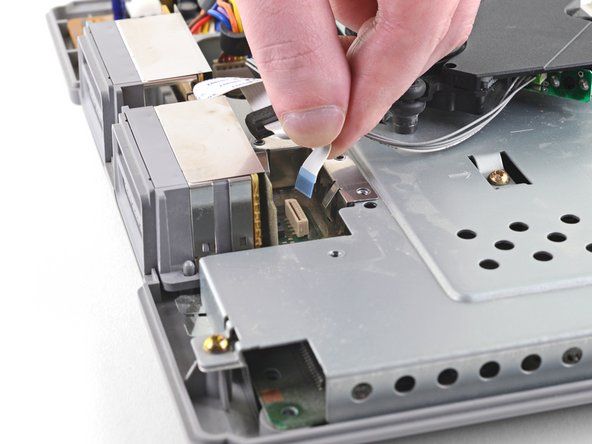
Ziehe die Flachkabel der Controlleranschlüsse gerade nach oben und aus ihrer Verankerung auf der Hauptplatine, um sie abzutrennen.
-
-
-
Hebe die Controlleranschlüsse gerade nach oben und aus dem unteren Gehäuseteil heraus.
-




Vergleiche das Austauschteil mit dem Originalteil– vielleicht musst du Teile oder Schutzfolien vom neuen Bauteil entfernen, bevor du es einbaust.
Um dein Gerät wieder zusammenzubauen, befolge diese Schritte in der umgekehrten Reihenfolge.
Entsorge deinen Elektromüll sachgerecht.
Hat die Reparatur nicht ganz geklappt? In unserem Forum findest du Hilfe bei der Fehlersuche.
Vergleiche das Austauschteil mit dem Originalteil– vielleicht musst du Teile oder Schutzfolien vom neuen Bauteil entfernen, bevor du es einbaust.
Um dein Gerät wieder zusammenzubauen, befolge diese Schritte in der umgekehrten Reihenfolge.
Entsorge deinen Elektromüll sachgerecht.
Hat die Reparatur nicht ganz geklappt? In unserem Forum findest du Hilfe bei der Fehlersuche.
Rückgängig: Ich habe diese Anleitung nicht absolviert.
11 weitere Personen haben diese Anleitung absolviert.
Besonderer Dank geht an diese Übersetzer:innen:
100%


Diese Übersetzer:innen helfen uns, die Welt zu reparieren! Wie kann ich mithelfen?
Hier starten ›


6 Kommentare
I changed the controller port but the psx still doesn't recognize any controller. Both controller port and ribbon cable work perfect in other console. I wonder which components on the mother board are related with the controller ports so I can check them with a tester.
I replaced the PS605 fuse and now the controllers work again! Thanks to this video https://www.youtube.com/watch?v=HdULot5F...
I'm having a weird issue, it will read in second do
Port but not the first. Changed controller port and still having the same issue
