Zum Hauptinhalt wechseln
Gemeinsam reparieren - Jetzt registrieren

Samsung Galaxy Note Headphone Jack/Earpiece Speaker Assembly Replacement

Was du brauchst

  1. Samsung Galaxy Note Headphone Jack/Earpiece Speaker Assembly Replacement, Stylus: Schritt 1, Bild 1 von 2 Samsung Galaxy Note Headphone Jack/Earpiece Speaker Assembly Replacement, Stylus: Schritt 1, Bild 2 von 2
    • Grasp the cap of the stylus and remove it from its slot in the midframe.

  2. Samsung Galaxy Note Headphone Jack/Earpiece Speaker Assembly Replacement, Rear Case: Schritt 2, Bild 1 von 2 Samsung Galaxy Note Headphone Jack/Earpiece Speaker Assembly Replacement, Rear Case: Schritt 2, Bild 2 von 2
    • Pry with a plastic opening tool, or your fingernail, in the divot to the right of the rear-facing camera, near the volume rocker.

  3. Samsung Galaxy Note Headphone Jack/Earpiece Speaker Assembly Replacement: Schritt 3, Bild 1 von 2 Samsung Galaxy Note Headphone Jack/Earpiece Speaker Assembly Replacement: Schritt 3, Bild 2 von 2
    • Lift and remove the rear case from the phone.

  4. Samsung Galaxy Note Headphone Jack/Earpiece Speaker Assembly Replacement, Battery: Schritt 4, Bild 1 von 2 Samsung Galaxy Note Headphone Jack/Earpiece Speaker Assembly Replacement, Battery: Schritt 4, Bild 2 von 2
    • Insert your finger in the notch of the battery compartment.

    • Press the battery toward the rear facing camera while pulling outward.

  5. Samsung Galaxy Note Headphone Jack/Earpiece Speaker Assembly Replacement, MicroSD Card: Schritt 5, Bild 1 von 3 Samsung Galaxy Note Headphone Jack/Earpiece Speaker Assembly Replacement, MicroSD Card: Schritt 5, Bild 2 von 3 Samsung Galaxy Note Headphone Jack/Earpiece Speaker Assembly Replacement, MicroSD Card: Schritt 5, Bild 3 von 3
    • Use the flat end of a spudger, or your fingernail, to press the microSD card slightly deeper into its slot until you hear a click.

    • After the click, release the card and it will pop out of its slot.

    • For reassembly, push the microSD card into the slot until it clicks in place.

  6. Samsung Galaxy Note Headphone Jack/Earpiece Speaker Assembly Replacement: Schritt 6, Bild 1 von 1
    • Remove the microSD card from its slot in the midframe.

  7. Samsung Galaxy Note Headphone Jack/Earpiece Speaker Assembly Replacement, SIM Card: Schritt 7, Bild 1 von 2 Samsung Galaxy Note Headphone Jack/Earpiece Speaker Assembly Replacement, SIM Card: Schritt 7, Bild 2 von 2
    • Use a plastic opening tool, or your fingernail, to push the SIM card out of its compartment.

  8. Samsung Galaxy Note Headphone Jack/Earpiece Speaker Assembly Replacement: Schritt 8, Bild 1 von 2 Samsung Galaxy Note Headphone Jack/Earpiece Speaker Assembly Replacement: Schritt 8, Bild 2 von 2
    • Slide the SIM card out the rest of the way with your thumb and remove it from the device.

  9. Samsung Galaxy Note Headphone Jack/Earpiece Speaker Assembly Replacement, Midframe: Schritt 9, Bild 1 von 1
    • Remove the nine 3.4 mm Phillips #00 screws securing the midframe to the display assembly.

  10. Samsung Galaxy Note Headphone Jack/Earpiece Speaker Assembly Replacement: Schritt 10, Bild 1 von 2 Samsung Galaxy Note Headphone Jack/Earpiece Speaker Assembly Replacement: Schritt 10, Bild 2 von 2
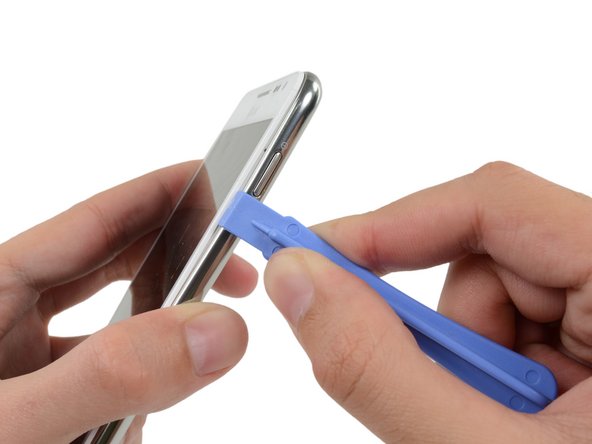
    • Insert your plastic opening tool to the left of the power button between the midframe and the front panel assembly and pry.

  11. Samsung Galaxy Note Headphone Jack/Earpiece Speaker Assembly Replacement: Schritt 11, Bild 1 von 3 Samsung Galaxy Note Headphone Jack/Earpiece Speaker Assembly Replacement: Schritt 11, Bild 2 von 3 Samsung Galaxy Note Headphone Jack/Earpiece Speaker Assembly Replacement: Schritt 11, Bild 3 von 3
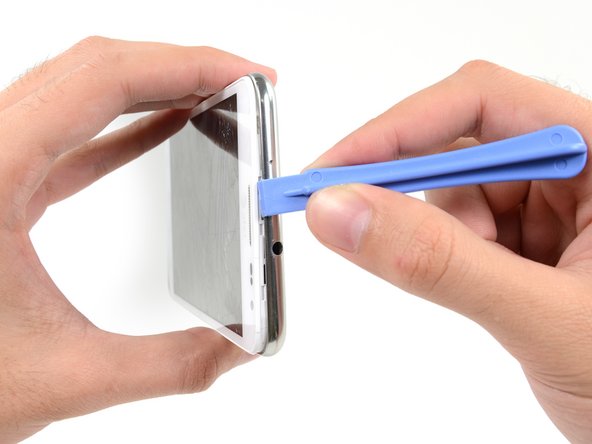
    • Slide the plastic opening tool down the seam.

  12. Samsung Galaxy Note Headphone Jack/Earpiece Speaker Assembly Replacement: Schritt 12, Bild 1 von 3 Samsung Galaxy Note Headphone Jack/Earpiece Speaker Assembly Replacement: Schritt 12, Bild 2 von 3 Samsung Galaxy Note Headphone Jack/Earpiece Speaker Assembly Replacement: Schritt 12, Bild 3 von 3
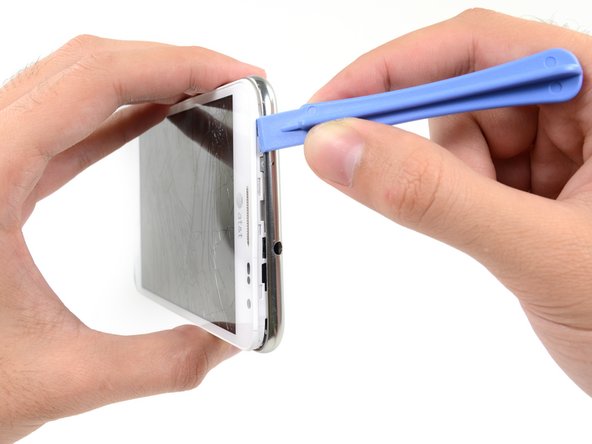
    • Insert your plastic opening tool to the left of the headphone jack between the midframe and the display assembly.

    • Slide the opening tool along the top edge of the phone.

    • Continue to run the plastic opening tool around the perimeter of the phone until the midframe is separated.

  13. Samsung Galaxy Note Headphone Jack/Earpiece Speaker Assembly Replacement: Schritt 13, Bild 1 von 2 Samsung Galaxy Note Headphone Jack/Earpiece Speaker Assembly Replacement: Schritt 13, Bild 2 von 2
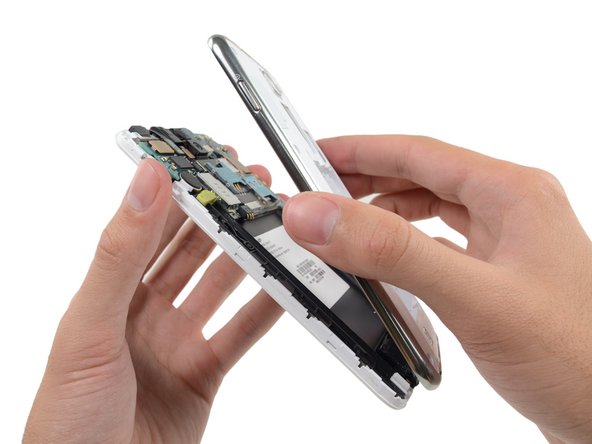
    • Remove the midframe from the display assembly.

  14. Samsung Galaxy Note Headphone Jack/Earpiece Speaker Assembly Replacement, Upper Display Assembly Bracket: Schritt 14, Bild 1 von 1
    • Use the flat end of a spudger to disconnect the headphone jack/earpiece speaker assembly cable connector.

  15. Samsung Galaxy Note Headphone Jack/Earpiece Speaker Assembly Replacement: Schritt 15, Bild 1 von 1
    • Remove the two 3 mm Phillips #00 screws securing the upper display assembly bracket.

  16. Samsung Galaxy Note Headphone Jack/Earpiece Speaker Assembly Replacement: Schritt 16, Bild 1 von 2 Samsung Galaxy Note Headphone Jack/Earpiece Speaker Assembly Replacement: Schritt 16, Bild 2 von 2
    In diesem Schritt verwendetes Werkzeug:
    Tweezers
    $4.99
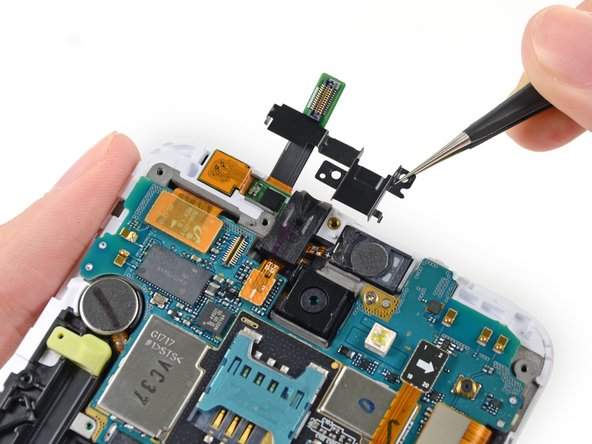
    • Use a pair of tweezers, or your fingers, to remove the upper display assembly bracket.

  17. Samsung Galaxy Note Headphone Jack/Earpiece Speaker Assembly Replacement, Headphone Jack/Earpiece Speaker Assembly: Schritt 17, Bild 1 von 1
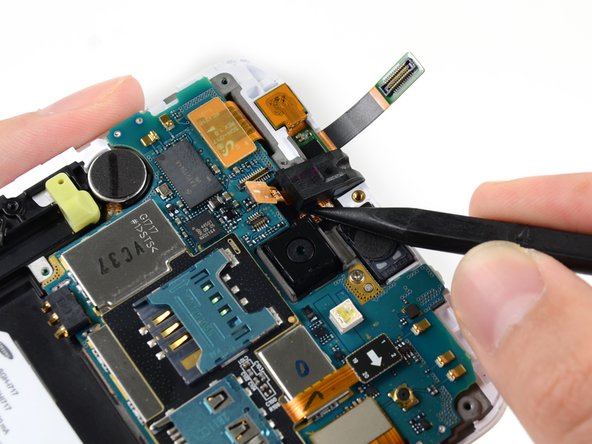
    • Use the flat end of a spudger to disconnect the headphone jack/earpiece speaker assembly connector.

  18. Samsung Galaxy Note Headphone Jack/Earpiece Speaker Assembly Replacement: Schritt 18, Bild 1 von 2 Samsung Galaxy Note Headphone Jack/Earpiece Speaker Assembly Replacement: Schritt 18, Bild 2 von 2
    • Use the point of a spudger to pry the headphone jack out of its recess in the display assembly.

  19. Samsung Galaxy Note Headphone Jack/Earpiece Speaker Assembly Replacement: Schritt 19, Bild 1 von 1
    In diesem Schritt verwendetes Werkzeug:
    Tweezers
    $4.99
    • Use a pair of tweezers, or your fingers, to remove the headphone jack/earpiece speaker assembly from the display assembly.

Abschluss

To reassemble your device, follow these instructions in reverse order.

12 weitere Personen haben diese Anleitung absolviert.

Sam Goldheart

Mitglied seit: 10/18/12

475.838 Reputation

538 Anleitungen geschrieben

Team

iFixit Mitglied von iFixit

Staff

123 Mitglieder

24.065 Anleitungen geschrieben

1 Kommentar zur Anleitung

I'd recommend getting an Original part if possible, the knock off speaker has no metal casing where the original does.

John Cobra - Antwort

Kommentar hinzufügen

Seitenaufrufe:

Letzte 24 Stunden: 0

Letzte 7 Tage: 11

Letzte 30 Tage: 34

Insgesamt: 20,696