Zum Hauptinhalt wechseln
Gemeinsam reparieren - Jetzt registrieren

Samsung Galaxy Note SIM Card Replacement

Was du brauchst

    1. Samsung Galaxy Note SIM Card Replacement, Rear Case: Schritt 1, Bild 1 von 2 Samsung Galaxy Note SIM Card Replacement, Rear Case: Schritt 1, Bild 2 von 2
      • Pry with a plastic opening tool, or your fingernail, in the divot to the right of the rear-facing camera, near the volume rocker.

      Frag FixBot

      Kommentar hinzufügen

    2. Samsung Galaxy Note SIM Card Replacement: Schritt 2, Bild 1 von 2 Samsung Galaxy Note SIM Card Replacement: Schritt 2, Bild 2 von 2
      • Lift and remove the rear case from the phone.

      Frag FixBot

      Kommentar hinzufügen

    1. Samsung Galaxy Note SIM Card Replacement, Battery: Schritt 3, Bild 1 von 2 Samsung Galaxy Note SIM Card Replacement, Battery: Schritt 3, Bild 2 von 2
      • Insert your finger in the notch of the battery compartment.

      • Press the battery toward the rear facing camera while pulling outward.

      Frag FixBot

      Kommentar hinzufügen

    1. Samsung Galaxy Note SIM Card Replacement, SIM Card: Schritt 4, Bild 1 von 2 Samsung Galaxy Note SIM Card Replacement, SIM Card: Schritt 4, Bild 2 von 2
      • Use a plastic opening tool, or your fingernail, to push the SIM card out of its compartment.

      Frag FixBot

      Kommentar hinzufügen

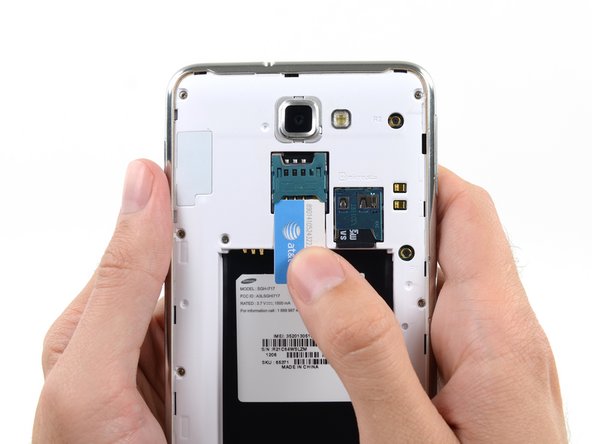
    2. Samsung Galaxy Note SIM Card Replacement: Schritt 5, Bild 1 von 2 Samsung Galaxy Note SIM Card Replacement: Schritt 5, Bild 2 von 2
      • Slide the SIM card out the rest of the way with your thumb and remove it from the device.

      Frag FixBot

      Kommentar hinzufügen

Abschluss

To reassemble your device, follow these instructions in reverse order.

Rückgängig: Ich habe diese Anleitung nicht absolviert.

6 weitere Personen haben diese Anleitung absolviert.

Sam Goldheart

Mitglied seit: 10/18/12

477.893 Reputation

538 Anleitungen geschrieben

Team

iFixit Mitglied von iFixit

Staff

123 Mitglieder

54.119 Anleitungen geschrieben

1 Kommentar zur Anleitung

What if I need to replace the card of SIM card?

Roaa - Antwort Teilen

Kommentar hinzufügen

Seitenaufrufe:

Letzte 24 Stunden: 0

Letzte 7 Tage: 7

Letzte 30 Tage: 45

Insgesamt: 17,025