Zum Hauptinhalt wechseln
Gemeinsam reparieren - Jetzt registrieren

Samsung RF28R7201SG Refrigerator Evaporator Thermistor (Refrigerator Compartment) Replacement

Was du brauchst

  1. Samsung RF28R7201SG Refrigerator Evaporator Thermistor (Refrigerator Compartment) Replacement, Unplug your refrigerator: Schritt 1, Bild 1 von 1
    • Unplug your refrigerator before you begin your repair.

    Frag FixBot

    Kommentar hinzufügen

  2. Samsung RF28R7201SG Refrigerator Evaporator Thermistor (Refrigerator Compartment) Replacement, Open the refrigerator doors: Schritt 2, Bild 1 von 2 Samsung RF28R7201SG Refrigerator Evaporator Thermistor (Refrigerator Compartment) Replacement, Open the refrigerator doors: Schritt 2, Bild 2 von 2
    • Open both French doors for the refrigerator compartment.

    Frag FixBot

    Kommentar hinzufügen

  3. Samsung RF28R7201SG Refrigerator Evaporator Thermistor (Refrigerator Compartment) Replacement, Remove the shelves: Schritt 3, Bild 1 von 2 Samsung RF28R7201SG Refrigerator Evaporator Thermistor (Refrigerator Compartment) Replacement, Remove the shelves: Schritt 3, Bild 2 von 2
    • Remove all the loose shelves and bins from the refrigerator compartment.

    • The bottom shelf is clipped in place. Follow the next step to remove it.

    Frag FixBot

    Kommentar hinzufügen

  4. Samsung RF28R7201SG Refrigerator Evaporator Thermistor (Refrigerator Compartment) Replacement: Schritt 4, Bild 1 von 3 Samsung RF28R7201SG Refrigerator Evaporator Thermistor (Refrigerator Compartment) Replacement: Schritt 4, Bild 2 von 3 Samsung RF28R7201SG Refrigerator Evaporator Thermistor (Refrigerator Compartment) Replacement: Schritt 4, Bild 3 von 3
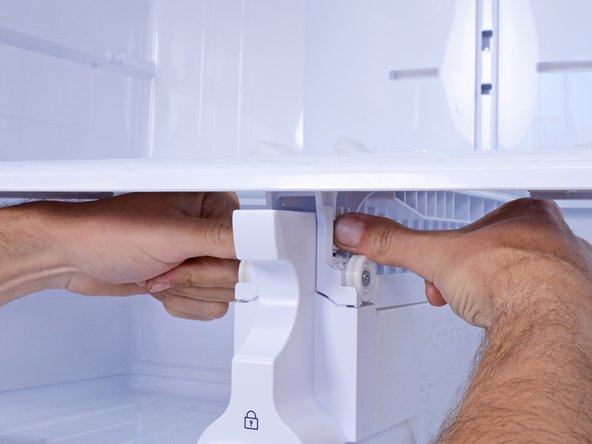
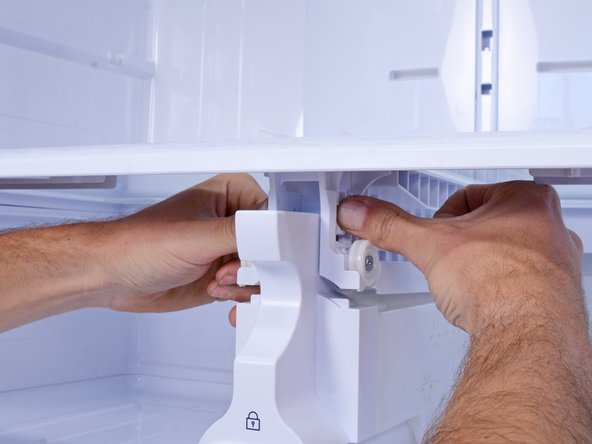
    • Two stiff plastic tabs (one on each side) secure the bottom shelf in place.

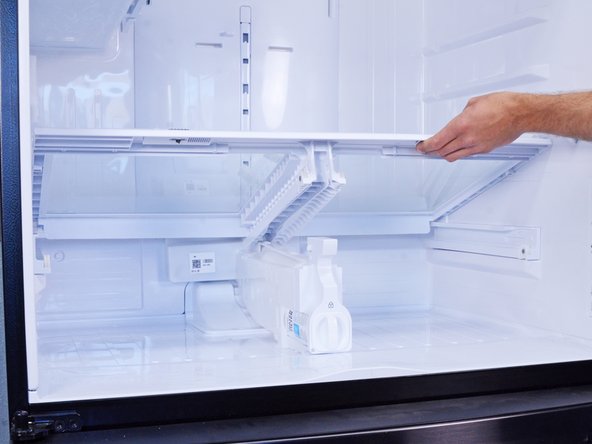
    • Press both plastic tabs firmly with your fingers and lift upward to unclip the bottom shelf.

    • If the shelf doesn't unclip, you can try using a flathead screwdriver to press each clip in.

    • Remove the bottom shelf.

    Frag FixBot

    Kommentar hinzufügen

  5. Samsung RF28R7201SG Refrigerator Evaporator Thermistor (Refrigerator Compartment) Replacement, Remove the refrigerator evaporator cover: Schritt 5, Bild 1 von 3 Samsung RF28R7201SG Refrigerator Evaporator Thermistor (Refrigerator Compartment) Replacement, Remove the refrigerator evaporator cover: Schritt 5, Bild 2 von 3 Samsung RF28R7201SG Refrigerator Evaporator Thermistor (Refrigerator Compartment) Replacement, Remove the refrigerator evaporator cover: Schritt 5, Bild 3 von 3
    • Use a flathead screwdriver to pry and remove the top screw cover on the evaporator cover.

    Frag FixBot

    Kommentar hinzufügen

  6. Samsung RF28R7201SG Refrigerator Evaporator Thermistor (Refrigerator Compartment) Replacement: Schritt 6, Bild 1 von 1
    • Use a Phillips screwdriver to remove the four screws securing the evaporator cover:

    • Two 37 mm-long screws

    • Two 16.5 mm-long screws

    Frag FixBot

    Kommentar hinzufügen

  7. Samsung RF28R7201SG Refrigerator Evaporator Thermistor (Refrigerator Compartment) Replacement: Schritt 7, Bild 1 von 3 Samsung RF28R7201SG Refrigerator Evaporator Thermistor (Refrigerator Compartment) Replacement: Schritt 7, Bild 2 von 3 Samsung RF28R7201SG Refrigerator Evaporator Thermistor (Refrigerator Compartment) Replacement: Schritt 7, Bild 3 von 3
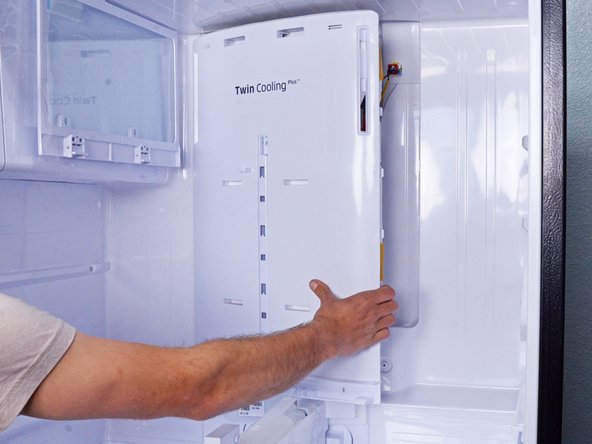
    • Grasp the right edge of the evaporator cover with your hands and swing it outwards toward you.

    • Don't try to fully remove the cover in this step, as it's connected by several wires.

    Frag FixBot

    Kommentar hinzufügen

  8. Samsung RF28R7201SG Refrigerator Evaporator Thermistor (Refrigerator Compartment) Replacement: Schritt 8, Bild 1 von 1
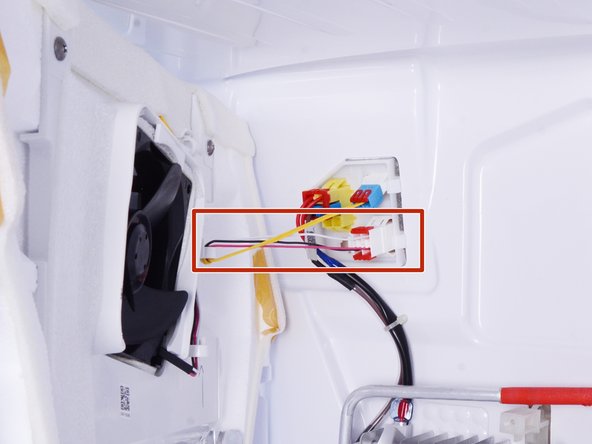
    • Squeeze and disconnect the two wire connectors connecting the evaporator cover to the refrigerator.

    Frag FixBot

    Kommentar hinzufügen

  9. Samsung RF28R7201SG Refrigerator Evaporator Thermistor (Refrigerator Compartment) Replacement: Schritt 9, Bild 1 von 2 Samsung RF28R7201SG Refrigerator Evaporator Thermistor (Refrigerator Compartment) Replacement: Schritt 9, Bild 2 von 2
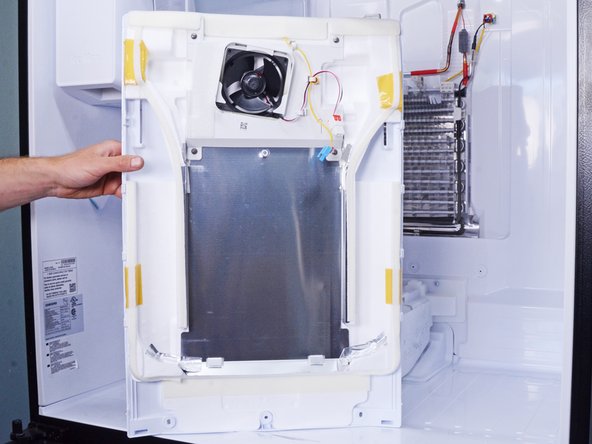
    • Pull the evaporator cover towards you and remove it.

    Frag FixBot

    Kommentar hinzufügen

  10. Samsung RF28R7201SG Refrigerator Evaporator Thermistor (Refrigerator Compartment) Replacement, Disconnect the evaporator thermistor: Schritt 10, Bild 1 von 3 Samsung RF28R7201SG Refrigerator Evaporator Thermistor (Refrigerator Compartment) Replacement, Disconnect the evaporator thermistor: Schritt 10, Bild 2 von 3 Samsung RF28R7201SG Refrigerator Evaporator Thermistor (Refrigerator Compartment) Replacement, Disconnect the evaporator thermistor: Schritt 10, Bild 3 von 3
    • Use a flathead screwdriver to pry off and remove the two red connector retaining clips.

    Frag FixBot

    Kommentar hinzufügen

  11. Samsung RF28R7201SG Refrigerator Evaporator Thermistor (Refrigerator Compartment) Replacement: Schritt 11, Bild 1 von 2 Samsung RF28R7201SG Refrigerator Evaporator Thermistor (Refrigerator Compartment) Replacement: Schritt 11, Bild 2 von 2
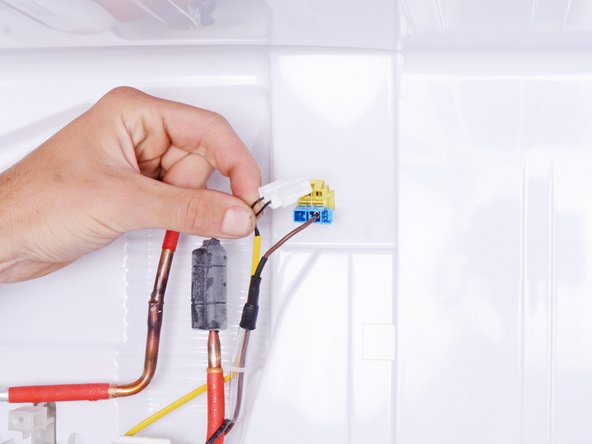
    • Use your fingers to squeeze the thermistor's white connector by the sides.

    • Pull the connector to disconnect it.

    Frag FixBot

    Kommentar hinzufügen

  12. Samsung RF28R7201SG Refrigerator Evaporator Thermistor (Refrigerator Compartment) Replacement: Schritt 12, Bild 1 von 1
    • Use snips or scissors to cut any cable ties securing the yellow thermistor cable.

    Frag FixBot

    Kommentar hinzufügen

  13. Samsung RF28R7201SG Refrigerator Evaporator Thermistor (Refrigerator Compartment) Replacement, Remove the evaporator thermistor: Schritt 13, Bild 1 von 3 Samsung RF28R7201SG Refrigerator Evaporator Thermistor (Refrigerator Compartment) Replacement, Remove the evaporator thermistor: Schritt 13, Bild 2 von 3 Samsung RF28R7201SG Refrigerator Evaporator Thermistor (Refrigerator Compartment) Replacement, Remove the evaporator thermistor: Schritt 13, Bild 3 von 3
    • Use your fingers to twist and unclip the thermistor from the evaporator coil.

    • Remove the evaporator thermistor.

    Frag FixBot

    Kommentar hinzufügen

Abschluss

To reassemble your device, follow these instructions in reverse order.

Take your e-waste to an R2 or e-Stewards certified recycler.

Repair didn’t go as planned? Ask our Answers community for help.

Rückgängig: Ich habe diese Anleitung nicht absolviert.

nicO

Mitglied seit: 04/14/15

15.990 Reputation

89 Anleitungen geschrieben

0 Kommentare zur Anleitung

Kommentar hinzufügen

Seitenaufrufe:

Letzte 24 Stunden: 1

Letzte 7 Tage: 15

Letzte 30 Tage: 77

Insgesamt: 835