Zum Hauptinhalt wechseln
Gemeinsam reparieren - Jetzt registrieren

Samsung Refrigerator Door Sensors Replacement

Was du brauchst

    1. Samsung Refrigerator Door Sensors Replacement, Unplug your refrigerator: Schritt 1, Bild 1 von 1
      • Unplug your refrigerator before you begin your repair.

      • If you are testing or repairing the following items, you may also need to shut off and disconnect the water supply:

      • Condenser fan motor

      • Compressor motor and thermal overload device

      • Water supply valve assembly

      Frag FixBot

      Kommentar hinzufügen

    1. Samsung Refrigerator Door Sensors Replacement, Remove the hinge cover: Schritt 2, Bild 1 von 1
      • Remove the screws securing the hinge cover (aka top table) on the top of the refrigerator.

      Frag FixBot

      Kommentar hinzufügen

    2. Samsung Refrigerator Door Sensors Replacement: Schritt 3, Bild 1 von 1
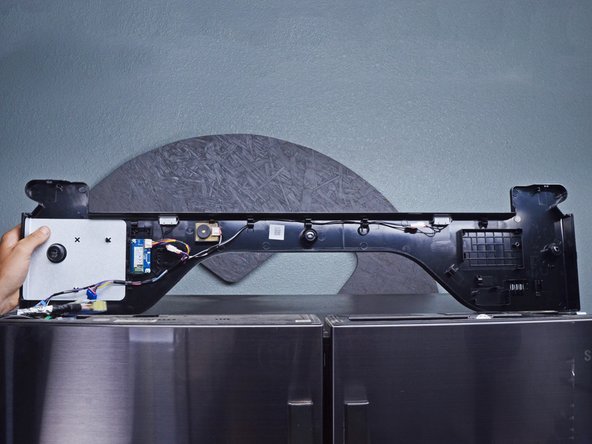
      • Lift the edges of the hinge cover to loosen it from the refrigerator.

      • Don't try to fully remove the cover, as it's still attached to the refrigerator by a few cables.

      • Flip the hinge cover over to access the cables underneath.

      Frag FixBot

      Kommentar hinzufügen

    3. Samsung Refrigerator Door Sensors Replacement: Schritt 4, Bild 1 von 2 Samsung Refrigerator Door Sensors Replacement: Schritt 4, Bild 2 von 2
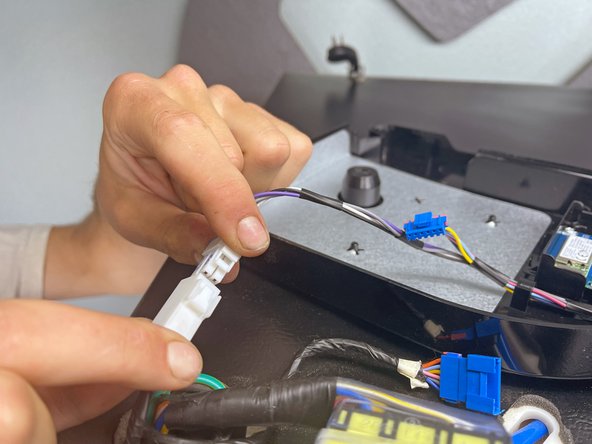
      • Use your fingers to release the wire connectors under the hinge cover.

      • Disconnect the wiring so you can remove the hinge cover.

      Frag FixBot

      Kommentar hinzufügen

    4. Samsung Refrigerator Door Sensors Replacement: Schritt 5, Bild 1 von 1
      • Remove the hinge cover.

      Frag FixBot

      Kommentar hinzufügen

    1. Samsung Refrigerator Door Sensors Replacement, Sensor information: Schritt 6, Bild 1 von 2 Samsung Refrigerator Door Sensors Replacement, Sensor information: Schritt 6, Bild 2 von 2
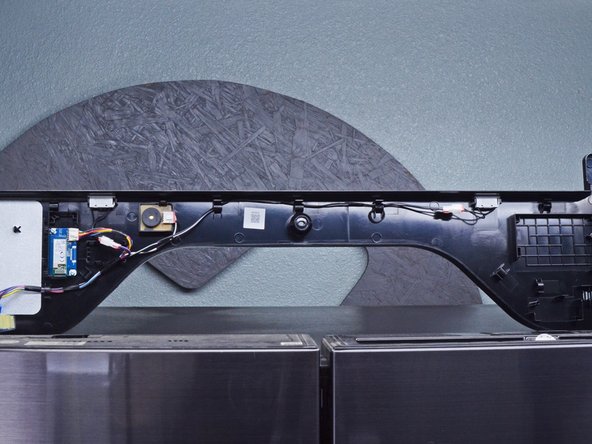
      • The door sensors are located in the hinge cover. In this example, the hinge cover has two door sensors:

      • The left door sensor

      • The left door sensor connector

      • The right door sensor

      • The right door sensor connector

      • Depending on your situation, you may need to replace either or both sensors.

      Frag FixBot

      Kommentar hinzufügen

    2. Samsung Refrigerator Door Sensors Replacement, Remove the sensor: Schritt 7, Bild 1 von 2 Samsung Refrigerator Door Sensors Replacement, Remove the sensor: Schritt 7, Bild 2 von 2
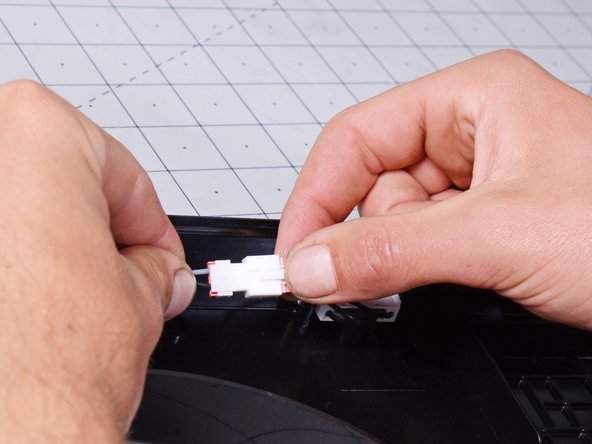
      • Use your fingers to squeeze and disconnect the sensor cable connector.

      Frag FixBot

      Kommentar hinzufügen

    3. Samsung Refrigerator Door Sensors Replacement: Schritt 8, Bild 1 von 2 Samsung Refrigerator Door Sensors Replacement: Schritt 8, Bild 2 von 2
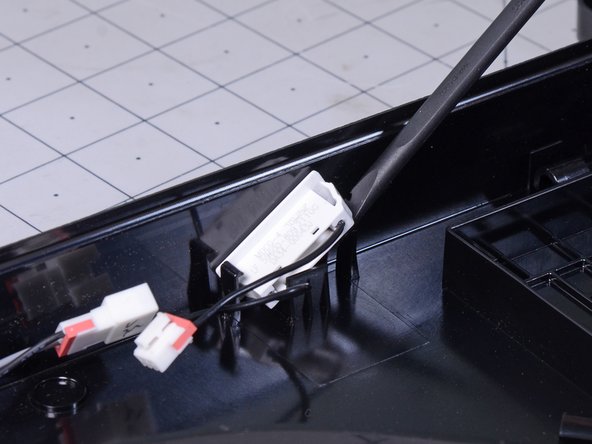
      • Use a spudger or a flathead screwdriver to pry the sensor out of its retaining clips.

      Frag FixBot

      Kommentar hinzufügen

    4. Samsung Refrigerator Door Sensors Replacement: Schritt 9, Bild 1 von 1
      • Remove the door sensor.

      Frag FixBot

      Kommentar hinzufügen

Abschluss

To reassemble your device, follow these instructions in reverse order.

Take your e-waste to an R2 or e-Stewards certified recycler.

Repair didn’t go as planned? Ask our Answers Community for help.

Rückgängig: Ich habe diese Anleitung nicht absolviert.

Eine weitere Person hat diese Anleitung absolviert.

nicO

Mitglied seit: 04/14/15

15.990 Reputation

89 Anleitungen geschrieben

Team

Team Vulcan Mitglied von Team Vulcan

Staff

6 Mitglieder

787 Anleitungen geschrieben

0 Kommentare zur Anleitung

Kommentar hinzufügen

Seitenaufrufe:

Letzte 24 Stunden: 12

Letzte 7 Tage: 154

Letzte 30 Tage: 681

Insgesamt: 15,010