Zum Hauptinhalt wechseln

Samsung Refrigerator Light (Refrigerator Compartment) Replacement

Was du brauchst

  1. Samsung Refrigerator Light (Refrigerator Compartment) Replacement, Unplug your refrigerator: Schritt 1, Bild 1 von 1
    • Unplug your refrigerator before you begin your repair.

    • If you are testing or repairing the following items, you may also need to shut off and disconnect the water supply:

    • Condenser fan motor

    • Compressor motor and thermal overload device

    • Water supply valve assembly

  2. Samsung Refrigerator Light (Refrigerator Compartment) Replacement, Open the refrigerator doors: Schritt 2, Bild 1 von 2 Samsung Refrigerator Light (Refrigerator Compartment) Replacement, Open the refrigerator doors: Schritt 2, Bild 2 von 2
    • Open both French doors for the refrigerator compartment.

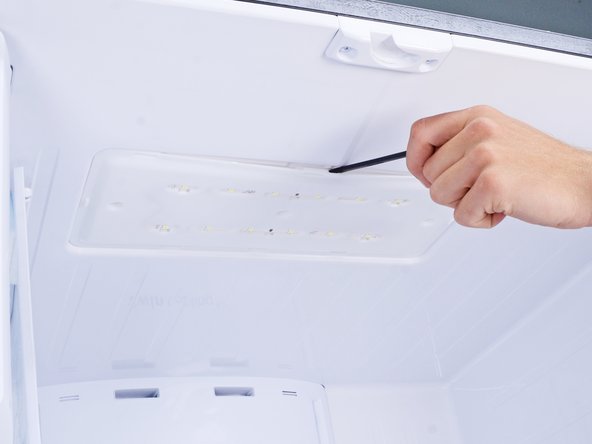
  3. Samsung Refrigerator Light (Refrigerator Compartment) Replacement, Remove the light cover: Schritt 3, Bild 1 von 3 Samsung Refrigerator Light (Refrigerator Compartment) Replacement, Remove the light cover: Schritt 3, Bild 2 von 3 Samsung Refrigerator Light (Refrigerator Compartment) Replacement, Remove the light cover: Schritt 3, Bild 3 von 3
    • Plastic clips hold the light cover in place.

    • Use a spudger to pry along the back edge of the light cover.

    • You can also use a flathead screwdriver, but be careful not to let the screwdriver slip, or you'll scratch your refrigerator surface.

    • Remove the light cover.

  4. Samsung Refrigerator Light (Refrigerator Compartment) Replacement, Remove the light panel: Schritt 4, Bild 1 von 1
    • Remove the screws securing the light panel.

  5. Samsung Refrigerator Light (Refrigerator Compartment) Replacement: Schritt 5, Bild 1 von 3 Samsung Refrigerator Light (Refrigerator Compartment) Replacement: Schritt 5, Bild 2 von 3 Samsung Refrigerator Light (Refrigerator Compartment) Replacement: Schritt 5, Bild 3 von 3
    • Use a spudger or a flathead screwdriver to pry and loosen the light panel.

    • Don't try to remove the light panel yet, as it's connected to the refrigerator with a cable.

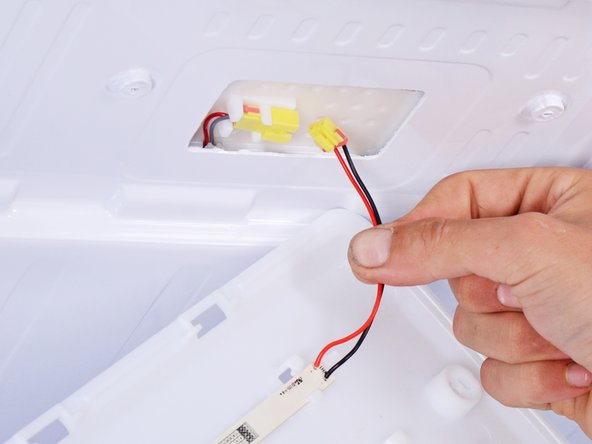
  6. Samsung Refrigerator Light (Refrigerator Compartment) Replacement: Schritt 6, Bild 1 von 2 Samsung Refrigerator Light (Refrigerator Compartment) Replacement: Schritt 6, Bild 2 von 2
    • Use your fingers to unplug the light's wire connector.

  7. Samsung Refrigerator Light (Refrigerator Compartment) Replacement: Schritt 7, Bild 1 von 1
    • Remove the refrigerator light.

Abschluss

To reassemble your device, follow these instructions in reverse order.

Take your e-waste to an R2 or e-Stewards certified recycler.

Repair didn’t go as planned? Ask our Answers Community for help.

nicO

Mitglied seit: 04/14/15

15.945 Reputation

89 Anleitungen geschrieben

Team

Team Vulcan Mitglied von Team Vulcan

Staff

6 Mitglieder

212 Anleitungen geschrieben

2 Kommentare zur Anleitung

I have a Samsung Refrigerator not sure what its called but it between the french doors a plastic stripe that is on the left side of door

Donna - Antwort

I believe that the strip between the doors that folds back when the doors are opened is called a mullion strip. It allows the doors to be sealed when closed, but moves out of the way when the doors are opened.

Bill Gilbert -

Kommentar hinzufügen

Seitenaufrufe:

Letzte 24 Stunden: 0

Letzte 7 Tage: 12

Letzte 30 Tage: 69

Insgesamt: 1,158