
Zum Hauptinhalt wechseln
Gemeinsam reparieren - Jetzt registrieren

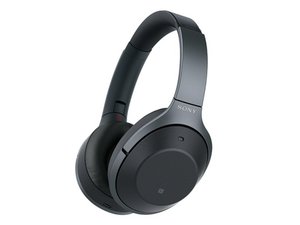
Reparatur- und Demontageinformationen für die Sony WH-1000XM2 kabellosen, geräuschunterdrückenden Over-Ear Kopfhörer.

The red charging LED indicator does not turn on

I followed the disassembly instructions on this page and managed to open the headset, but I haven´t replaced the battery yet. When testing the voltage with a multimeter, it says 3.2volts, and the headset indicated that the battery level is low. However, when connecting the USB charger, I have the same problem that the red charging LED indicator does not turn on, and when measuring the voltage while charging, the battery still says 3.2 volt. So my conclusion is the same as yours, it is probably not the battery but the charging board that has a failure. I haven´t found any instructions on how to replace that yet. I am re-considering if this is a sustainable repair or not...?

Diese Frage beantworten Ich habe das gleiche Problem

Ist dies eine gute Frage?

Bewertung 1
Einen Kommentar hinzufügen

4 Antworten

Hilfreichste Antwort

Hi, I disassembled the device and found that the wires were very interlaced. Some seamed like having lost their isolation. I carefully spread the wires apart and connected the micro-USB charging cable. The red light went solid red and it's charging again. It is too small for me to replace those wires and solder them so I do not know how long and if it will work after reassembling. But al least, I set a diagnostic for the poor craftsmanship of Sony for such an expensive device... :-(

Bild

War diese Antwort hilfreich?

Bewertung 3

1 Kommentar:

Hi Thomas, Have you been successful in solving the powe issue?

I had the same problem possibly caused by a fast charger. The battery didn't hold the charge so I replaced the battery. This worked for a while but now the new battery doesn't want to charge.

Thanks!

von

Einen Kommentar hinzufügen

Hi, it's now 6 month later and the fix I did still works. So I definitely can say, this problem is not related to charger, battery or any other active part. It's just poor soldering done by Sony. Hopefully new models are better assembled but probably not. It's not in the manufactures interest to do long lasting quality products. It's done to be sold. Period.

War diese Antwort hilfreich?

Bewertung 3

1 Kommentar:

Thanks a lot for the info. I'll take another look at it 😁

von

Einen Kommentar hinzufügen

Take a look at the charge connector solder joints on the board. They are know to crack through time and connecting and disconnecting the cable. Might be something as simple as re soldering the connections.

War diese Antwort hilfreich?

Bewertung 1
Einen Kommentar hinzufügen

@olsensan I think you are on the right way and I also believe in fixing things. Keep going with your excellent troubleshooting. The only thing I suggest at this time is that you get yourself an inexpensive USB Ammeter and see if your headset draws any amperage. Your battery voltage does not change which could be okay at 3.2V but lets see what happens when you plug it in and monitor the amperage. also, check the actual charging port to make sure that it is clear of any debris and nothing bend or corroded. Then try another cable and USB charger to see if that helps.

War diese Antwort hilfreich?

Bewertung 0
Einen Kommentar hinzufügen

Antwort hinzufügen

John Olav Olsen wird auf ewig dankbar sein.
Seitenaufrufe:

Letzte 24 Stunden: 0

Letzte 7 Tage: 5

Letzte 30 Tage: 43

Insgesamt: 2,879
