Zum Hauptinhalt wechseln
Gemeinsam reparieren - Jetzt registrieren

Microsoft Surface Pro 7+ Kickstand Replacement

Was du brauchst

  1. Microsoft Surface Pro 7+ Kickstand Replacement, Before you begin: Schritt 1, Bild 1 von 1
    • Before starting your repair, unplug all cables and fully shut down your Surface Pro.

    Frag FixBot

    Kommentar hinzufügen

  2. Microsoft Surface Pro 7+ Kickstand Replacement, Open the kickstand: Schritt 2, Bild 1 von 2 Microsoft Surface Pro 7+ Kickstand Replacement, Open the kickstand: Schritt 2, Bild 2 von 2
    • Open the kickstand to about 90 degrees.

    Frag FixBot

    Kommentar hinzufügen

  3. Microsoft Surface Pro 7+ Kickstand Replacement, Remove the kickstand screws: Schritt 3, Bild 1 von 3 Microsoft Surface Pro 7+ Kickstand Replacement, Remove the kickstand screws: Schritt 3, Bild 2 von 3 Microsoft Surface Pro 7+ Kickstand Replacement, Remove the kickstand screws: Schritt 3, Bild 3 von 3
    • While holding the kickstand behind the hinge with your finger, use a Torx Plus 3IP screwdriver to remove the two 2.7 mm‑long screws from each hinge (four total).

    • Make sure the screws don't fall into the hinge cutouts.

    Frag FixBot

    Kommentar hinzufügen

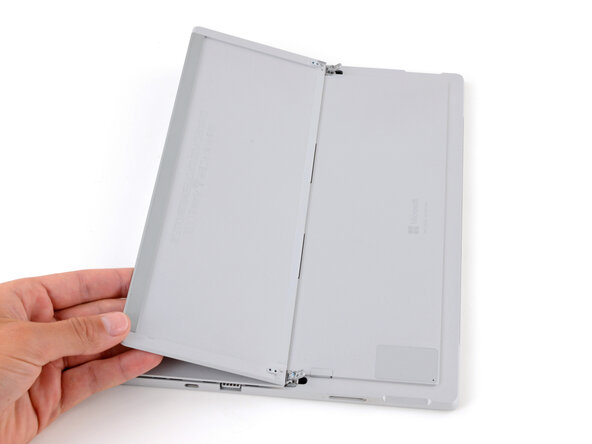
  4. Microsoft Surface Pro 7+ Kickstand Replacement, Lay the kickstand down: Schritt 4, Bild 1 von 2 Microsoft Surface Pro 7+ Kickstand Replacement, Lay the kickstand down: Schritt 4, Bild 2 von 2
    • Lay the kickstand down towards the top of the device so it's lying flat.

    Frag FixBot

    Kommentar hinzufügen

  5. Microsoft Surface Pro 7+ Kickstand Replacement, Reposition the hinges: Schritt 5, Bild 1 von 3 Microsoft Surface Pro 7+ Kickstand Replacement, Reposition the hinges: Schritt 5, Bild 2 von 3 Microsoft Surface Pro 7+ Kickstand Replacement, Reposition the hinges: Schritt 5, Bild 3 von 3
    • Wrap your finger in a clean cloth and push both hinges down to about 30 degrees.

    Frag FixBot

    Kommentar hinzufügen

  6. Microsoft Surface Pro 7+ Kickstand Replacement, Flip the kickstand over: Schritt 6, Bild 1 von 2 Microsoft Surface Pro 7+ Kickstand Replacement, Flip the kickstand over: Schritt 6, Bild 2 von 2
    • Flip the kickstand towards the bottom of the device so it's resting on the hinges.

    Frag FixBot

    Kommentar hinzufügen

  7. Microsoft Surface Pro 7+ Kickstand Replacement, Remove the kickstand: Schritt 7, Bild 1 von 2 Microsoft Surface Pro 7+ Kickstand Replacement, Remove the kickstand: Schritt 7, Bild 2 von 2
    • Firmly secure the device to your work surface with one hand, and use your free hand to pull the kickstand out until both foam tabs slide out.

    • If you're having trouble, make sure the kickstand isn't getting stuck on the hinges—it should slide out fairly easily.

    Frag FixBot

    Kommentar hinzufügen

Abschluss

To reassemble your device, follow these instructions in reverse order.

Repair didn’t go as planned? Try some basic troubleshooting, or ask our Answers community for help.

Rückgängig: Ich habe diese Anleitung nicht absolviert.

Spencer Day

Mitglied seit: 09/14/22

191.214 Reputation

1.204 Anleitungen geschrieben

0 Kommentare zur Anleitung

Kommentar hinzufügen

Seitenaufrufe:

Letzte 24 Stunden: 1

Letzte 7 Tage: 24

Letzte 30 Tage: 53

Insgesamt: 74