Zum Hauptinhalt wechseln
Gemeinsam reparieren - Jetzt registrieren

Acer Extensa 4420 Back Panel Replacement

Was du brauchst

  1. Acer Extensa 4420 Back Panel Replacement, Battery: Schritt 1, Bild 1 von 2 Acer Extensa 4420 Back Panel Replacement, Battery: Schritt 1, Bild 2 von 2
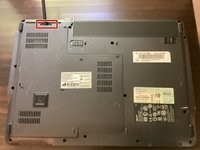
    • First, make sure that the battery lock is turned off.

    • The battery lock makes it so the battery doesn't accidentally fall out of your computer while it is running.

    Frag FixBot
  2. Acer Extensa 4420 Back Panel Replacement: Schritt 2, Bild 1 von 3 Acer Extensa 4420 Back Panel Replacement: Schritt 2, Bild 2 von 3 Acer Extensa 4420 Back Panel Replacement: Schritt 2, Bild 3 von 3
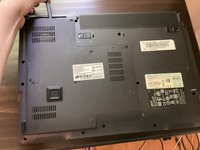
    • Then, slide the other battery lock while pulling the battery out.

    Frag FixBot
  3. Acer Extensa 4420 Back Panel Replacement, Back Panel: Schritt 3, Bild 1 von 1
    In diesem Schritt verwendetes Werkzeug:
    Phillips #00 Screwdriver
    $5.49
    • Unscrew all five screws on the back panel with a Phillips #00 screwdriver

    • The screws will stay in the back panel, so when you remove it, you don't have to worry about organizing the screws.

    Frag FixBot
  4. Acer Extensa 4420 Back Panel Replacement: Schritt 4, Bild 1 von 3 Acer Extensa 4420 Back Panel Replacement: Schritt 4, Bild 2 von 3 Acer Extensa 4420 Back Panel Replacement: Schritt 4, Bild 3 von 3
    In diesem Schritt verwendetes Werkzeug:
    Spudger
    $3.99
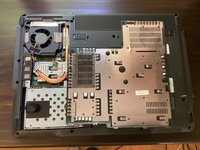
    • Take a spudger and start to pry open the back panel. Finish prying it open with your hands.

    • Be extra careful and try not to break any clips in this process.

    Frag FixBot
Abschluss

To reassemble your device, follow these instructions in reverse order.

0 Kommentare zur Anleitung

Kommentar hinzufügen

Seitenaufrufe:

Letzte 24 Stunden: 1

Letzte 7 Tage: 5

Letzte 30 Tage: 39

Insgesamt: 214