Zum Hauptinhalt wechseln
Gemeinsam reparieren - Jetzt registrieren

Altec Lansing BoomJacket Battery Replacement

Was du brauchst

    1. Altec Lansing BoomJacket Battery  Replacement, Case Removal: Schritt 1, Bild 1 von 1
      • Using your hands, remove the pegs (4+4) from the front and back of the speaker.

      Frag FixBot

      Kommentar hinzufügen

    2. Altec Lansing BoomJacket Battery  Replacement: Schritt 2, Bild 1 von 1
      • Remove the outer black rubber housing of the speaker.

      Frag FixBot

      Kommentar hinzufügen

    3. Altec Lansing BoomJacket Battery  Replacement: Schritt 3, Bild 1 von 1
      • Remove the inner blue rubber housing from the speaker.

      Frag FixBot

      Kommentar hinzufügen

    4. Altec Lansing BoomJacket Battery  Replacement: Schritt 4, Bild 1 von 1
      • Pull out the two black wire meshes using a metal spudger.

      • Be careful not to damage the metal casing.

      Frag FixBot

      Kommentar hinzufügen

    5. Altec Lansing BoomJacket Battery  Replacement: Schritt 5, Bild 1 von 2 Altec Lansing BoomJacket Battery  Replacement: Schritt 5, Bild 2 von 2
      In diesem Schritt verwendetes Werkzeug:
      Tweezers
      $4.99
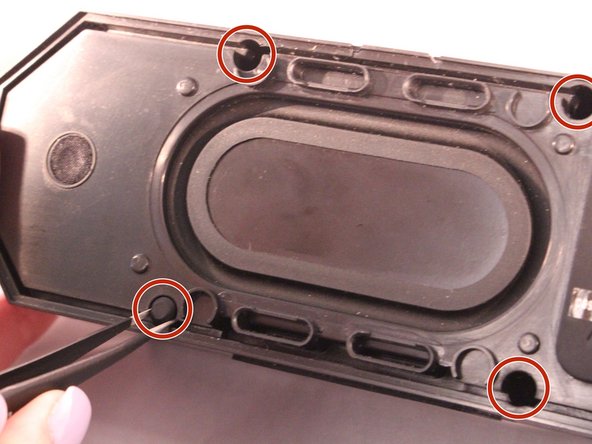
      • Using tweezers remove the rubber stoppers (4 at the back + 2 at the front).

      Frag FixBot

      Kommentar hinzufügen

    6. Altec Lansing BoomJacket Battery  Replacement: Schritt 6, Bild 1 von 1
      • Using the size PH1 screwdriver remove the screws exposed from the rubber stoppers (4 + 2).

      Frag FixBot

      Kommentar hinzufügen

    7. Altec Lansing BoomJacket Battery  Replacement: Schritt 7, Bild 1 von 1
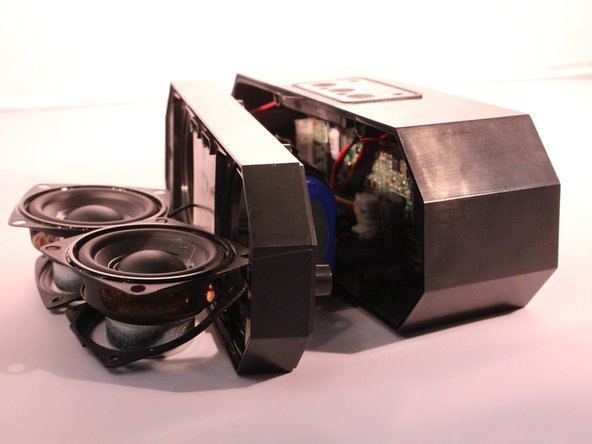
      • Pull the case apart and you will be able to see all the components inside the speaker.

      Frag FixBot

      Kommentar hinzufügen

    1. Altec Lansing BoomJacket Battery  Replacement, Battery: Schritt 8, Bild 1 von 1
      • The battery will be sitting right behind the speakers when the case is open.

      Frag FixBot

      Kommentar hinzufügen

    2. Altec Lansing BoomJacket Battery  Replacement: Schritt 9, Bild 1 von 1
      • Unplug and disconnect the battery from the motherboard.

      Frag FixBot

      Kommentar hinzufügen

Abschluss

To reassemble your device, follow these instructions in reverse order.

Rückgängig: Ich habe diese Anleitung nicht absolviert.

5 weitere Personen haben diese Anleitung absolviert.

6 Kommentare zur Anleitung

Where can you buy a replacement battery?

Darrell riley - Antwort Teilen

Where can you buy the battery please?

Juan Roa - Antwort Teilen

Where can I find ghe batteries? What type of battery ?

Violet Roach - Antwort Teilen

where ca i buy a replacement battery

Shelley Franck - Antwort Teilen

This tutorial is incomplete.

Ivan Rodriguez - Antwort Teilen

Kommentar hinzufügen

Seitenaufrufe:

Letzte 24 Stunden: 2

Letzte 7 Tage: 18

Letzte 30 Tage: 58

Insgesamt: 15,961