Einleitung
Will your device not turn on or off? Your power button is likely the reason.
Was du brauchst
-
-
-
Using your hands, remove the pegs (4+4) from the front and back of the speaker.
 Frag FixBot
-
-
In diesem Schritt verwendetes Werkzeug:Tweezers$4.99
-
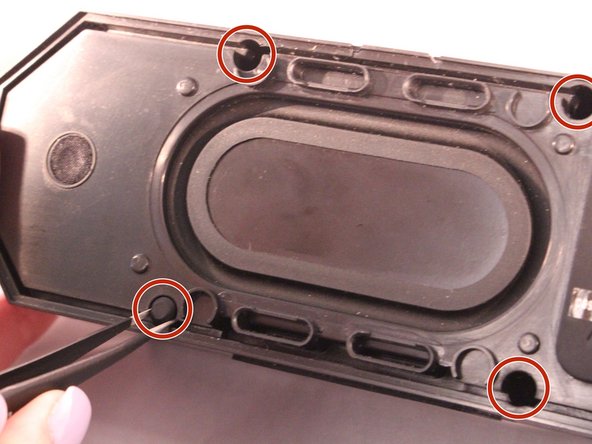
Using tweezers remove the rubber stoppers (4 at the back + 2 at the front).
-
-
-
-
Using the size PH1 screwdriver remove the screws exposed from the rubber stoppers (4 + 2).
-
-
-
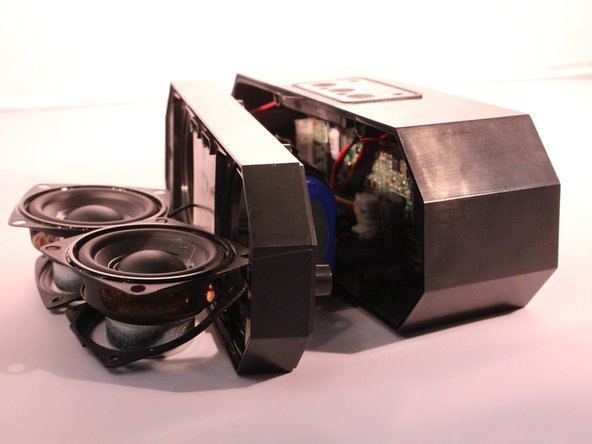
Pull the case apart and you will be able to see all the components inside the speaker.
-
-
-
-
-
The battery will be sitting right behind the speakers when the case is open.
-
-
-
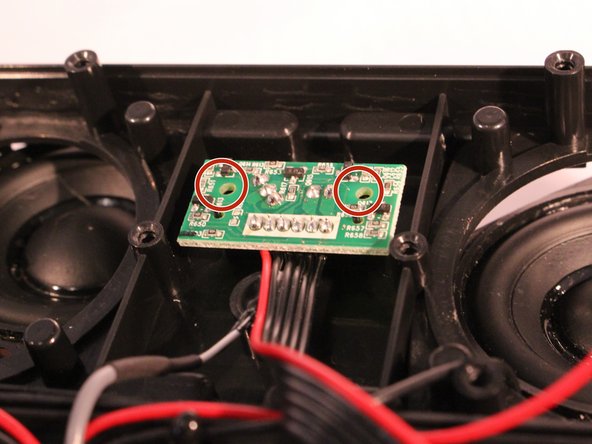
You will now see the motherboard for the power button.
-
Remove the 2 screws holding the motherboard into place.
-
-
-
Disconnect the power button motherboard from the speaker motherboard.
-
-








To reassemble your device, follow these instructions in reverse order.
Rückgängig: Ich habe diese Anleitung nicht absolviert.
8 weitere Personen haben diese Anleitung absolviert.

Team

Eastern Washington University, Team S2-G2, Rowley Spring 2017 Mitglied von Eastern Washington University, Team S2-G2, Rowley Spring 2017
EWU-ROWLEY-S17S2G2
4 Mitglieder
10 Anleitungen geschrieben
1 Kommentar zur Anleitung
Current speaker won’t turn on even though charging light looks all good so came across these instructions.
Thinking it’s the power button on my speaker that’s the issue.
Assuming these instructions are assuming you are replacing the power button motherboard? Where could I source one?
