Zum Hauptinhalt wechseln
Gemeinsam reparieren - Jetzt registrieren

Astro Mixamp Control Button Replacement

Was du brauchst

  1. Astro Mixamp Control Button Replacement, Panel Dial: Schritt 1, Bild 1 von 2 Astro Mixamp Control Button Replacement, Panel Dial: Schritt 1, Bild 2 von 2
    • Grip the dial tightly and pull straight off the device.

    • Repeat for the second dial

    Frag FixBot

    Kommentar hinzufügen

  2. Astro Mixamp Control Button Replacement: Schritt 2, Bild 1 von 2 Astro Mixamp Control Button Replacement: Schritt 2, Bild 2 von 2
    In diesem Schritt verwendetes Werkzeug:
    Tweezers
    $4.99
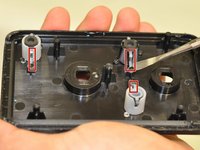
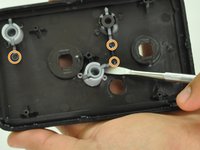
    • Using tweezers, remove the spacer nuts and washers from each dial post.

    Frag FixBot

    Kommentar hinzufügen

  3. Astro Mixamp Control Button Replacement, Outer Casing: Schritt 3, Bild 1 von 2 Astro Mixamp Control Button Replacement, Outer Casing: Schritt 3, Bild 2 von 2
    • Before opening your device, ensure the device is not on or connected to the charging cable.

    • Insert a plastic opening tool into the seam between the rubber foot and plastic casing.

    • Pull the rubber foot free of the plastic casing.

    Frag FixBot

    Kommentar hinzufügen

  4. Astro Mixamp Control Button Replacement: Schritt 4, Bild 1 von 1
    • Use a screwdriver to remove the screw from the rear casing.

    Frag FixBot

    Kommentar hinzufügen

  5. Astro Mixamp Control Button Replacement: Schritt 5, Bild 1 von 1
    • Gently lift the rear casing from the device.

    Frag FixBot

    Kommentar hinzufügen

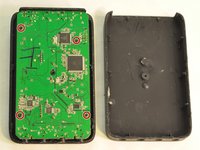
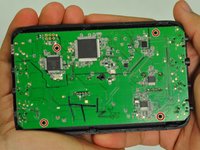
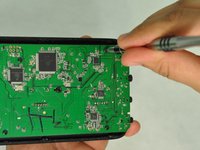
  6. Astro Mixamp Control Button Replacement, Motherboard: Schritt 6, Bild 1 von 3 Astro Mixamp Control Button Replacement, Motherboard: Schritt 6, Bild 2 von 3 Astro Mixamp Control Button Replacement, Motherboard: Schritt 6, Bild 3 von 3
    • Remove the four screws that hold the motherboard in place.

    • Only touch the edges of the motherboard. Touching the surface can damage the motherboard.

    Frag FixBot

    Kommentar hinzufügen

  7. Astro Mixamp Control Button Replacement: Schritt 7, Bild 1 von 1
    • Gently pull the motherboard from the front cover.

    Frag FixBot

    Kommentar hinzufügen

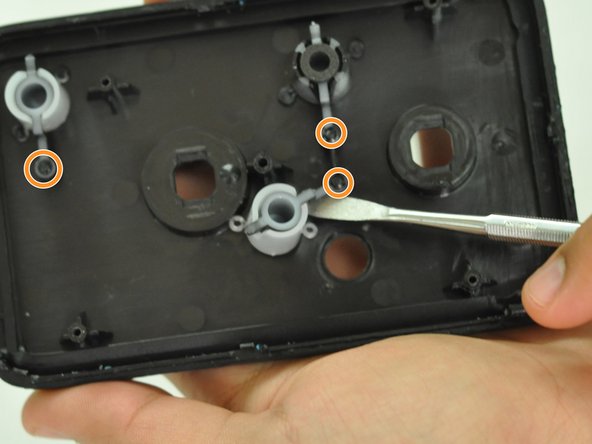
  8. Astro Mixamp Control Button Replacement, Control Button: Schritt 8, Bild 1 von 2 Astro Mixamp Control Button Replacement, Control Button: Schritt 8, Bild 2 von 2
    • Gently insert a metal spudger under a control button housing.

    • Do not pry the button housing from the front panel, this can cause damage to the button.

    • Rotate the control button around the marked pin.

    Frag FixBot

    Kommentar hinzufügen

Abschluss

To reassemble your device, follow these instructions in reverse order.

Rückgängig: Ich habe diese Anleitung nicht absolviert.

2 weitere Personen haben diese Anleitung absolviert.

0 Kommentare zur Anleitung

Kommentar hinzufügen

Seitenaufrufe:

Letzte 24 Stunden: 3

Letzte 7 Tage: 12

Letzte 30 Tage: 33

Insgesamt: 2,012