Zum Hauptinhalt wechseln
Gemeinsam reparieren - Jetzt registrieren

BRCK v1 Modem Replacement

Was du brauchst

  1. BRCK v1 Modem  Replacement, Top Cover: Schritt 1, Bild 1 von 1
    • Place the face of the device showing BRCK face up.

    Frag FixBot

    Kommentar hinzufügen

  2. BRCK v1 Modem  Replacement: Schritt 2, Bild 1 von 1
    • Remove the four screws(4mm hex head) on the corners of the device with a Hex 2.0 Screwdriver.

    Frag FixBot

    Kommentar hinzufügen

  3. BRCK v1 Modem  Replacement: Schritt 3, Bild 1 von 1
    • Remove the top cover.

    Frag FixBot

    Kommentar hinzufügen

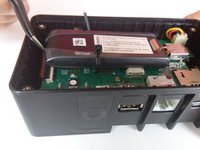
  4. BRCK v1 Modem  Replacement, Modem: Schritt 4, Bild 1 von 1
    • Cut the black zip tie holding the modem down.

    • Caution By cutting the zip tie, you void any manufacturer warranty you may have on the device.

    Frag FixBot

    Kommentar hinzufügen

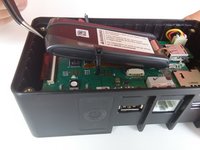
  5. BRCK v1 Modem  Replacement: Schritt 5, Bild 1 von 1
    • Remove the connection located on the edge of the modem.

    Frag FixBot

    Kommentar hinzufügen

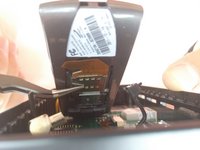
  6. BRCK v1 Modem  Replacement: Schritt 6, Bild 1 von 2 BRCK v1 Modem  Replacement: Schritt 6, Bild 2 von 2
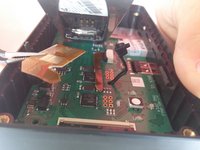
    • Slightly lift the modem to reveal the brown ribbon connector and metal connection plate, located on the bottom of the modem.

    Frag FixBot

    Kommentar hinzufügen

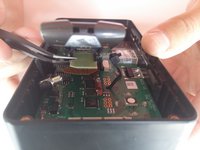
  7. BRCK v1 Modem  Replacement: Schritt 7, Bild 1 von 3 BRCK v1 Modem  Replacement: Schritt 7, Bild 2 von 3 BRCK v1 Modem  Replacement: Schritt 7, Bild 3 von 3
    In diesem Schritt verwendetes Werkzeug:
    Tweezers
    $4.99
    • Using your tweezers, gently push on the metal plate and slide it down toward the base of the modem to release the locking mechanism.

    • Lower the plate and gently pull the ribbon out of the face plate.

    • Caution Be extremely gentle while preforming this step. The ribbon is brittle and prone to breaking if bent too much. Make sure you go slowly so that you do not damage the device.

    Frag FixBot

    Kommentar hinzufügen

  8. BRCK v1 Modem  Replacement: Schritt 8, Bild 1 von 2 BRCK v1 Modem  Replacement: Schritt 8, Bild 2 von 2
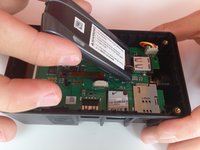
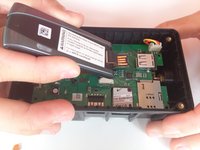
    • Remove the modem from the device.

    Frag FixBot

    Kommentar hinzufügen

Abschluss

To reassemble your device, follow these instructions in reverse order.

Rückgängig: Ich habe diese Anleitung nicht absolviert.

Team

Cal Poly, Team 12-3, Lancaster Spring 2015 Mitglied von Cal Poly, Team 12-3, Lancaster Spring 2015

CPSU-LANCASTER-S15S12G3

3 Mitglieder

14 Anleitungen geschrieben

0 Kommentare zur Anleitung

Kommentar hinzufügen

Seitenaufrufe:

Letzte 24 Stunden: 3

Letzte 7 Tage: 6

Letzte 30 Tage: 25

Insgesamt: 466