Zum Hauptinhalt wechseln
Gemeinsam reparieren - Jetzt registrieren

Capresso Perfectea 260 Control System Replacement

Was du brauchst

  1. Capresso Perfectea 260 Control System Replacement, Motherboard: Schritt 1, Bild 1 von 1
    • First, take the base of the device and flip it over.

    Frag FixBot

    Kommentar hinzufügen

  2. Capresso Perfectea 260 Control System Replacement: Schritt 2, Bild 1 von 2 Capresso Perfectea 260 Control System Replacement: Schritt 2, Bild 2 von 2
    • Remove the four 12 mm Phillips #2 screws surrounding the base then lift the bottom half of the base to expose the circuit boards inside the device.

    Frag FixBot
    Kommentar hinzufügen

  3. Capresso Perfectea 260 Control System Replacement: Schritt 3, Bild 1 von 1
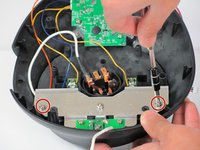
    • Remove the two 7.5 mm Phillips #2 screws holding in the motherboard

    Frag FixBot

    Kommentar hinzufügen

  4. Capresso Perfectea 260 Control System Replacement: Schritt 4, Bild 1 von 1
    • Unplug the wire going into the side of the motherboard

    Frag FixBot

    Kommentar hinzufügen

  5. Capresso Perfectea 260 Control System Replacement: Schritt 5, Bild 1 von 2 Capresso Perfectea 260 Control System Replacement: Schritt 5, Bild 2 von 2
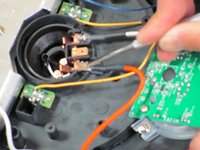
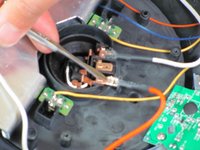
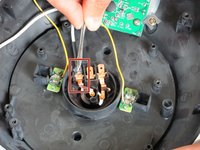
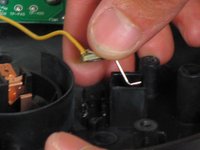
    • Use the metal spudger to cut open the rubber covering the latch where it clamps onto the copper tab.

    • Unplug wire at heating element by first using the metal spudger to push the latch in and then pushing it out.

    • Be careful when unplugging the wire as if it is done too forcefully it can damage the connection and make it difficult to connect a new motherboard

    Frag FixBot
    Kommentar hinzufügen

  6. Capresso Perfectea 260 Control System Replacement: Schritt 6, Bild 1 von 1
    • Lift the motherboard out of the device

    Frag FixBot
    Kommentar hinzufügen

  7. Capresso Perfectea 260 Control System Replacement, Control System: Schritt 7, Bild 1 von 2 Capresso Perfectea 260 Control System Replacement, Control System: Schritt 7, Bild 2 von 2
    • Remove the two 7.5mm Phillips #2 screws from the metal frame.

    • Remove the frame from the assembly.

    Frag FixBot

    Kommentar hinzufügen

  8. Capresso Perfectea 260 Control System Replacement: Schritt 8, Bild 1 von 3 Capresso Perfectea 260 Control System Replacement: Schritt 8, Bild 2 von 3 Capresso Perfectea 260 Control System Replacement: Schritt 8, Bild 3 von 3
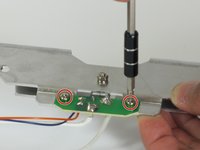
    • Remove the two 6mm fine thread Phillips #2 screws attaching the small computer chip to the metal frame.

    • Flip over and remove the 7.5 mm fine thread Phillips #2 screw from the back while holding the 5mm nut on the front securely.

    Frag FixBot

    Kommentar hinzufügen

  9. Capresso Perfectea 260 Control System Replacement: Schritt 9, Bild 1 von 3 Capresso Perfectea 260 Control System Replacement: Schritt 9, Bild 2 von 3 Capresso Perfectea 260 Control System Replacement: Schritt 9, Bild 3 von 3
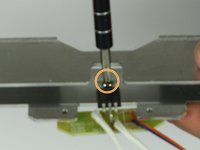
    • Find the cable that attaches the small computer chip to the heating element connections.

    • Use the spudger to cut open the rubber coating on the latch where it clamps onto the copper tab.

    • Insert the metal spudger into the rectangular hole on the latch and push toward the tab (away from the wire) to unbend the tab.

    • Push the latch off the tab with the spudger.

    • The tab will come loose suddenly. Make sure that you apply force in a controlled manner to avoid injuring yourself or damaging the other components.

    Frag FixBot

    Kommentar hinzufügen

  10. Capresso Perfectea 260 Control System Replacement: Schritt 10, Bild 1 von 3 Capresso Perfectea 260 Control System Replacement: Schritt 10, Bild 2 von 3 Capresso Perfectea 260 Control System Replacement: Schritt 10, Bild 3 von 3
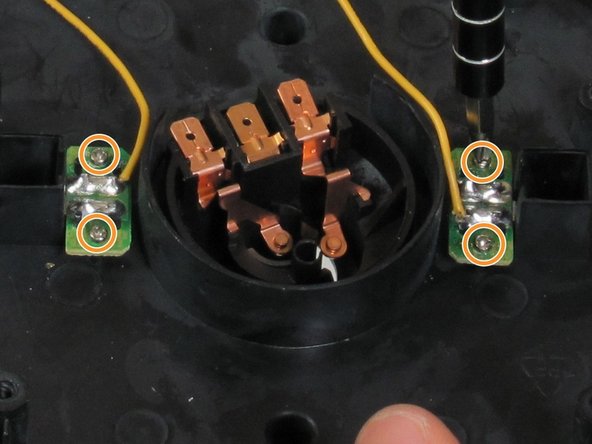
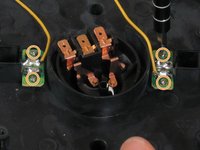
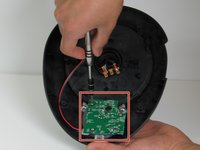
    • Identify the two computer chips that connect the two yellow wires to the temperature controls.

    • Remove the four 5 mm Phillips #1 screws.

    • Remove the two computer chips from their places.

    • The two computer chips are held in place by plastic interference pins. Wiggle the board free of these pins to remove.

    Frag FixBot
    Kommentar hinzufügen

  11. Capresso Perfectea 260 Control System Replacement: Schritt 11, Bild 1 von 3 Capresso Perfectea 260 Control System Replacement: Schritt 11, Bild 2 von 3 Capresso Perfectea 260 Control System Replacement: Schritt 11, Bild 3 von 3
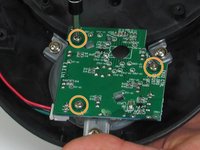
    • Find the computer chip over the dial.

    • Remove the three 6mm Phillips #2 screws.

    • Remove the computer chip.

    • Remember the orientation of the computer chip on the dial and which peg goes into which hole.

    • Keep the plastic frame on the bottom of the chip attached.

    Frag FixBot
    Kommentar hinzufügen

  12. Capresso Perfectea 260 Control System Replacement: Schritt 12, Bild 1 von 1
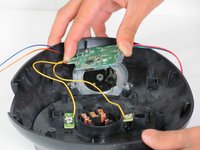
    • Unplug the four cables on the left side of the chip.

    • Remember which cable goes to which plug.

    Frag FixBot

    Kommentar hinzufügen

Abschluss

To reassemble your device, follow these instructions in reverse order.

Rückgängig: Ich habe diese Anleitung nicht absolviert.

Eine weitere Person hat diese Anleitung absolviert.

Team

Cal Poly, Team 6-17, Maness Spring 2015 Mitglied von Cal Poly, Team 6-17, Maness Spring 2015

CPSU-MANESS-S15S6G17

4 Mitglieder

6 Anleitungen geschrieben

0 Kommentare zur Anleitung

Kommentar hinzufügen

Seitenaufrufe:

Letzte 24 Stunden: 0

Letzte 7 Tage: 11

Letzte 30 Tage: 38

Insgesamt: 2,876