Zum Hauptinhalt wechseln
Gemeinsam reparieren - Jetzt registrieren

HP Spectre x360 13-4103dx Battery Replacement

Was du brauchst

  1. HP Spectre x360 13-4103dx Battery Replacement, Back Panel: Schritt 1, Bild 1 von 1
    • Turn off your laptop before you start.

    • Flip your laptop so the bottom is facing upwards.

    Frag FixBot

    Kommentar hinzufügen

  2. HP Spectre x360 13-4103dx Battery Replacement: Schritt 2, Bild 1 von 1
    • Use a Phillips #0 to remove the screws that hold the back panel down.

    Frag FixBot

    Kommentar hinzufügen

  3. HP Spectre x360 13-4103dx Battery Replacement: Schritt 3, Bild 1 von 1
    • Use an opening tool to remove the back panel.

    • Be careful when applying force to the panel so the components and the panel are not damaged.

    • Try to start at a corner or a place with the most room to slide under the panel.

    Frag FixBot

    Kommentar hinzufügen

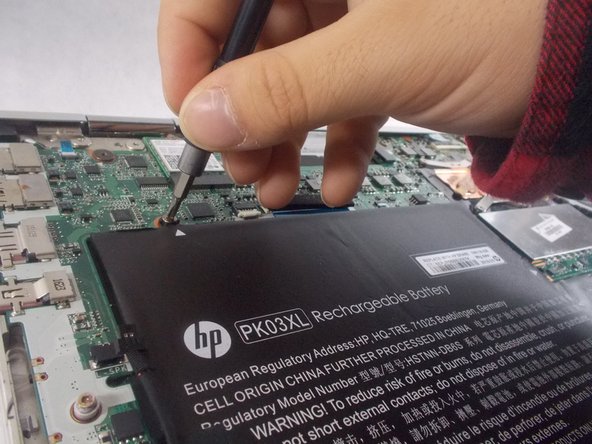
  4. HP Spectre x360 13-4103dx Battery Replacement, Battery: Schritt 4, Bild 1 von 2 HP Spectre x360 13-4103dx Battery Replacement, Battery: Schritt 4, Bild 2 von 2
    • Remove the four screws from the battery using a Phillips #0 screwdriver.

    Frag FixBot

    Kommentar hinzufügen

  5. HP Spectre x360 13-4103dx Battery Replacement: Schritt 5, Bild 1 von 1
    • Remove the battery from the computer.

    Frag FixBot

    Kommentar hinzufügen

Abschluss

To reassemble your device, follow these instructions in reverse order.

For optimal performance, after completing this guide, calibrate your newly installed battery.
Take your e-waste to an R2 or e-Stewards certified recycler.

Rückgängig: Ich habe diese Anleitung nicht absolviert.

Team

UMass Dartmouth, Team 3-6, Sinclaire Fall 2021 Mitglied von UMass Dartmouth, Team 3-6, Sinclaire Fall 2021

UMASSD-SINCLAIRE-F21S3G6

3 Mitglieder

5 Anleitungen geschrieben

0 Kommentare zur Anleitung

Kommentar hinzufügen

Seitenaufrufe:

Letzte 24 Stunden: 0

Letzte 7 Tage: 5

Letzte 30 Tage: 35

Insgesamt: 1,063