Einleitung
The HTC Touch (model P3450), also known as the HTC Elf or the HTC Vogue, was released in 2007. This guide does not apply to subsequently released devices in the same family such as the HTC Touch 3G, HTC Touch Cruise, etc, which you can find elsewhere on iFixit.
Use this guide to replace the front buttons on your HTC Touch if the buttons are no longer working or if you want to refresh the look of your phone. The front buttons can malfunction due to wear and tear over time or physical shock of the device when dropped onto a hard surface. Faulty buttons may work inconsistently, not work at all, or be cracked or chipped.
Before beginning, make sure to be familiar with grounding to prevent electrostatic damage, as you will be handling the circuit board of the device.
Was du brauchst
-
-
Using your finger, remove the back panel by sliding it up.
 Frag FixBot
-
-
-
Remove the four screws in the corners of the phone using the T5 Torx screwdriver.
-
-
-
-
Use the plastic opening tool to remove the front panel from the phone.
-
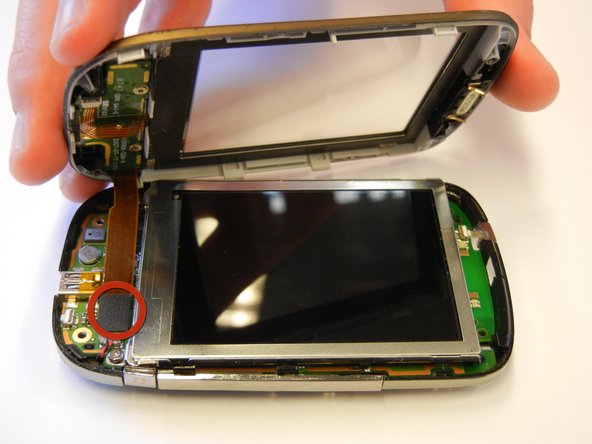
Unplug the front button cable from the inside of the phone.
-
-
-
Remove the two screws from the back of the front panel using the Phillips #00 screwdriver.
-
-
-
Remove the small circuit board by gently pushing on the center button on the front of the phone.
-
-
-
Remove the buttons by pushing on them from the front side of the phone.
-




To reassemble your device, follow these instructions in reverse order.
Rückgängig: Ich habe diese Anleitung nicht absolviert.
Eine weitere Person hat diese Anleitung absolviert.

Team

Cal Poly, Team 15-12, Regan Spring 2011 Mitglied von Cal Poly, Team 15-12, Regan Spring 2011
CPSU-REGAN-S11S15G12
4 Mitglieder
10 Anleitungen geschrieben
1 Kommentar zur Anleitung
I need the keypad flex cable. Where to buy. Please guide smahapatra2012@gmail.com
