Diese Übersetzung wurde maschinell erstellt und noch nicht von einer Person überprüft. Sprichst du diese Sprache? Schau es dir an.
Was du brauchst
-
-
-
Ziehe an der Ecke, um die Abdeckung zu entfernen.
 Frag FixBot
-
-
-
-
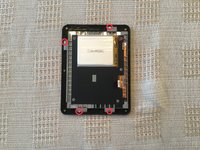
Entferne die vier Schrauben vom Motherboard.
-
Entferne den Display-Stecker und den Akku-Stecker.
-
Entferne die Micro-SD-Karte.
-
Entferne das Motherboard aus dem Gehäuse.
-
-
-
Entferne die vier Schrauben vom Bildschirmrahmen.
-
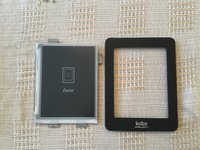
Entferne den Bildschirm
-
-



Rückgängig: Ich habe diese Anleitung nicht absolviert.
3 weitere Personen haben diese Anleitung absolviert.

9 Kommentare zur Anleitung
Just a quick note, I noticed that the SD card in the teardown is a 4gb one. The Kobo Mini has only 2gb of storage. There's just under 2gb of unpartitioned space. You can use a partition manager to extend out the last partition to fill the card, and get close to 4gb of space.
There's a guide over on Mobile Read: https://www.mobileread.com/forums/showth...
Yes I think
Thanks for the teardown! See https://www.mobileread.com/forums/showth... and https://wiki.mobileread.com/wiki/Kobo_Mi... for more disassembly advice and information about the components used.
I would be concerned about the reliability of the 4GB micro SD cards when extended to use the full unpartitioned space. While I could imagine a situation where 4GB cards were used due to unavailability of 2GB cards, there doesn’t seem to be a good reason to only format them to 2GB unless they were only guaranteed to reliably hold 2GB of data. In other words, I wonder if they were originally 4GB cards that failed some QA test and were only rated for use as 2GB capacity cards.
How do you remove the battery connector? Simply pull? Remove the black little things on the sides in some way?
Yes you just need to pull it from the motherboard
