Zum Hauptinhalt wechseln
Gemeinsam reparieren - Jetzt registrieren

Kocaso M750B Display Replacement

Was du brauchst

    1. Kocaso M750B Display Replacement, Backplate: Schritt 1, Bild 1 von 3 Kocaso M750B Display Replacement, Backplate: Schritt 1, Bild 2 von 3 Kocaso M750B Display Replacement, Backplate: Schritt 1, Bild 3 von 3
      • Pry the edges of the tablet apart using an iFixit opening tool.

      Frag FixBot

      Kommentar hinzufügen

    1. Kocaso M750B Display Replacement, Display: Schritt 2, Bild 1 von 2 Kocaso M750B Display Replacement, Display: Schritt 2, Bild 2 von 2
      • Remove three 1.2 mm screws from the motherboard using a Phillips #000 screwdriver.

      Frag FixBot

      Kommentar hinzufügen

    2. Kocaso M750B Display Replacement: Schritt 3, Bild 1 von 1
      • Disconnect the ribbon cables.

      • This guide will help you identify what type of ribbon cables the tablet uses and helps you on how exactly to remove different types of ribbon cables. The exact ribbon cables you are looking for are called ZIF connectors.

      Frag FixBot

      Kommentar hinzufügen

    3. Kocaso M750B Display Replacement: Schritt 4, Bild 1 von 1
      • Desolder the connections to the motherboard and the display.

      • When using the soldering iron, make sure to review the safety guidelines provided in the introduction. Work carefully and precisely to avoid any electrical discharge, puncture of the battery, or heating of the motherboard.

      Frag FixBot

      Kommentar hinzufügen

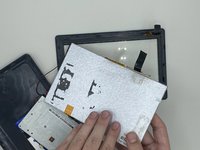
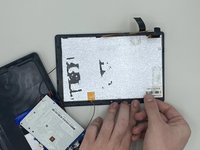
    4. Kocaso M750B Display Replacement: Schritt 5, Bild 1 von 2 Kocaso M750B Display Replacement: Schritt 5, Bild 2 von 2
      • Remove the display by loosening the tabs surrounding it.

      Frag FixBot

      Kommentar hinzufügen

Abschluss

To reassemble your device, follow these instructions in reverse order.

Rückgängig: Ich habe diese Anleitung nicht absolviert.

0 Kommentare zur Anleitung

Kommentar hinzufügen

Seitenaufrufe:

Letzte 24 Stunden: 2

Letzte 7 Tage: 4

Letzte 30 Tage: 20

Insgesamt: 270