Zum Hauptinhalt wechseln
Gemeinsam reparieren - Jetzt registrieren

LG CU515 Keypad Replacement

Was du brauchst

  1. LG CU515 Keypad Replacement, Battery: Schritt 1, Bild 1 von 2 LG CU515 Keypad Replacement, Battery: Schritt 1, Bild 2 von 2
    • Use your thumb to press down and slide off the back cover of the phone.

    Frag FixBot

    Kommentar hinzufügen

  2. LG CU515 Keypad Replacement: Schritt 2, Bild 1 von 3 LG CU515 Keypad Replacement: Schritt 2, Bild 2 von 3 LG CU515 Keypad Replacement: Schritt 2, Bild 3 von 3
    • Take out the battery by levering it out towards the bottom of the phone.

    Frag FixBot

    Kommentar hinzufügen

  3. LG CU515 Keypad Replacement, Motherboard: Schritt 3, Bild 1 von 1
    • Push the spudger between each of the two rubber cushions and the body of the phone. Then turn the spudger to pop each cushion out.

    Frag FixBot

    Kommentar hinzufügen

  4. LG CU515 Keypad Replacement: Schritt 4, Bild 1 von 1
    • Remove six 3.0 mm Phillips #00 screws from the back of the phone.

    Frag FixBot

    Kommentar hinzufügen

  5. LG CU515 Keypad Replacement: Schritt 5, Bild 1 von 3 LG CU515 Keypad Replacement: Schritt 5, Bild 2 von 3 LG CU515 Keypad Replacement: Schritt 5, Bild 3 von 3
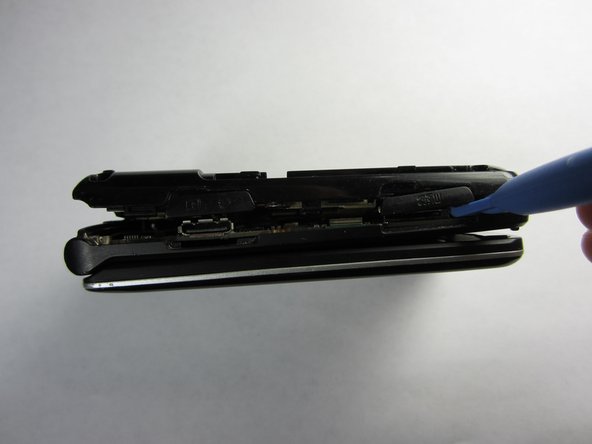
    • Push the spudger into the crack separating the two pieces of the phone.

    • Then use the plastic opening tools to pry the back off by separating the two pieces of the phone.

    • Repeat as necessary around the perimeter of the phone until the casing pops off. Use force as necessary without breaking the cover.

    • The back is attached to the motherboard by a wire, so don't pull the back casing off just yet.

    Frag FixBot

    Kommentar hinzufügen

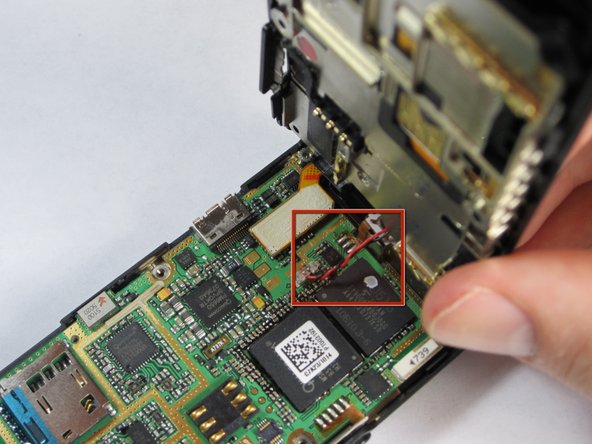
  6. LG CU515 Keypad Replacement: Schritt 6, Bild 1 von 1
    • Gently pull the wire up from the motherboard, separating the back of the phone and the motherboard.

    Frag FixBot

    Kommentar hinzufügen

  7. LG CU515 Keypad Replacement: Schritt 7, Bild 1 von 1
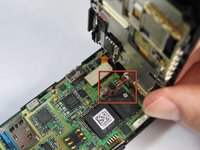
    • Remove the plastic tab connecting the screen to the motherboard by pulling the tab up from the board.

    Frag FixBot

    Kommentar hinzufügen

  8. LG CU515 Keypad Replacement: Schritt 8, Bild 1 von 1
    • Gently grasp one of the corners of the motherboard and simply lift it straight up out of the phone casing.

    • Replace the motherboard with a new one.

    Frag FixBot

    Kommentar hinzufügen

  9. LG CU515 Keypad Replacement, Keypad: Schritt 9, Bild 1 von 1
    • Push keypad up and out of the phone casing until they separate.

    • Replace with new keypad.

    Frag FixBot

    Kommentar hinzufügen

Abschluss

To reassemble your device, follow these instructions in reverse order.

Rückgängig: Ich habe diese Anleitung nicht absolviert.

Team

Cal Poly, Team 21-55, Johann Spring 2013 Mitglied von Cal Poly, Team 21-55, Johann Spring 2013

CPSU-JOHANN-S13S21G55

4 Mitglieder

12 Anleitungen geschrieben

0 Kommentare zur Anleitung

Kommentar hinzufügen

Seitenaufrufe:

Letzte 24 Stunden: 0

Letzte 7 Tage: 9

Letzte 30 Tage: 32

Insgesamt: 499